


Yale Unity Slim Smart Lock with Multipoint Locking System

Yale is an American brand within the ASSA ABLOY group, and ASSA ABLOY is progressively withdrawing the Unity Slim from the Yale range in favour of an Australian-badged equivalent. The Lockwood Latitude Slim is the same lock - identical specifications, the same slim 37.5mm escutcheon, and the same app - now sold under the Lockwood brand instead of Yale. As Yale-badged stock runs down, individual backset and locking-point configurations are increasingly going out of stock. To avoid disappointment, consider ordering the Lockwood Latitude Slim in your required configuration instead.
- 30mm backset / Short Throw / 4-Point (YURSSL0430400B) - 3 in stock
- 30mm backset / Long Throw / 4-Point (YURSSL0431400B) - only 1 left
- 40mm backset / Short Throw / 4-Point (YURSSL0440400B) - only 1 left
The Yale Unity Slim Smart Lock is a keyless smart lock built for hinged doors with narrow stiles. Its sleek, narrow escutcheon and multi-backset mortice suit both aluminium and timber framed doors, which makes it one of the few genuine smart lock options for the aluminium front doors now common on new Australian homes.
Access is by 6-digit PIN on the built-in keypad or through the Yale Home App over Bluetooth 
 . A built-in Yale module means the lock works with the Yale Home App and Apple HomeKit straight out of the box, with no separate network module to buy. Add the Yale Connect Plus Hub 2 (sold separately) when you want remote access from anywhere plus Amazon Alexa and Google Home voice control.
Security comes from the Induro lift-to-lock mechanism. Lift the handle and the lock throws all of its points at once: latch, deadbolt and, in the 4-Point configuration, the top and bottom shoot bolts. That single action both secures the door and compresses the weather seal, which matters on large aluminium panels. A door position sensor is supplied so the lock knows whether the door is genuinely closed before it locks. It is built in a range of configurations - 30mm, 40mm, 50mm and 60mm backsets, in 4-Point or 2-Point, with short throw or long throw options - so it can be matched to an existing door preparation. This is a 100% key free lock - there is no mechanical key override, so plan a backup before you buy.

Usually ships in 3 business days.


If your door has a narrow frame or tight stile, browse the full range of slim profile smart locks built for aluminium and narrow-frame doors. Stile width is the measurement that decides what will fit - see how to measure stile width first.
View all slim-style smart locks for narrow frame doors
 Key Features
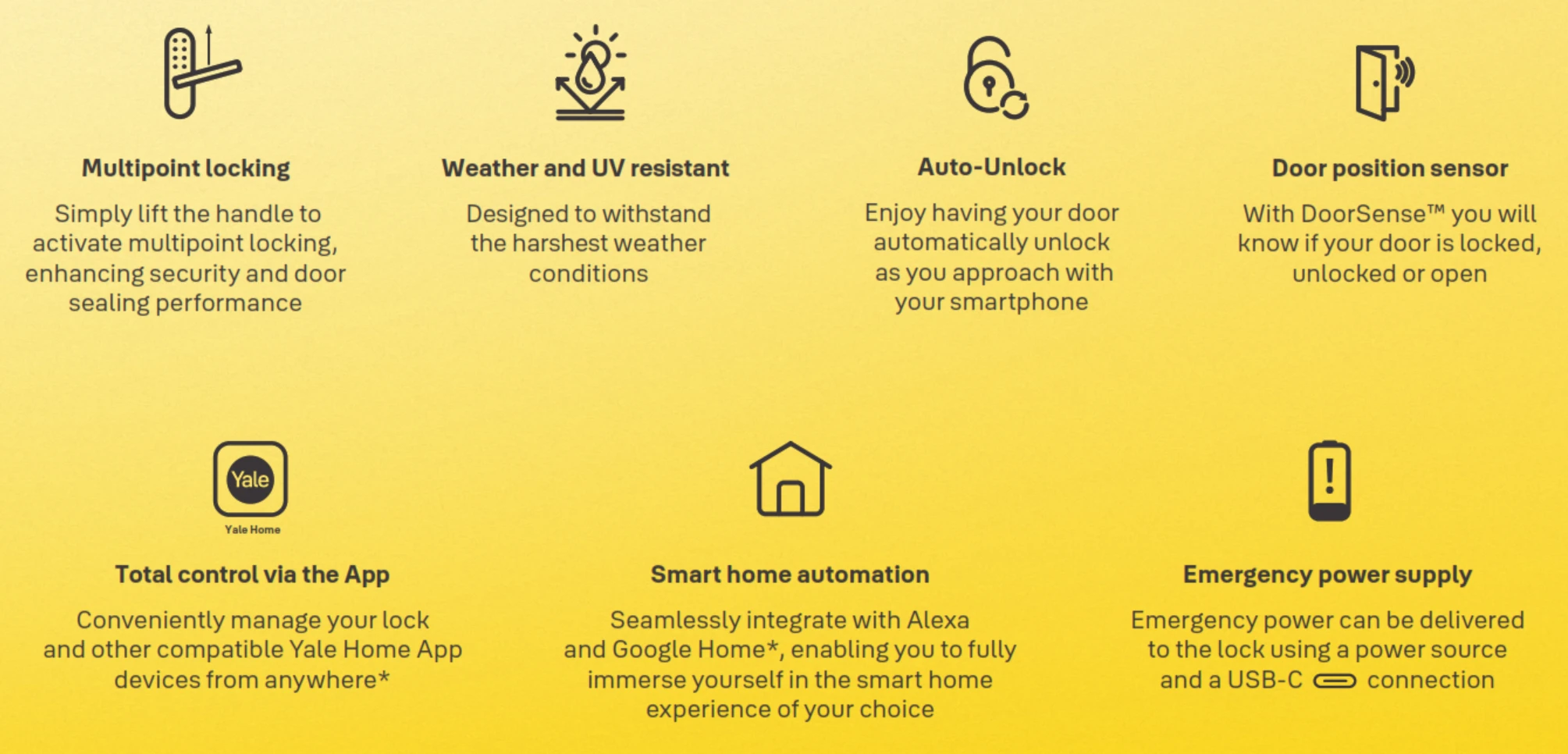
- Multipoint locking, lift to lock - one lift of the handle throws every locking point and compresses the door seal.
- Induro 4-Point configuration for aluminium frames (latch, deadbolt and two shoot bolts) or a 2-Point configuration for timber and for retrofits onto existing Optimum and Induro 2-point systems.
- Four backsets - 30mm, 40mm, 50mm and 60mm - in 4-Point or 2-Point, with short throw and long throw options.
- Narrow escutcheon just 37.5mm wide - fits slender aluminium stiles where a standard smart lock cannot.
- 6-digit keypad entry storing up to 100 user codes, plus a single-use one-time code.
- Built-in Yale module - Yale Home App over Bluetooth and Apple HomeKit work straight out of the box, with no network module to add.
- Auto-lock (10 seconds by default) and auto-unlock as you approach, both managed from the app.
- DoorSense door position sensor supplied - the app tells you whether the door is closed and locked, not just locked.
- Fake PIN code lets you pad your real code with random digits so it cannot be read over your shoulder.
- 3-minute lockout after five failed attempts, plus a Security Lockout Mode that disables the outside keypad entirely.
- Genuine tamper alarm and internal intrusion alarm, with voice prompts guiding set-up.
- Emergency USB-C power on the underside of the external body if the batteries ever run flat.
- DualDoor ready - pair with the Yale Unity Security Screen Door Lock through a Connect Plus Hub 2 to work both doors in one action.
- Weather built: IP55 external module, UV-tested screen, powder-coated diecast body and a stainless-steel faceplate.
- Tested to AS4145.2.2008 - SL7 security, D7 durability; RCM compliant for Australia and New Zealand, with ASSA ABLOY Cyber Security Declaration Cyber-AU-00030.
 Access Methods
 Yale Home App
 Face Recognition
 What's In The Box
- External body (keypad, LED indicator, handle and USB-C emergency power port)
- Internal body (handle, status indicator button, registration button and two battery compartments)
- Yale Induro 4-Point mortice lock
- Strike (the supplied strike may differ from the one shown in the diagrams)
- Door Position Sensor
- 4 x AA alkaline batteries
- Spindle, mounting screws and compression spring (short and long spindle and screw sets to suit door thickness)
- Installation Instructions, Routing Template and User Guide

 Suitable Uses
- Aluminium-framed hinged front and rear entry doors, including slender stiles - check stile width first
- Timber hinged entry doors 35-60mm thick
- Retrofits onto existing Optimum and Induro 2-point systems using the 2-Point configuration (no door routing needed, though the strike plate must be changed for the lift bolt)
- Large panel doors where seal compression matters as much as security
- Homes that want keyless entry with Apple HomeKit working at the lock, without buying a gateway first
- Households pairing a front door and a security screen door with DualDoor through a Connect Plus Hub 2

Gates, or any opening where the escutcheon is exposed to the weather - Yale rates this product for residential entry doors only. It is also the wrong choice if you need a mechanical key backup, since there is no key override. On the coastal Gold Coast, read how salt air affects electronic locks and the Yale coastal installation notes.
 Available Finish Options
 Matt Black
(This Product)
YURSSL
Matt black powder coat over a diecast body, with a UV-tested screen and a stainless-steel faceplate. Finish selection does not affect functionality, compliance, or performance.
 Available Configurations
Three things decide which Unity Slim you need: the backset (door edge to spindle centre), the number of locking points, and the bolt throw. Measure the existing lock before ordering - none of the three can be changed on site. The published part numbers are below.
Every configuration is supplied with a matching stainless steel strike. 4-Point adds a top and a bottom shoot bolt and is the usual choice on aluminium frames and tall or wide panels; 2-Point omits the shoot bolts and is the retrofit option for existing Optimum and Induro 2-point systems. Not sure which throw you need? Read what is bolt throw and why it matters, then confirm your backset. Not every backset and throw combination is published as a stocked trade pack - if the one you need is not listed, or you are unsure, send us a photo of the existing lock and we will match it.
 Item Codes & Related Products
Backset, locking-point and bolt-throw part numbers are listed in Available Configurations above.
 Accessories & Spares
- Yale Connect Plus Hub 2 - Wi-Fi gateway for remote lock and unlock, Amazon Alexa, Google Home and DualDoor pairing
- Unity Slim Stainless Plate Strike Assembly (YURSSL-STRIKE-01) - replacement strike assembly
- Unity Slim Heavy Duty Magnet Housing Assembly (YURSSL-STRIKE-02) - door position sensor magnet housing for retrofit installs alongside an existing strike
- Unity Slim Strike Packer (YURSSL-PACK) - packs the strike out for correct alignment
- Unity Slim Screw Pack (YURSSL-SCRP-01) - replacement screws and spindle hardware
- Unity Slim Retrofit Scar Plate Kit (YURSSL-SCAR) - covers previous hardware marks on a retrofit; background reading in scar plates for smart locks
 Full Specifications

The external (outside) module is IP55 weather rated with a UV-tested screen for everyday outdoor exposure. The internal module, which houses the two battery compartments and the electronics, is for interior use only and is not weather rated.
 Lock Layout
The two diagrams below identify every part of the external (outside) and internal (inside) body.


How Multipoint Locking Works
Lifting the handle drives every locking point at once. In the Induro 4-Point configuration that is the latch, the deadbolt and the top and bottom shoot bolts into the frame head and sill. Pulling the handle down retracts them all. The single action is what gives the door both its security and its seal compression, and it is why the Unity Slim suits large aluminium panels that tend to bow.


Auto-lock, the inside status indicator button and the app all lock the door, but multipoint locking is only engaged by lifting and releasing a handle. If you leave through the door, lift the outside handle before auto-lock runs; if you have come inside, lift the inside handle. This is a mechanical characteristic of every lift-to-lock system, not a fault.
Dimensions


 Battery, Power & Emergency Access
- Runs on 4 x AA alkaline batteries (included), split two in the top compartment and two in the bottom. Yale rates a set at around 12 months at ten uses a day.
- The low battery warning begins at 20%: the external LED flashes red, the lock says to replace the batteries, and the app raises a notification. Replace all four batteries together.
- Use alkaline batteries only. Lithium and rechargeable cells can cause the lock to malfunction.
- If the batteries do go flat, a USB-C cable and a power bank on the port under the external body will power the keypad long enough to enter a code and get in. There is no mechanical key on this model, so keep a cable and power bank somewhere sensible.
- Battery life on any electronic lock is mostly a function of how well the door is aligned - a binding door works the motor harder. See what really affects battery life and the Yale low-battery notes.
 Remote Access & Smart Home
- Out of the box the built-in Yale module gives you the Yale Home App over Bluetooth and Apple HomeKit at the lock. There is no separate network module to buy and no Wi-Fi radio inside the lock.
- Adding the Yale Connect Plus Hub 2 (sold separately) is what turns on remote lock and unlock from anywhere, live activity notifications, remote PIN changes and Amazon Alexa
 and Google Home
  voice control.
 - One Hub 2 covers up to 16 Bluetooth Yale devices, so a front door lock, a screen door lock and a keypad can all run from the same gateway. Compare gateways in Chapter 08.
- DualDoor: pair the Unity Slim with a Yale Unity Security Screen Door Lock through the Hub 2 and one action works both doors. Read Dual Unlock explained and check your screen door clearance first.
- The Yale Home App is available for iOS and Android . Not sure which ecosystem suits you? Read which app platform is right for you.

ASSA ABLOY Australia has issued an Australian Cyber Security Declaration for the Yale Unity Slim Smart Lock: Declaration Cyber-AU-00030, hardware Rev 1, firmware V1.6.0, with a 3-year product support period, covering the Yale Home app on iOS and Android. Confirmed 29 January 2026. Download the Cyber Security Declaration (PDF).
Security Features
Type any number of extra digits before or after your real 6-digit code and the lock still finds the genuine code inside the string. It is the simplest defence against someone watching you at the door.
Five failed code attempts locks the keypad for three minutes, which makes guessing impractical. Enter a valid user code, or press the button for five seconds, to clear it early.

Hold the inside status indicator button for four seconds and the external keypad and app control are both disabled until you release it the same way. Useful overnight or while the house is occupied. The LEDs flash blue while it is active.
Armed from the keypad with the master code, this sounds if the door is opened from the inside. It is aimed at households wanting to know if a door is being used while they are home.
The lock sounds if the external body is separated from the internal body or if the door is forced. As a genuine Yale (ASSA ABLOY) feature these alerts are real, not the phantom triggers seen on some other platforms.
Green flash means unlocked, red means locked, blue means Security Lockout Mode is on, and a red flash on the outside only is the low-battery warning.
 Frequently Asked Questions
The lock has no Wi-Fi of its own. Its built-in Yale module is Bluetooth, which is enough for the Yale Home App when you are near the door and for Apple HomeKit at the lock. Buy the Connect Plus Hub 2 only if you want control from anywhere plus Alexa and Google voice control. More in Chapter 08 - do you need a gateway.
4-Point adds a top and a bottom shoot bolt to the latch and deadbolt, and is the usual choice on aluminium frames and tall or wide panels because of the extra seal compression. 2-Point drops the shoot bolts and is the retrofit option for existing Optimum and Induro 2-point systems, where no door routing is required, though the strike plate must be swapped because the projection changes to a lift bolt. Both are made across the backset range with short and long throw options - see Available Configurations for the published part numbers.
Plug a power bank into the USB-C port on the underside of the external body and the keypad wakes up long enough for your code. The lock warns you at 20% battery through the LED, a voice prompt and an app notification, so a flat lock should never be a surprise. If a guaranteed mechanical backup matters to you, look at a keyed model such as the Yale ByYou Pro instead.

Only if you are set up for it. The Induro mortice has to be installed first and the stile routed to the supplied template, then the external and internal bodies, the door position sensor cable and the strike all have to line up. Most owners are better served by a locksmith - misalignment is the single biggest cause of smart lock complaints. See when to DIY and when not to, or book a site survey.
Three choices decide it: backset (30mm, 40mm, 50mm or 60mm), locking points (4-Point or 2-Point) and bolt throw (short or long). The published part numbers are listed in Available Configurations. Measure from the door edge to the centre of the spindle hole before ordering - none of the three can be adjusted out on site. Help with measuring your backset, bolt throw and Chapter 02.
Additional Information
The master code is set at the lock and can only be changed at the lock, never in the app. Lose it and the only route back is a full factory reset, which wipes every user code. Write it down and store it away from the door. Connecting the lock to the Yale Home App resets every other setting to default but leaves the master code alone.
After pairing, user codes, one-time codes, auto-lock, auto-unlock and volume can only be customised in the Yale Home App. That is a deliberate design choice, not a fault, and it catches out owners who set the lock up at the door first. If you never intend to use the app, the lock can be programmed entirely from the keypad instead.
A multipoint lock is only as good as the frame it closes into. The shoot bolts, the deadbolt and the latch all have to find their keeps at the same time, and the door position sensor magnet has to sit directly opposite the sensor. Allow for adjustment on a door that has settled, and use the strike packer rather than forcing the door. Common errors are set out in three common installation mistakes.
The Unity Slim is UV tested and IP55 on the outside module, which suits it to an exposed Gold Coast front door far better than most. Yale's warranty still excludes corrosion from coastal air and salt spray, so a wash-down of the external escutcheon every few months is a sensible habit within a couple of streets of the water. Background: Yale coastal installations.
The Unity Slim is the narrow-stile multipoint lock. For a standard timber hinged door on a single-point latch, the Unity Entrance is the direct sibling; for a security screen door it is the Unity Security Screen Door Lock. If you want fingerprint or a mechanical key, move to the mortice range: ByYou Pro, Kyra Pro or the face-recognition Luna Pro+. The full picture is in the Yale brand profile.

Genuine Yale products bought new in Australia from authorised retailers are covered against defects in materials and workmanship for:
- Mechanical parts: 10 years
- Electrical and electronic components: 3 years (batteries excluded)
- Keys: 12 months

Yale Unity Slim - Brochure
Yale Unity Slim - User Guide
Yale Unity Slim - Installation Instructions
Yale Unity Slim - Routing Template
Yale Unity Slim - Technical Specifications
Yale Unity Slim - Cyber Security Declaration (Cyber-AU-00030)
Yale Smart Locks Catalogue
Yale Access App Guide
Yale Access Quick Start Guide
Yale Unity Slim - FAQ, Setup and Owner's Guide
A deep reference for the Yale Unity Slim Smart Lock (SKU YURSSL) covering access, multipoint locking behaviour, remote access, power, fit, programming and troubleshooting. It is written from the Yale Unity Slim User Guide, Installation Instructions, Routing Template, Technical Specifications and the 2025 Yale Smart Locks Catalogue, reworded for Australian buyers. For general questions see Chapter 13 - Smart Lock FAQ, and for the full range read the Ultimate Smart Lock Buyer's Guide.
Access and Credentials
Up to 100 user codes, plus the master code and a one-time code. User slots are numbered 01 to 100, with slot 100 entered as 00 when you are programming at the keypad.
Exactly six digits. Unlike some brands there is no 4 to 8 digit range on this model - user codes, the master code and the one-time code are all six digits. Compare credential types in Chapter 03 - Access Methods.
A single-use six-digit code that the lock deletes automatically the moment it is used. It suits a one-off tradesperson or delivery. Only one one-time code exists at a time.
Touch the keypad with your palm. The numbers light up and you can enter your code. This is a wake gesture, not a palm credential.

No. RFID key tags work on the Unity Entrance and Unity Screen Door locks, not on the Unity Slim. If key tags matter to your household, look at the Unity Entrance range instead.

Not on the Unity Slim. Yale's fingerprint models are the mortice range - the ByYou Pro with its Grab-and-Go sensor in the handle, and the Kyra Pro. The Yale Smart Keypad 2 adds fingerprint to Unity locks that have no keypad of their own; the Unity Slim already has one built in.
Enter random digits before your real code, after it, or both, then press the confirm button or palm touch. The lock searches the string for a valid code and opens. Anyone watching sees a long meaningless sequence.
Locking Behaviour and Multipoint
Push the handle down to unlock and open the door, step outside, then lift and release the outside handle. That lift is what engages multipoint locking. If auto-lock is enabled, lift the handle before the timer runs.
Unlock with the keypad, the app or auto-unlock, pull the handle down and open the door. Once inside, lift and release the inside handle to re-engage multipoint locking.
No. Auto-lock, the inside status indicator button and the Yale Home App all secure the door, but only lifting and releasing a handle drives the full multipoint set. After locking by any of those other methods, lift the inside handle to complete the multipoint engagement.
Ten seconds by default. When auto-lock is on and the lock is not muted, it beeps as the door closes to warn you it is about to lock. Timing is adjusted in the Yale Home App once the lock is paired.
It combines your phone's Bluetooth, Wi-Fi and GPS to detect that you left the area and have returned, then unlocks as you reach the door. It can only be switched on and tuned in the app, and it needs location permissions left enabled on the phone.
It tells the app whether the door is actually closed, not just whether the lock has thrown. That prevents the lock trying to secure an open door and lets you check from your phone whether the door was left ajar. The magnet sits in the strike, or in the separate heavy duty magnet housing on a retrofit.
Remote Access, Voice and DualDoor
Remote lock and unlock from anywhere, remote PIN changes, live activity notifications and voice control through Amazon Alexa and Google Home. Without it the lock is a capable Bluetooth and HomeKit lock, and everything still works at the door. Full spec on the Connect Plus Hub 2 page.
Within Bluetooth reach of the lock and on 2.4GHz Wi-Fi. Brick, stone and concrete internal walls between hub and lock will cut the range, and a large home may need the hub relocated rather than a second one. Placement advice in Chapter 08 - placement.
You lose remote access and voice control only. The keypad, the app over Bluetooth and Apple HomeKit at the lock all keep working, and the hub reconnects by itself when the internet returns. See what happens when the internet is down and why smart locks drop off Wi-Fi.
No. The built-in Yale module gives HomeKit at the lock straight out of the box, so Siri and the Apple Home app work over Bluetooth. A HomePod or Apple TV acting as a home hub is what extends HomeKit control beyond Bluetooth range.
Pair the Unity Slim and a Yale Unity Security Screen Door Lock to the same Yale Home account with a Connect Plus Hub 2, then link them in the app. One action then works both doors. DualDoor relies on an internet connection, so keep app access and a way into both doors independently. Read Dual Unlock explained.
Yes. The Yale Home App issues guest access on an always, recurring or temporary schedule, and keeps a 24/7 activity trail of who came and went. Guests need an internet connection on their own phone so the server can check their access window.
Power and Batteries
Four AA alkaline cells, two in the top compartment and two in the bottom. Yale is explicit that lithium and rechargeable cells must not be used because they can make the lock malfunction. Replace all four at once, never in pairs.
The external LED flashes red, the lock speaks a replace-the-batteries prompt when you lock or unlock, and the Yale Home App raises a low battery notification. Yale prints the warning threshold at 20%.
Connect a power bank to the USB-C port on the underside of the external body. That powers the keypad temporarily so you can enter a user code and get inside, then change the batteries. There is no mechanical key on this model.
Yale's figure assumes a well-aligned door and around ten operations a day. A door that drags, a stiff multipoint mechanism or heavy traffic will shorten it. Cold and very humid conditions also cost some capacity. Our honest take is in the realities of electronic door locks and the Yale battery life issue.
Fit, Installation and Door Preparation
It suits aluminium or timber hinged doors 35mm to 60mm thick, in 30mm, 40mm, 50mm and 60mm backsets, in 4-Point or 2-Point with short or long throw options, and works on left or right-hand opening doors. The escutcheon is only 37.5mm wide, which is what lets it go on slender stiles. Measure before ordering using Chapter 02 - stile width.
Bolt throw is how far the bolt projects into the frame. A longer throw resists a kicked door better and suits frames where the gap between door and jamb is wider; a short throw suits a standard, well-fitted aluminium frame. If you are replacing an existing multipoint lock, match what is already there, because the strike and keeps are cut for that projection. Background in what is bolt throw.
For a new 4-Point installation, yes - the stile is routed to the supplied 1:1 template, 198mm long for a standard forend plate or 278mm for the extended plate, with the routing set back 28mm, 38mm or 48mm from the face depending on the backset. Replacing an existing Optimum or Induro 2-point system with the 2-Point Unity Slim needs no routing, but the strike plate must be changed because the projection becomes a lift bolt.
Both handles are rotated to suit the door's opening direction during installation. On the external body the handing tab sits under the gasket, which has to be peeled back and then refitted properly so the gasket spigots seat in their holes and the weather seal is maintained. Handing explained in door handing in Australia.
That depends on door thickness: short spindle with short screws for 35-44mm, short spindle with medium screws for 44-48mm, long spindle with medium screws for 48-53mm, and long spindle with long screws for 53-60mm. A compression spring goes into the internal body handle hole in every case. Spares are in the Unity Slim screw pack.
Three things. Do not fit the batteries and operate either body before both are mounted on the door - that can make the lock malfunction. Do not pinch the external body cable or the door position sensor cable when you draw the bodies together. And the plugs on the internal circuit board only fit one way, so never force them. Test by lifting and lowering the inside handle before the covers go back on.
The Unity Slim retrofit scar plate kit covers previous hardware footprints on a retrofit. Background on sizing and materials in scar plates for smart locks.
Setup and Programming
Register the master code at the keypad first, then download the Yale Home App, create or sign in to an account, choose to set up a new device, scan the QR code behind the top battery cover or on the box, put the lock into app pairing mode and finish in the app. Pairing mode stays open for five minutes.
Connecting to the Yale Home App restores every lock setting except the master code to default. It is expected behaviour. From that point user codes, one-time codes, auto-lock, volume and auto-unlock are managed in the app only, so set the lock up in the app first and add your codes there.
Yes. Everything essential can be programmed at the keypad: register or change the master code, add and delete user codes, set the one-time code, delete all user codes, enable or disable auto-lock and set the volume to high, low or silent. You give up auto-unlock, remote access, the activity trail and guest scheduling.
Under a battery cover on the internal body, marked with an R. It starts and completes programming sessions at the keypad. The status indicator button sits beside it and is used for locking from inside and for Security Lockout Mode.
It cannot be recovered or reset from the app, only from the lock. You will need a full restore of default settings, which erases every user code including the master code, and then create a new master code before anything else can be programmed. Store it somewhere safe. Step-by-step help is in our Unity Slim reset guide.
Troubleshooting and Reset
A factory reset in the Yale Home App disconnects your account from the lock. Restoring default settings at the lock deletes all user codes and the master code and returns every feature to default, but does not disconnect the app account. If you are handing the lock on to a new owner, do both. Our Unity Slim troubleshooting and reset guide walks through each one.
Take off the battery covers and batteries, remove the internal body to reach the reset button, hold that button while you reinstall the batteries, and release it when you hear the completed prompt about ten seconds later. Refit the covers, then create a new master code - it is the only option available until you do.
For the internal intrusion alarm and the tamper alarm, open the door from the inside with the internal handle and press the button. For a 3-minute lockout, enter a registered user code or press the button for five seconds. To leave Security Lockout Mode, hold the internal status indicator button for four seconds until you hear the prompt.
That is nearly always alignment rather than the lock. Check that the door closes flush, that the shoot bolt keeps line up in the head and sill, and that the strike is packed correctly. A door that has dropped on its hinges will fight a multipoint mechanism every time. Start with misalignment.
Palm touch it first to wake it, then check the LED. A red flash on the outside only means the batteries are low. No response at all usually means flat batteries, so try the USB-C emergency power. If it lights but rejects a known code, the lock may be in Security Lockout Mode or a 3-minute lockout. More at keypad unresponsive.
Suitability, Care and Compliance
No. Yale rates the Unity Slim for residential entry doors and specifically excludes openings where the escutcheon is exposed to outdoor elements, such as a gate. The IP55 rating covers the outside module in normal door service, not full weather exposure of the whole assembly.

No. The Unity Slim carries AS4145.2.2008 SL7 security and D7 durability but no fire rating. For a fire door you need the Unity Entrance Fire Rated, or the DDA lever version where accessibility also applies. Background in Chapter 05 - Fire Door Smart Locks.

The Unity Slim is not a DDA-certified leverset. Where AS1428.1 compliance is specified, the Unity Entrance with DDA lever is the Yale answer. See Chapter 09 - DDA, NDIS and Accessibility.
A damp cloth only. Never use solvents, petrol or benzene - they damage the electronics and strip the finish. On a coastal door, rinse salt off the external escutcheon regularly; Yale excludes corrosion from its warranty, and salt air is the single biggest killer of electronic locks on the Gold Coast.
It works well where you want codes instead of keys and no key handover at all - though remember there is no mechanical backup and the guest experience depends on the app for scheduling. Add a Connect Plus Hub 2 if you need to change codes remotely between stays. See Yale for rentals and Chapter 07 - Airbnb and Short-Stay.
Related Yale Products, Guides and Buyer's Guide Chapters
Unity Slim spare parts: Stainless Plate Strike Assembly | Heavy Duty Magnet Housing Assembly | Strike Packer | Screw Pack | Retrofit Scar Plate Kit.
Accessories: Connect Plus Hub 2 | Smart Keypad 2 | Smart Keypad | Contactless Key Tag.
Other Yale smart locks: Unity Entrance (Matt Black) | Unity Entrance (Silver) | Unity Entrance Fire Rated | Unity Entrance Fire Rated + DDA Lever | Unity Screen Door (Matt Black) | Unity Screen Door (Silver) | Unity Screen Door + Hub 2 (Black) | Unity Screen Door + Hub 2 (Silver) | Unity Screen Door Mortice Only | ByYou Pro | Kyra Pro | Luna Pro+ (Nova Graphite) | Luna Pro+ (Champagne Gold) | Libi Digital Lever | Libi Digital Lock | 530 Series Tubular Deadlatch.
Same platform, other brands: Lockwood 001Touch Plus - Yale Home App and remote access | Lockwood Lume interior lever | Lockwood Home Hub.
Buyer's Guide chapters: 01 What Is a Smart Lock | 02 Measuring Your Door | 03 Access Methods | 04 Door Types | 05 Fire Doors | 07 Airbnb and Short-Stay | 08 Gateways | 09 DDA and NDIS | 10 Yale Brand Profile | 11 Australian Standards | 12 Installation and Troubleshooting | 13 Smart Lock FAQ | 15 App Platforms.
Guides and blogs: Unity Slim troubleshooting and reset guide | Yale smart locks - an honest guide | Yale network modules explained | Dual Unlock explained | Which app platform is right for you | Measuring your lock backset | What is bolt throw | Door handing in Australia | Mechanical key override | Realities of electronic door locks | How long do digital locks last | Why smart locks drop off Wi-Fi | 3 common DIY installation mistakes | Check screen door clearance | Scar plates for smart locks | The perils of the internal snib | Site survey and installation.
What's In The Box - Yale Unity Slim
- External body with keypad, LED indicator, handle and USB-C emergency power port
- Internal body with handle, status indicator button, registration button and two battery compartments
- Yale Induro 4-Point mortice lock (or the 2-Point mortice where that configuration is ordered)
- Strike
- Door Position Sensor
- 4 x AA alkaline batteries
- Spindle sets, mounting screws and a compression spring to suit 35-60mm door thickness
- Installation Instructions, Routing Template and User Guide
The Yale Connect Plus Hub 2 is sold separately and is only required for remote access and voice control. Installation tools are also not supplied: you will need a flat head screwdriver, a Philips head screwdriver and a clamp.
Installation & Assembly

Installation sequence in brief: fit the Induro mortice first, set the handing on both handles, remove the battery covers, feed the door position sensor wire through the mortice hole, choose the spindle and screws for your door thickness, fit the compression spring, mount the external body and then the internal body, plug in the external body and sensor cables, fix the bodies together, test the handle lift, fit the strike so its magnet sits opposite the sensor, then install the batteries.
Yale is explicit that the batteries must not be installed and the external or internal body operated before both are mounted on the door. Doing so can make the lock malfunction. Take equal care not to pinch either cable as the bodies are drawn together, and never force the circuit board plugs - they only fit one way.
Full step-by-step detail is in the Installation Instructions and the 1:1 Routing Template. If you would rather not cut the door yourself, book a Terry's installation.
Yale Unity Slim - Dimensions
Routing lengths are 198mm for the standard forend plate and 278mm for the extended forend plate, set back 28mm, 38mm, 48mm or 58mm from the door face for the 30mm, 40mm, 50mm and 60mm backsets respectively. The 2mm forend plate may be recessed if preferred, in which case the backset is measured from the recessed face. The 1:1 Routing Template is the authority for door preparation.
Yale Unity Slim - Product Brochure


PDF Files
Yale Unity Slim - Brochure
Yale Unity Slim - User Guide
Yale Unity Slim - Installation Instructions
Yale Unity Slim - Routing Template
Yale Unity Slim - Technical Specifications
Yale Unity Slim - Cyber Security Declaration (Cyber-AU-00030)
Yale Smart Locks Catalogue
Yale Access App Guide
Yale Access Quick Start Guide
Explore the Complete Yale Smart Lock Range
Yale builds a smart lock for most Australian door types. The Unity range covers hinged doors: the Unity Slim for narrow aluminium stiles with multipoint locking, the Unity Entrance for standard timber doors, and the Unity Security Screen Door Lock for the screen in front of them. The mortice range - ByYou Pro, Kyra Pro and Luna Pro+ - adds fingerprint, key override and facial recognition. Every one of them runs on the Yale Home App.
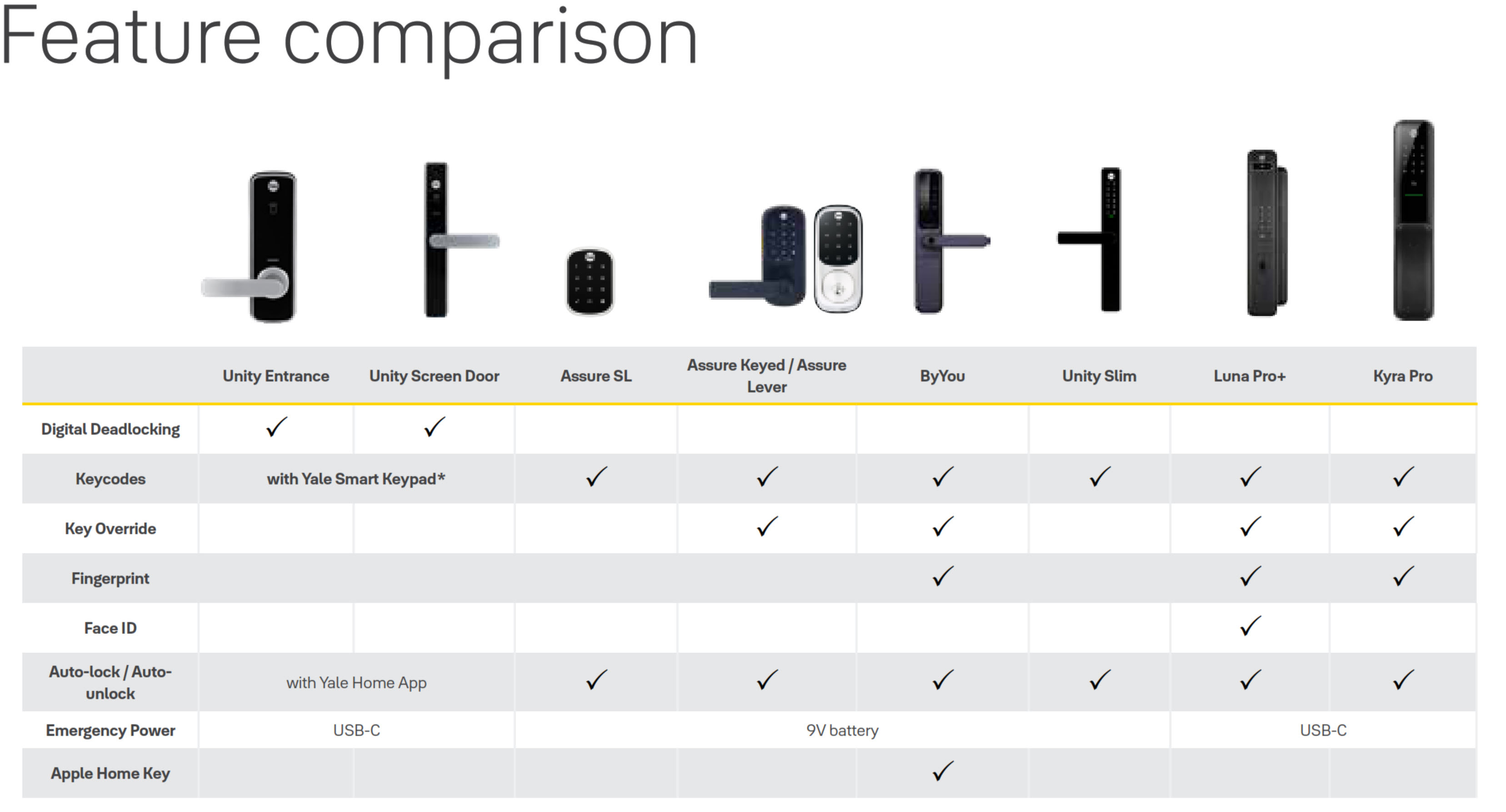
Yale Smart Lock Feature Comparison
Compare features across the Yale smart lock range to find the model that matches your door and the way you want to get in.
Browse All Yale Products
The complete range of Yale smart locks, digital locks, mechanical locks, padlocks and security accessories stocked by Terry's.
View the entire Yale range
Slim Line Smart Locks
Built for narrow door frames and tight stiles. Slim-profile smart locks for aluminium and narrow-frame doors, across every brand we stock.
View all slim line locks
Talk to Terry's about your door type, security requirements and smart home plans before you order. Backset, stile width and door thickness all have to be right, and a five-minute conversation is cheaper than the wrong lock. Start with the Yale brand profile or book a site survey.
Yale Warranty
Yale branded products are manufactured and warranted in Australia by ASSA ABLOY Australia Pty Ltd. Coverage is tiered by component type - mechanical parts, electrical and electronic components, and keys each carry their own warranty period. The summary below sets out each period, what is excluded, and how to make a claim through Gold Coast Smart Locks.
This warranty applies to genuine Yale products purchased new in Australia from ASSA ABLOY or its authorised resellers. It operates in addition to your rights under the Australian Consumer Law.
Warranty Summary
How to Make a Claim
For full returns and warranty claim procedures, visit our Returns & Warranty page - this is kept up to date and is the authoritative reference for current claim steps.
- Keep your proof of original purchase (invoice or receipt).
- Contact Gold Coast Smart Locks - operated by Terry's Tradies Pty Ltd and its associated websites, trading names, and subsidiaries - as your authorised retailer, and follow the steps on our Returns & Warranty page.
- Return the product securely packed to protect it in transit, together with your proof of purchase and your name, address, email and phone number.
- ASSA ABLOY assesses the claim. Where the warranty applies, they will (at their option) repair the product, replace it with the same or closest equivalent Yale product, or refund the price you paid.
Claims made directly to ASSA ABLOY require a Case Number from their Customer Service Department before goods are returned - products sent back without a Case Number may not be accepted. Costs of returning a product are the customer's responsibility.
What Is Not Covered
- Normal wear and tear.
- Misuse, abuse, accident, or use outside Yale's published technical specifications.
- Improper maintenance or neglect, or failure to follow ASSA ABLOY's care and maintenance recommendations.
- Use of batteries other than those specified; batteries themselves are not covered.
- Unauthorised alteration, modification or repair by anyone other than ASSA ABLOY authorised personnel.
- Custom orders made to components or specifications supplied by someone other than ASSA ABLOY.
- Goods that were not new when purchased, second-hand goods, or products not originally sold in Australia through ASSA ABLOY or an authorised reseller.
- Products with brands, marks, plates, numbers or other ASSA ABLOY information defaced or removed.
- Use of substitute, replacement or non-genuine ASSA ABLOY parts or cylinders.
- Corrosive exposure, including vapours, chemicals, abrasive compounds, contamination, pollution, coastal air, salt spray and high humidity.
- Removal, refitment or replacement of products, and any associated charges.
Important Notes
Batteries are consumable and are not covered. Cosmetic finishes and appearance are excluded. Stainless steel resists staining but is not stain-proof - tea staining is a natural process and is not covered where cleaning and maintenance guidelines have not been followed.
Damage from salt spray, coastal air, high humidity and other corrosives is excluded. In Gold Coast and coastal locations, choose a suitable finish and follow the care and maintenance guidance to protect your hardware and preserve your cover.
Your Rights Under the Australian Consumer Law
This manufacturer's warranty is in addition to other rights and remedies you may have under the law. Our goods come with guarantees that cannot be excluded under the Australian Consumer Law. You are entitled to a replacement or refund for a major failure and to compensation for any other reasonably foreseeable loss or damage. You are also entitled to have the goods repaired or replaced if they fail to be of acceptable quality and the failure does not amount to a major failure.
Further Information
Returns & Warranty - goldcoastsmartlocks.com.au
Download the Yale Warranty (PDF)
Official Yale warranty terms - yalehome.com.au
Manufacturer: ASSA ABLOY Australia Pty Ltd, 235 Huntingdale Road, Oakleigh VIC 3166. Tel: 1300WARRANTY. Email: 1300warranty@assaabloy.com

Confused? Overwhelmed? We get it.
Choosing the right smart lock can be genuinely tricky - door types, backsets, app platforms, compatibility with your existing hardware... there is a lot to consider. We have decades of experience fitting locks of all types, including smart locks, and we are happy to help.
Our expert recommendation service is free. Upload a few photos of your door and describe what you need, and one of our qualified locksmiths will give you a personalised recommendation.
Get Your Free Recommendation →How it works - three easy steps:
1. Upload photos
A few clear shots of your door, lock and frame - inside and out.
2. We assess
Our locksmith reviews your setup and requirements - door type, weather exposure, how you want to use it.
3. You get a recommendation
A personalised recommendation tailored to your door, budget and needs. No pressure, no upsell.
Also useful while you are deciding:


