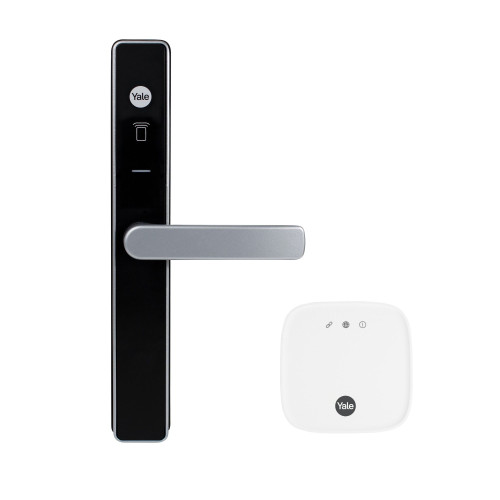
Yale Unity Security Screen Door Lock with Connect Plus Hub 2 - Matt Black
At A Glance
 At A Glance
 DISPATCHSame Day Before 11am


 Yale Home App
  Contactless Key Tag
  Apple HomeKit / Siri
  Mechanical Key
(Not Available)
 Remote via Hub 2
  PIN / Fingerprint
(Add Keypad 2)
The Yale Unity Security Screen Door Lock with Connect Plus Hub 2 is a residential smart screen door lock bundle designed specifically for the Australian market. The lock is certified to Australian Standard AS4145.2:2008, Security Level SL6 and Durability Level D7, and was a winner of the International Good Design Award 2022. Out of the box it is controlled over Bluetooth via the Yale Home app, with two contactless key tags and Apple HomeKit built in. It is the screen-door member of the Yale smart lock range - one of the few smart locks purpose-built for hinged security screen doors. This bundle pairs the lock with the Yale Connect Plus Hub 2, so worldwide remote access, Amazon Alexa, Google Home, Samsung SmartThings and DualDoor Technology all work from the day it is installed.
The included Connect Plus Hub 2 connects the lock to your home Wi-Fi so you can lock, unlock, manage users and receive notifications from anywhere in the world through the Yale Home app, adds Amazon Alexa, Google Home (Hey Google) and Samsung SmartThings voice control, and activates DualDoor Technology - operating both a security screen door lock and a Yale Smart Entrance Lock together with a single command. When your phone is in range the lock also works directly over Bluetooth, and with the two included contactless key tags, so nothing depends on the internet for everyday entry - see what still works without Wi-Fi. What a gateway actually does is explained in Chapter 08.
The lock features patented digital deadlocking technology that locks both the internal and external handles when activated. Three LED-indicated locking modes are provided: Unlock (green), Locked (yellow) and Secure (red). A built-in door position sensor monitors whether the door is open or closed, preventing inadvertent locking while the door is ajar. Auto-unlock activates as you approach home using Bluetooth and GPS. The lock is 100 percent key-free - there is no mechanical key override, so read what happens when the battery dies - and suits new installations or retrofits over Lockwood 8654, Whitco Tasman Mk2 and Yale Quattro screen door locks. Measure your screen door clearance before you order.
Usually ships same day if ordered before 11am AEST (excludes Queensland public holidays).

Because this bundle includes the Connect Plus Hub 2, DualDoor Technology is ready to activate. DualDoor lets a single command open both your security screen door and your front door - pair this lock with a compatible Yale Smart Entrance Lock (sold separately) such as the Yale Unity Entrance Lock (Silver) or Matt Black, or the fire-rated Unity Entrance for an apartment door. See how dual unlock works, how the Yale approach differs from McGrath and whether it is always on. The same SyncPath pairing also works with the narrow-stile Lockwood Latitude Slim on an aluminium front door.

The lock in this bundle has been assessed and declared compliant with the Australian Cyber Security Act (IoT consumer products). Declaration No. Cyber-AU-00004, confirmed 3 February 2026, firmware V1.4.0. Software support is provided for a minimum of 3 years from the declaration date. What the Australian smart device security law requires, and how Yale complies, are explained in our guides.
This bundle includes the Yale Connect Plus Hub 2 (item code YAR/SWAA/HUB/-I-D), the Wi-Fi gateway that links the lock to your home network. Plug it into a power point within range of the door, join it to your 2.4GHz Wi-Fi in the Yale Home app, and you have worldwide lock and unlock, user management, activity notifications, Amazon Alexa, Google Home and Samsung SmartThings voice control, and DualDoor - what changes once the hub is on the network. One hub serves up to 16 Yale Home Bluetooth devices, so it can also carry a Unity Entrance Lock on the front door later. Only need Bluetooth at the door? The lock is also sold on its own: lock only (Matt Black) / Silver - which setup suits you.


If your door has a narrow frame or tight stile, you may want to explore our range of slim profile smart locks designed for aluminium and narrow-frame doors. These options suit different door types, backsets and handle styles - check the stile width first.
View all slim-style smart locks for narrow frame doors
Access Methods and Smart Features





Wi-Fi remote access and Amazon Alexa / Google Home / Samsung SmartThings voice control are provided by the Yale Connect Plus Hub 2 included in this bundle. Apple HomeKit works at the lock over Bluetooth; remote HomeKit control needs an Apple home hub, not the Yale hub.
 Key Features
- Patented digital deadlocking technology - locks both internal and external handles simultaneously via the app or contactless key tag. How a mortice deadbolt differs from a latch is in Chapter 01.
- Three LED-indicated locking modes: Unlock (green), Locked (yellow), Secure (red).
- Auto-unlock via geofencing - the door unlocks automatically as you approach using Bluetooth and GPS - one of the things Yale does well.
- Bluetooth control via the Yale Home app when your phone is in range, plus worldwide remote lock and unlock through the included Connect Plus Hub 2.
- Grant one-time, date-range or permanent virtual key access to guests via the Yale Home app - no physical key required. Ideal for rentals, Airbnb and short-stay properties.
- 24/7 activity feed with a full audit trail - see who accessed the lock and when, from anywhere.
- DoorSense door position sensor - monitors door status and prevents inadvertent locking while the door is ajar.
- Built-in break-in and tamper alarm - a genuine hardware alarm, unlike the phantom tamper alerts some other platforms report.
- DualDoor Technology - operate both locks together; the included Connect Plus Hub 2 enables it, so only a compatible Yale Smart Entrance Lock (sold separately) is needed.
- Apple HomeKit built in at lock level (no hub required). Amazon Alexa, Google Home (Hey Google) and Samsung SmartThings work through the included Connect Plus Hub 2. Compare the ecosystems in Chapter 15 - choosing a platform.
- Optional 3-point locking kit for additional security (hook bolt type, sold separately) - activated by lifting the lever.
- Retrofits Lockwood 8654, Whitco Tasman Mk2 and Yale Quattro screen door locks - identify what is on the door now with Chapter 02 - existing hardware.
- Fits industry-standard screen door cutouts - suits left or right hand opening doors.
- IP55 rated (external / outside module) - protected against dust ingress and low-pressure water jets. The internal escutcheon houses the battery compartment and is for interior use only. On the coast, read Yale coastal installations.
- Certified to Australian Standard AS4145.2:2008, Security Level SL6, Durability Level D7; RCM marked - what RCM means.
- International Good Design Award 2022 winner.
 What's in the Box
- External furniture x1
- Internal furniture x1
- Mortice lock x1
- Battery cover tool x1
- 18mm M5 furniture fixing screws x2
- 13mm mortice lock fixing screws x2
- 25mm striker fixing screws x2
- Striker plate x1
- 4 x AA alkaline batteries
- 2 x Yale contactless key tags
- Installation guide
- Yale Connect Plus Hub 2 unit (Snow White) x1
- USB-C power cable x1
- Power adaptor (Type I Australian plug) x1
- Quick start guide
Note: the Yale Smart Keypad and the 3-point locking kit are not included and are sold separately.
 Suitable Uses
- Residential security screen doors requiring full remote access and smart home integration - see the door type compatibility matrix.
- Homes where remote monitoring and control is needed - frequent travellers, dual-occupancy, rental properties (browse all app-enabled and Wi-Fi capable smart locks).
- Installations requiring Alexa, Google Home or Samsung SmartThings voice control (with the Hub 2 - see the Yale hub in Chapter 08).
- DualDoor Technology setups paired with a compatible Yale Smart Entrance Lock - how dual unlock works.
- Retrofit over existing Lockwood 8654, Whitco Tasman Mk2 or Yale Quattro screen door locks - avoid the most common screen-door mistake.
- Short-term rental and holiday properties where time-limited guest access is managed remotely - see our Airbnb and short-stay guide and whether you need Wi-Fi.
 Available Finish Options
 Matt Black
(This Product)
STK YUR/SSDL/HUB2/MBK
Finish selection does not affect functionality, compliance, or performance. The Silver bundle (YUR/SSDL/HUB2/SIL) is listed separately; the hub itself is Snow White in both bundles.
 Unity Security Screen Door Lock - Bundle Range
This product (bold row) is the Lock + Connect Plus Hub 2 bundle. All configurations use the same lock body - the differences are in the included accessories and the resulting feature capabilities. A spare mortice body is sold separately for service, and every screen door option we stock is in the hinged security screen category.
This bundle includes the Connect Plus Hub 2 but not a keypad. Adding the Yale Smart Keypad 2 (item code 05/303000/BL) adds PIN code and fingerprint entry for family members, guests and service providers. The original Yale Smart Keypad (PIN only) also pairs with this lock; both are in the keypads for smart locks category.
- Supports up to 100 PIN codes and up to 10 fingerprint users, managed via the Yale Home app.
- Create temporary, recurring or permanent access codes.
- Connects wirelessly to the lock over Bluetooth - no hard-wiring or power point required. Extra contactless key tags are also available from the RFID credentials range - how RFID tags work.
- Mounts externally beside the door; IP55 rated.
- Battery life approximately 6 months on 4 x AAA alkaline batteries.

The lock runs on 4 x AA alkaline batteries with an expected life of approximately 12 months under normal conditions. The Yale Home app displays the current battery level and sends push notifications when replacement is required. A low battery alert triggers automatically at 20 percent, and the lock provides audible warnings during operation when the batteries are running low. Because this lock has no key override, change the batteries when warned - see the Yale battery-life note, what really affects battery life and power and battery FAQs.
 Unity Security Screen Door Lock - Technical Specifications
Connect Plus Hub 2 (Included) - Technical Specifications
The hub is a Yale Home accessory shared across the range - the same unit sold separately as the Yale Connect Plus Hub 2. It does not replace the lock's own Bluetooth: if the internet drops, you still open the door with the app in range or a contactless key tag.
 Dimensions

 Installation and Assembly


- Before installing, scan the QR code in the installation guide to check the compatibility chart for your door. Decide whether to DIY or use an installer; Terry's offers installation across the Gold Coast.
- Determine the door handing first. The lock can be handed by lifting the internal spring and rotating the lever - check this before mounting.
- The maximum clearance between the door and jamb should not exceed 4mm - how to measure screen door clearance; misalignment is the number one cause of a lock that will not throw.
- For the central strike on a standard 19mm door, chisel the bolt recess at least 20mm deep and 44mm high.
- For 3-point locking installations, connect the top auxiliary lock first, then the bottom.
- Take care not to pinch the door position sensor (DPS) cable when fitting the furniture, and do not close the door before the batteries are installed.
 Frequently Asked Questions
Without a hub, the lock operates over Bluetooth only - the Yale Home app must be within Bluetooth range to communicate. The Connect Plus Hub 2 in this bundle connects the lock to your home Wi-Fi, enabling remote access from anywhere in the world, Amazon Alexa, Google Home, Samsung SmartThings and DualDoor Technology. Apple HomeKit works at the lock level without the hub. For how gateways fit in, see our gateway comparison guide and Yale app connectivity.
It suits doors 18-25mm thick and fits industry-standard screen door cutouts. It retrofits Lockwood 8654, Whitco Tasman Mk2 and Yale Quattro screen door locks. It is not suitable where the internal escutcheon is directly exposed to outside elements, such as an outdoor gate. Check the door type in our door-type guide and confirm clearance with the screen door clearance guide before ordering.
No. This bundle is the lock plus the Connect Plus Hub 2. The Yale Smart Keypad 2 (item code 05/303000/BL) is sold separately; adding it gives PIN code and fingerprint entry alongside the worldwide remote access this bundle already provides. Compare the credential types in Chapter 03.

Yes. Auto-unlock is configured in the Yale Home app and can be turned off entirely. It does not activate while the app is in Home Mode - it only arms after you leave and returns to standby when you are back home. More on how Yale locks work day to day.
The 3-point locking kit is not included. The compatible kit is the hook bolt version (item code 8654-3PK). Projection bolt 3-point kits are not compatible with this lock. Customers retrofitting from a projection bolt system may require door frame and strike modifications before installation - book a site survey if unsure. The triple-lock detail in Chapter 04 explains cable vs rod systems.
Additional Information
- This is the Lock + Connect Plus Hub 2 bundle. Remote access, voice control and DualDoor work out of the box. If you only want Bluetooth, key-tag and Apple HomeKit control at the door, the lock is also sold on its own (Matt Black / Silver) and the Connect Plus Hub 2 can be added at any time.
- Hub 2 network requirements: the included Connect Plus Hub 2 requires a 2.4GHz Wi-Fi network and a standard Australian power point (Type I plug included). It does not support 5GHz-only networks - if your router merges its bands, read band steering. Position the hub within reliable range of the lock (placement tips) - brick or concrete walls can reduce signal range in larger homes. If it keeps dropping out, see the real fixes and what still works when the internet is down.
- 3-point locking kit: only the hook bolt 3-point locking kit (8654-3PK) is compatible. Projection bolt kits are not suitable. Customers retrofitting from a projection bolt system may need door frame and strike modifications first.
- Secure Mode safety requirement: Secure Mode locks both internal and external handles, preventing egress from inside. It must not be activated while the building is occupied. It can be deactivated by tapping the app or holding a contactless key tag to the reader. Read what Secure Mode disables, the short-stay risk and best practice.
- Apple HomeKit without the hub: Apple HomeKit is built into the lock and does not require the Connect Plus Hub 2. Alexa, Google Home and Samsung SmartThings all require the hub. All four platforms can be used together when the hub is connected. For how the platforms compare, see our app platforms guide and which platform is right for you.
 Warranty
Genuine Yale products bought new in Australia from authorised retailers are covered against defects in materials and workmanship for:
- Mechanical parts: 10 years
- Electrical and electronic components: 3 years (batteries excluded)
- Keys: 12 months
 Download PDF Resources
Product overview brochure for the Unity security screen door lock - features, finishes, and specifications at a glance.
Yale's step-by-step guide to fitting the Unity lock to a security screen door. Pair it with our screen door lock guide.
Yale's Australian smart lock range catalogue - useful for comparing the Unity against the wider family, alongside our Yale brand profile.
Declaration of compliance with the Australian Cyber Security Act for this product - declaration number, confirmed date, hardware and firmware versions, and the software support period.
Yale Unity Security Screen Door Lock with Connect Plus Hub 2 - FAQ, Setup and Owner's Guide
Everything below is here to help you buy, install, set up and live with your Yale Unity Security Screen Door Lock and Connect Plus Hub 2. For general smart-lock questions see our Smart Lock FAQ (Chapter 13), and for measuring and fitting see the Buyer's Guide.
Access and Locking Modes
The Unity Security Screen Door Lock has three modes. In Unlocked mode the lock is free from both sides and the LED shows green (passage mode). In Locked mode the door is secured but you can still exit from inside, indicated by a yellow LED (safe mode). Secure (deadlocking) mode locks both the internal and external handles and disables the internal electronic snib, shown by a red LED. Locking and unlocking can be triggered from the Yale Home app, a contactless key tag, or a paired Yale Smart Keypad.
When a hook-bolt 3-point locking kit is fitted, lifting the lever throws the top and bottom auxiliary bolts into the frame for extra security. To use lift-to-lock: make sure the lever is in the unlocked position, close the door, then lift the lever upwards. The bolts retract automatically when you operate the lever to open the door. If the lever is locked, it will not lift - the lever must be unlocked first.
The internal electronic snib changes the lock between locked and unlocked. Press it to step outside briefly; if auto-lock is off, close the door on your return and press the snib again to relock. Note that the snib only switches between locked and unlocked - it does not set Secure mode, and it is disabled while the lock is in Secure mode. For a deeper look at how internal snibs behave on smart locks, see the perils of the internal snib.
Yes. To operate the auxiliary bolts from inside, the lock can remain in the locked state because the internal lever stays active in that mode. From the outside, the lock must be unlocked first so the external lever can be lifted.
DualDoor Technology
DualDoor lets a single command lock or unlock your security screen door and your front entrance door together. It needs both a Yale Unity screen door lock and a compatible Yale Unity entrance lock set up under the one Home, each connected to a Yale Connect device - the included Connect Plus Hub 2 covers both, or you can use two Yale Connect Bridges (one per lock). You then set it up from the screen door lock: House settings, Lock settings for the Security Screen Door Lock, Utilities, Linked Lock. See how dual unlock works and the matching Unity Entrance Lock (Silver) / Matt Black.
A Yale Smart Keypad pairs to only one lock at a time. To run DualDoor from the keypad, unpair it from the entrance lock and pair it to the screen door lock; with both locks joined to a bridge, DualDoor then drives both. Any PIN codes and users held under the keypad on the entrance lock have to be re-added to the screen door lock - that information cannot transfer across for privacy reasons.
No. Because the screen door is usually the first door entered, users need their own access on the screen door lock, and existing entrance-lock access has to be duplicated there. In the Yale Home app you re-apply each user's app access level, re-pair their contactless key tag, and re-issue their entry code against the screen door lock.
Yes. With DualDoor active you can grant a guest screen-door-only access. Be aware that if DualDoor ever fails to fire, that guest will not be able to open the entrance lock, so for full-time residents access to both locks is safer.
DualDoor relies on the connection, so if your internet is down the linked action will not work. Yale recommends that you and your guests always keep direct access to both locks - via the Yale Home app over Bluetooth in range, and via contactless key tag - so a single door can still be opened independently.
No. DualDoor is limited to the Yale Unity series - the Unity Security Screen Door Lock paired with a Unity Entrance Lock. It is the reason the Unity range is sold as a screen-door-plus-entrance solution.
Remote Access, Gateway and Voice Control
The Connect Plus Hub 2 connects the lock to your home Wi-Fi so you can lock, unlock, manage users and see activity from anywhere in the world through the Yale Home app, and it enables Amazon Alexa / Google Home / Samsung SmartThings voice control plus DualDoor. Without the hub the lock still works fully over Bluetooth within range (app unlock, contactless key tags, and a Smart Keypad if you add one). For how gateways work in general, see Buyer's Guide Chapter 08.
A single Hub 2 supports up to 16 Yale Home Bluetooth devices and up to 30 Zigbee Yale devices, so one hub can grow with your Yale smart-home setup in most homes. Response time may slow slightly once you connect more than 10 devices. The Zigbee capacity currently applies to the Yale Aeron window actuator and its remotes.
The Hub 2 connects to 2.4GHz 802.11b/g/n networks only - make sure your router broadcasts a 2.4GHz band. It will not complete setup while your phone is on a 5GHz-only network; reconnect your phone to 5GHz afterwards if you wish. If setup reports the signal as weak, continue past that point to finish.
The Hub 2 has no battery backup. During an internet or power outage you can still control the lock over Bluetooth when you are in range, but remote access pauses; the hub reconnects automatically once power and internet return. See gateways and internet-down behaviour.
Install the Hub 2 within about 9 metres of the lock, ideally within 4.5 metres for reliable performance. Avoid steel door frames and walls of brick, stone or concrete between the hub and the lock. If your lock ever drops off Wi-Fi, our guide to Wi-Fi dropouts and band steering covers the common fixes.
With the hub connected the lock works with Amazon Alexa, Google Home (Hey Google) and Samsung SmartThings. Apple HomeKit is built into the lock itself and works over Bluetooth without the hub. All four can run together once the hub is set up. Compare the ecosystems in Chapter 15 and which platform is right for you.
Auto-Unlock and Auto-Lock
Auto-Unlock uses your phone's Bluetooth, Wi-Fi and GPS together with the Yale Home app. The app runs in Home or Away mode: it switches to Away once you travel more than about 200 metres from home, then unlocks the door automatically when you return and come within a few metres of the lock. Location permission must be set to Always, and Bluetooth and Wi-Fi left on, for it to work reliably.
Auto-Unlock can be enabled on only one lock per keychain, typically your most-used door. With two Yale Unity locks set up for DualDoor, you run Auto-Unlock on the screen door and DualDoor then drives the entrance lock in the same action - so you still walk up to both doors opening together.
The built-in door position sensor stops the lock engaging while the door is ajar, which is the safe behaviour for a screen door. Note Yale's own caution that Auto-Lock is not suited to a door that has to have the handle lifted to lock, because forcing the mechanism could jam it - so on a 3-point lift-to-lock setup, treat Auto-Lock with care. See installation and troubleshooting.
Yes. Open the Yale Home app, go to the lock's settings, select Auto-Unlock and toggle it off. You can re-enable it the same way at any time.
Keypad and Contactless Key Tags
No. This bundle includes the lock and the Connect Plus Hub 2, not a keypad. For PIN code and fingerprint entry, add the Yale Smart Keypad 2 (sold separately); the original Yale Smart Keypad offers PIN-only entry. The keypad connects wirelessly over Bluetooth - no wiring or power point needed.
Mount the keypad within Bluetooth range of the lock - roughly 5 metres with clear line of sight - for a quick, reliable response; the closer it is, the faster it reacts. It comes with both screws and a double-sided sticker so you can position it. Keep the keypad out of direct rain and sunlight.
Contactless key tags are a Yale Unity feature and register through the Yale Home app to the owner of the screen door lock. Tags can be shared, scheduled and deleted if lost. Extra Yale Contactless Key Tags can be added for family members or guests.
Fit, Compatibility and Standards
The lock is designed to suit industry-standard security screen door lock preparations, so it retrofits the door prep used by the Lockwood 8654, Whitco Tasman Mk2 and Yale Quattro screen door locks, as well as new installations. Always confirm your door's cutout against standard dimensions first - our guide to checking screen door clearance and Chapter 04 door-type matching walk through it.
Only the hook-bolt 3-point locking kit (8654-3PK) is compatible - projection-bolt kits are not suitable, and retrofitting from a projection-bolt system can require door frame and strike modifications first. A 3-point kit is optional: the lock works as a single-point lock on its own, and the kit simply adds auxiliary top and bottom bolts for extra security.
The lock is built for hinged aluminium security screen doors and is certified to Australian Standard AS4145.2:2008 at Security Level SL6 and Durability Level D7, and was an International Good Design Award winner in 2022. It is designed for a hinged security door, not a sliding screen door. See Australian standards and grades.

The external lock body is IP55 rated for everyday outdoor exposure. The internal module houses the electronics and is for interior use only, so it is not weather rated. If you wash the door down, cover the lock completely first - water entering from the inside can damage it. Coastal homes should also read the realities of electronic locks in coastal conditions.
Power and Batteries
The lock runs on 4 x AA batteries lasting roughly 12 months in typical use. It sends a low-battery alert through the app at around 20 percent remaining and gives audible warnings at the lock, so you have plenty of notice before a change is due. For real-world battery-life factors see the realities of electronic locks.
A black cover at the bottom front of the lock protects a USB-C emergency power-up port. Applying power there restores the lock so you can operate it and change the batteries - this lock is 100 percent key-free, so there is no mechanical key cylinder to fall back on. A small button beside the port performs a soft reset (a restart, not a factory reset).
Installation, Handing and Troubleshooting
Yes. Before the batteries are fitted: lift and hold the metal slide tab on the inside of each handle near the top, then rotate the handle to your chosen hand - do both handles, and never force a handle against resistance. If the batteries are already fitted, keep the door closed, put the lock into Secure mode, remove the batteries, re-hand as above, refit and come out of Secure mode. Background on handing is in understanding door handing in Australia.
This means the clutch is not engaged. Fit the batteries so the LED glows white with a series of tones, then check that both the interior and exterior levers retract the hook bolt. If the snib LED blinks purple, confirm the door position sensor is connected, then press and hold the internal snib until you hear a grinding sound. Do not close the door before the batteries are installed.
Perform a soft reset. Behind the black cover at the bottom of the lock, next to the USB-C backup port, is a small button; press it and the lock plays a power-up sound. A soft reset is like restarting a device and does not erase your setup or return the lock to factory settings.
A red LED on the internal snib usually means the clutch is jammed. Check that the rubber seal is seated correctly around both the external and internal furniture, and that the fix-through screws are straight and firmly tightened so the lock and the screen-door mortice are aligned. Then press the snib several times; a minor jam should clear and the LED should return to green (passage) or yellow (safe). More reset detail is in the Yale Unity reset and troubleshooting guide.
If the alarm is triggered during fitting by disconnecting the main cable while the batteries are still in, remove a battery, reconnect the main cable, then refit the battery. The break-in alarm is genuine lock hardware, so this only applies to the install step described - in normal use it guards against forced entry.
App, Access Sharing and Account
The lock uses the Yale Home app (previously called Yale Access), free on iOS and Android.
Download it, then log in or create a Yale Home account to set up your lock.
Owners have full control - they can lock and unlock, use Auto-Unlock, add or remove other users, change every setting and view the activity feed and guest list. Guests get limited access: they can lock and unlock via the app or a keypad code, but cannot use Auto-Unlock, manage users, change settings or see the activity feed. You can promote a Guest to Owner at any time.
Three types. Always gives open-ended access you can revoke at any time; Recurring repeats on chosen days and time windows; Temporary is a one-off invitation that starts and expires at set times. A live internet connection is needed so the servers can verify a guest is connecting within their authorised window.
No. The app is built for iOS and Android phones only. Yale uses a token on your mobile device to authorise entry to your home, so for security the app does not run on a desktop.
Because the lock is key-free, plan for this in advance. You can regain access by installing the Yale Home app on another phone and signing in to your account. To cut the lost phone off, sign in to the Yale Home website from any computer or tablet, choose Lost Phone, and log the app out on all devices; your locks stay set up in your account. If the batteries are flat as well, use the USB-C power-up port to operate the lock.
Related Products, Guides and Chapters
This lock and its finishes: Lock + Connect Plus Hub 2 bundle - Silver bundle · lock only: Matt Black / Silver · Connect Plus Hub 2 on its own
DualDoor partners and accessories: Unity Entrance Lock - Silver · Unity Entrance Lock - Matt Black · Connect Plus Hub 2 · Smart Keypad 2 (PIN + fingerprint) · Smart Keypad (PIN) · Contactless Key Tag · Screen Door Mortice Body (spare part)
Buyer's Guide chapters: Ch 02 Measuring Your Door · Ch 03 Access Methods · Ch 04 Door Types · Ch 08 Gateways · Ch 11 Standards and IP · Ch 12 Installation and Troubleshooting · Ch 13 Smart Lock FAQ · Ch 15 App Platforms
Helpful blog reading: What is Dual Unlock? · Check Screen Door Clearance · Why Smart Locks Drop Off Wi-Fi · The Realities of Electronic Door Locks · How Long Do Digital Door Locks Last? · The Perils of the Internal Snib · Yale Smart Locks: An Honest Guide · Yale Unity Reset and Troubleshooting · Understanding Door Handing · Site Survey and Installation
What's in the Box - Unity Security Screen Door Lock with Connect Plus Hub 2

- External furniture x1
- Internal furniture x1
- Mortice lock x1
- Battery cover tool x1
- 18mm M5 furniture fixing screws x2
- 13mm mortice lock fixing screws x2
- 25mm striker fixing screws x2
- Striker plate x1
- 4 x AA alkaline batteries
- 2 x Yale contactless key tags
- Installation guide
- Yale Connect Plus Hub 2 (Wi-Fi gateway, Snow White) with USB-C cable, Type I power adaptor and quick start guide
Yale Unity Screen Door Lock with Connect Plus Hub 2 - Real Installations


Yale Unity Security Screen Door Lock - Dimensions
Yale Unity Security Screen Door Lock - Product Brochure


PDF Files - Yale Unity Security Screen Door Lock with Connect Plus Hub 2
Product overview brochure for the Unity security screen door lock - features, finishes, and specifications at a glance.
Yale's step-by-step guide to fitting the Unity lock to a security screen door. Pair it with our screen door lock guide.
Yale's Australian smart lock range catalogue - useful for comparing the Unity against the wider family, alongside our Yale brand profile.
The extended edition of the Yale smart locks catalogue, covering the complete product family.
Condensed product brochure for the Yale smart lock range.
Full walk-through of setting up and using the Yale Access app.
Short-form quick start version of the Yale Access app setup guide.
Declaration of compliance with the Australian Cyber Security Act for this product - declaration number, confirmed date, hardware and firmware versions, and the software support period.
Yale Warranty
Yale branded products are manufactured and warranted in Australia by ASSA ABLOY Australia Pty Ltd. Coverage is tiered by component type - mechanical parts, electrical and electronic components, and keys each carry their own warranty period. The summary below sets out each period, what is excluded, and how to make a claim through Gold Coast Smart Locks.
This warranty applies to genuine Yale products purchased new in Australia from ASSA ABLOY or its authorised resellers. It operates in addition to your rights under the Australian Consumer Law.
Warranty Summary
How to Make a Claim
For full returns and warranty claim procedures, visit our Returns & Warranty page - this is kept up to date and is the authoritative reference for current claim steps.
- Keep your proof of original purchase (invoice or receipt).
- Contact Gold Coast Smart Locks - operated by Terry's Tradies Pty Ltd and its associated websites, trading names, and subsidiaries - as your authorised retailer, and follow the steps on our Returns & Warranty page.
- Return the product securely packed to protect it in transit, together with your proof of purchase and your name, address, email and phone number.
- ASSA ABLOY assesses the claim. Where the warranty applies, they will (at their option) repair the product, replace it with the same or closest equivalent Yale product, or refund the price you paid.
Claims made directly to ASSA ABLOY require a Case Number from their Customer Service Department before goods are returned - products sent back without a Case Number may not be accepted. Costs of returning a product are the customer's responsibility.
 What Is Not Covered
- Normal wear and tear.
- Misuse, abuse, accident, or use outside Yale's published technical specifications.
- Improper maintenance or neglect, or failure to follow ASSA ABLOY's care and maintenance recommendations.
- Use of batteries other than those specified; batteries themselves are not covered.
- Unauthorised alteration, modification or repair by anyone other than ASSA ABLOY authorised personnel.
- Custom orders made to components or specifications supplied by someone other than ASSA ABLOY.
- Goods that were not new when purchased, second-hand goods, or products not originally sold in Australia through ASSA ABLOY or an authorised reseller.
- Products with brands, marks, plates, numbers or other ASSA ABLOY information defaced or removed.
- Use of substitute, replacement or non-genuine ASSA ABLOY parts or cylinders.
- Corrosive exposure, including vapours, chemicals, abrasive compounds, contamination, pollution, coastal air, salt spray and high humidity.
- Removal, refitment or replacement of products, and any associated charges.
Important Notes
Batteries are consumable and are not covered. Cosmetic finishes and appearance are excluded. Stainless steel resists staining but is not stain-proof - tea staining is a natural process and is not covered where cleaning and maintenance guidelines have not been followed.
Damage from salt spray, coastal air, high humidity and other corrosives is excluded. In Gold Coast and coastal locations, choose a suitable finish and follow the care and maintenance guidance to protect your hardware and preserve your cover.
Your Rights Under the Australian Consumer Law
This manufacturer's warranty is in addition to other rights and remedies you may have under the law. Our goods come with guarantees that cannot be excluded under the Australian Consumer Law. You are entitled to a replacement or refund for a major failure and to compensation for any other reasonably foreseeable loss or damage. You are also entitled to have the goods repaired or replaced if they fail to be of acceptable quality and the failure does not amount to a major failure.
Further Information
Returns & Warranty - goldcoastsmartlocks.com.au
Download the Yale Warranty (PDF)
Official Yale warranty terms - yalehome.com.au
Manufacturer: ASSA ABLOY Australia Pty Ltd, 235 Huntingdale Road, Oakleigh VIC 3166. Tel: 1300WARRANTY. Email: 1300warranty@assaabloy.com

Confused? Overwhelmed? We get it.
Choosing the right smart lock can be genuinely tricky - door types, backsets, app platforms, compatibility with your existing hardware... there is a lot to consider. We have decades of experience fitting locks of all types, including smart locks, and we are happy to help.
Our expert recommendation service is free. Upload a few photos of your door and describe what you need, and one of our qualified locksmiths will give you a personalised recommendation.
Get Your Free Recommendation →How it works - three easy steps:
1. Upload photos
A few clear shots of your door, lock and frame - inside and out.
2. We assess
Our locksmith reviews your setup and requirements - door type, weather exposure, how you want to use it.
3. You get a recommendation
A personalised recommendation tailored to your door, budget and needs. No pressure, no upsell.
Also useful while you are deciding: