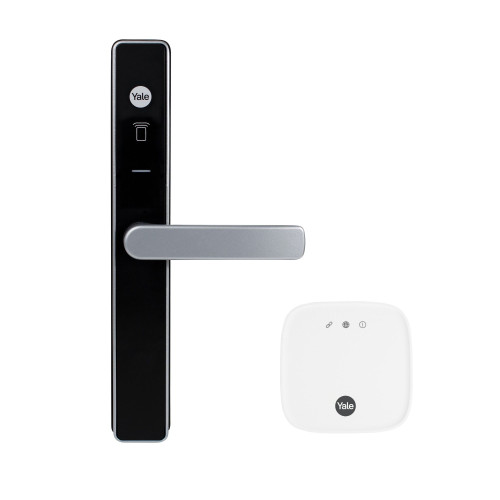
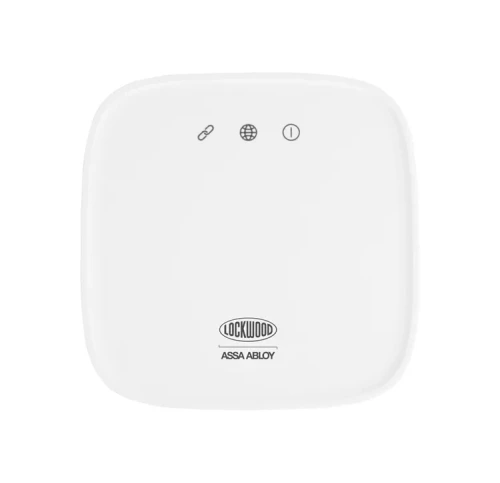
Yale Connect Plus Hub 2 - Multi-Device Wi-Fi Gateway
The Yale Connect Plus Hub 2 (YAR/SWAA/HUB/-I-D) is the gateway that turns a Bluetooth-only Yale smart lock into a lock you can see and operate from anywhere. Plug it into a power point inside the home, link it to your Wi-Fi, and the Yale Home App 
 gains remote lock and unlock, a live activity feed, prompt low-battery readings and voice control through Amazon Alexa and Google Home.
Where the original single-device Yale Connect Wi-Fi Bridge served one lock, the Hub 2 serves a household. It supports up to 16 Bluetooth Yale Home devices and up to 30 Zigbee devices on the one unit, so a front door, a security screen door, a safe and a set of window actuators can all run through a single power point instead of one adaptor each.
It is also the part that unlocks Yale's whole-of-home features. DualDoor pairing between a Yale Unity Security Screen Door Lock and a Yale Unity Entrance Lock runs through the Hub 2, as do Amazon Alexa, Google Assistant and Samsung SmartThings. The hub is a Wi-Fi 2.4GHz device finished in Snow White, powered by the supplied USB-C adaptor, and is designed for indoor use.

Usually ships same day if ordered before 11am AEST (excludes weekends and Queensland public holidays).
 Key Features
- One app, from anywhere. Check whether the door is locked, lock or unlock it, and read the activity feed from any internet connection, with no need to be on the home network.
- Up to 16 Bluetooth and 30 Zigbee Yale devices on a single hub, so one power point covers the whole house rather than one adaptor per lock.
- Voice control through Amazon Alexa and Google Home, plus Samsung SmartThings and Siri on the locks that support them.
- Enables DualDoor between a Yale Unity Security Screen Door Lock and a paired Yale smart lock, so one action opens both doors.
- Prompt smart alerts for manual lock and unlock, entry-code users, door left ajar with DoorSense, and auto-lock events, rather than the delayed or missed alerts you get on Bluetooth alone.
- Better range than the original Connect Wi-Fi Bridge, which supported one Yale device only.
- Simple QR-code setup. Scan the code on the underside of the hub and the Yale Home App walks you through it, then offers to link your other Yale devices at the end.
- Three status LEDs for power, Wi-Fi and server connection, so faults can be diagnosed at a glance.
- Firmware updates over the air, prompted in the Yale Home App.
- USB-C powered with the Australian-pattern adaptor supplied, in a compact 80 x 80 x 30mm Snow White housing.

The Hub 2 connects to 802.11b/g/n networks on the 2.4GHz band. Your router must broadcast a 2.4GHz network, and your phone must also be on 2.4GHz during setup (it can go back to 5GHz afterwards). If your router hides both bands behind one network name, band steering can push the phone onto 5GHz and the pairing will fail. See band steering explained and Chapter 13 on Wi-Fi dropouts. If the app shows a "signal appears to be weak" message part-way through setup, keep going - it does not stop the hub working.
 What the Hub 2 Works With
The Hub 2 links to Yale Home devices over Bluetooth, and to Yale's Zigbee devices over Zigbee. It does not replace the lock's own app registration - each device is first paired to the Yale Home App, then linked to the hub.

The Hub 2 speaks Zigbee 3.0, but Yale currently supports only the Aeron Window Actuator and its Zigbee remotes on that side. Your Yale locks connect over Bluetooth and use the 16 Bluetooth slots, not the Zigbee ones. This is also why the Hub 2 is a different animal to a Yale Zigbee Network Module, which fits inside an Assure lock and talks to a third-party home automation hub instead. The difference is explained in Yale Network Modules explained.
 What's in the Box
- 1 x Yale Connect Plus Hub 2 (Snow White, 80 x 80 x 30mm)
- 1 x USB-C power adaptor, 5V DC 1A, Australian I-pattern plug
- Setup QR code printed on the underside of the hub

The Hub 2 is a gateway on its own. Your locks, safes or window actuators are bought separately and must already be registered to the Yale Home App before you link them to the hub.
 Suitable Uses
- Households running more than one Yale device - a front entrance lock plus a security screen door lock, or several doors across a larger home, all on one hub.
- Anyone who wants remote access to a Yale smart lock while away from the property, rather than being limited to Bluetooth range.
- DualDoor installations, where one action needs to release both a Yale Unity Security Screen Door Lock and the entrance lock behind it. See how Yale's approach compares.
- Voice-controlled homes running Amazon Alexa, Google Home or Samsung SmartThings.
- Owners who want reliable low-battery warnings and a live activity feed instead of readings that only refresh when someone opens the app near the lock.
- Holiday houses and second properties where you need to grant or revoke access without driving there.
- Replacing an older single-device Yale Connect Wi-Fi Bridge where a second or third Yale device has since been added.

It is an indoor device with no weather rating, so it is not for garages exposed to the weather, carports or outbuildings without shelter. It has no backup battery, so it does nothing during a blackout. It will not add app control to a lock that has none - the offline Yale Libi range and mechanical hardware such as the Yale 530 deadlatch gain nothing from it. And it is not a TTLock-platform gateway, so it will not work with McGrath, Lockton or Austyle locks - those use the G2 to G5 gateway range instead.
 Available Finish Options
 Snow White
(This Product)
STK YAR/SWAA/HUB/-I-D
Finish selection does not affect functionality, compliance, or performance.
 Yale Gateways and Modules
Yale sells three different things that all get called "the Yale connectivity bit", and they are not interchangeable. The Hub 2 is a plug-in gateway. The Home Module is a circuit board that fits inside an Assure lock. The Zigbee Network Module also fits inside an Assure lock, but hands the lock to a third-party automation hub rather than to Yale Home. Every gateway and module we stock sits in the modules and Wi-Fi gateways category.
 Full Specifications
 Dimensions

 Reading the Three LEDs
Almost every Hub 2 fault can be identified from the front panel before you open the app. The three lights report, in turn, whether the hub has power, whether it can reach your router, and whether it can reach Yale's servers.
Yale Home App and Remote Access
The Hub 2 is managed entirely through the Yale Home App, free on the Apple App Store and Google Play . Yale maintains support for the two most recent operating system releases on each platform, and there is no desktop version - the app authorises your handset with a token, so it is a mobile-only tool. The Yale Home App is profiled in Chapter 15 of the Buyer's Guide.
What actually changes when the hub is added is worth being precise about, because it is the whole reason to buy one:
If you are weighing up whether a gateway is worth it at all, Chapter 08 explains what a gateway actually does, and Chapter 01 covers the difference between a smart lock and a connected lock.

The Yale Connect Plus Hub 2 has been assessed and declared compliant with the Australian Cyber Security Act (IoT consumer products). Declaration No. Cyber-AU-00006, confirmed 3 February 2026, hardware Rev 1, firmware V2.1.0. Software support is provided for a minimum of 3 years from the declaration date. What the Australian smart device security law requires, and how Yale complies, are explained in our guides.
 Frequently Asked Questions
Your lock works perfectly well without it. Every Yale Home lock operates on its own credentials and on Bluetooth from your phone when you are near it. The Hub 2 is what adds distance: locking or unlocking from work, seeing the activity feed in real time, getting reliable low-battery warnings, and using voice assistants. If you never need to touch the lock from away, you can skip it. There is a fuller discussion in Chapter 08.
The original bridge handled a single Yale device. The Hub 2 handles up to 16 Bluetooth and 30 Zigbee devices and has better range. If you already own the older bridge and have only ever had one lock, it will keep doing its job; the Hub 2 is the upgrade once you add a second door, or if range has been marginal.
The limiting factor is Bluetooth between the hub and your locks, not Wi-Fi. Put it as centrally as the power points allow, and be aware that home size, layout and building materials all affect how far it reaches. Steel framing, masonry walls and long runs across a large single-storey house are the usual culprits. Larger homes may simply need a second Hub 2 for full coverage. See gateway placement in Chapter 08.

In both cases you fall back to Bluetooth: you can still operate your locks from the app when you are within range, and all the lock's own credentials keep working normally. What you lose is remote access, live alerts and voice control. There is no backup battery in the hub, so a blackout takes it offline entirely. When the internet returns, the hub reconnects by itself with nothing for you to do. Chapter 08 covers the internet-down scenario.
No. The Hub 2 is a Yale Home device and only links to Yale Home hardware. McGrath, Lockton and Austyle locks run on the TTLock platform and use the G2 to G5 gateway range; Carbine Connect locks have no remote-access gateway at all. Which app platform is right for you compares them side by side.
Additional Information
Yale rates the hub at 16 Bluetooth devices, but notes that once you go beyond roughly ten linked devices you may notice a slight lag in response. It is worth knowing before you plan a large installation around a single unit rather than two.

A short press of under five seconds does nothing at all. A long press of more than five seconds disconnects the hub from your Wi-Fi router, which is the single most common cause of a hub that "stopped working for no reason". The fix is in the app: Hub Settings, then Network Settings under Utilities, then Wi-Fi Network. A genuine factory reset is done from the app, not from that button.

A Hub 2 that will not discover a Yale device is very often simply running older firmware without the Bluetooth support for that device. Open the Yale Home App, check for a firmware update on the hub, and retry the link. Updates are prompted automatically when one is available.

The hub carries no IP rating and belongs inside the house. That matters more than usual on the Gold Coast, because Yale's warranty specifically excludes corrosion from coastal air and salt spray across the range. Keep the hub away from open windows facing the water and unventilated laundries. Our honest assessment of Yale in Australia covers coastal installations properly.

A hub that is still registered to a previous owner's Yale Home account cannot simply be adopted. Yale support can arrange a factory reset on a previously owned device, but they will want proof of purchase and the serial number, and they contact the original owner to perform the reset. If you are buying privately, get the seller to remove it from their account first.
 Warranty
Genuine Yale products bought new in Australia from authorised retailers are covered against defects in materials and workmanship for:
- Mechanical parts: 10 years
- Electrical and electronic components: 3 years (batteries excluded)
- Keys: 12 months
 Download PDF Resources
Yale's two-page brochure (New Zealand edition): remote access and voice assistants, the 16 Bluetooth and 30 Zigbee device capacity, whole-of-home coverage and the rear-panel drawing. Its small specification panel belongs to a door lock, so use the Full Specifications on this page for the hub's figures.
Yale's 2025 Australian smart lock catalogue, opened at the Connect Plus Hub 2 page (part number and specifications); page 39 covers the Yale Home App and page 40 compares the whole range.
Step-by-step guide to the Yale Home App, opened at running several devices through one Connect bridge; it also covers DualDoor, guest access, auto-unlock and smart alerts. Its bridge FAQ page (page 28) describes the older single-device Connect Wi-Fi Bridge, not the Hub 2.
One-page quick start card: download the Yale Home App and scan the QR code to begin setting up a Yale device.
ASSA ABLOY Australia's declaration Cyber-AU-00006 for the YAR/SWAA/HUB/-I-D: hardware Rev 1, firmware V2.1.0, confirmed 3 February 2026, with 3 years of software support.
Yale's Australian warranty terms (P/No 999-521): 10 years mechanical, 3 years electrical and electronic (batteries excluded), 12 months on keys, the claim procedure and the exclusions, including coastal corrosion.
Yale Connect Plus Hub 2 - FAQ, Setup and Owner's Guide
Everything we get asked about the Hub 2, grouped by topic: what it does, how to set it up, how to fix it when it sulks, and where it fits against the rest of the Yale range. For broader questions see Chapter 13 of the Smart Lock FAQ and the full Buyer's Guide.
What the Hub 2 Does
It is a small plug-in gateway that bridges your Yale Home smart devices to your home Wi-Fi and, through it, to the internet. Your locks talk to the hub over Bluetooth; the hub talks to Yale's servers over Wi-Fi; and the Yale Home App on your phone talks to those servers from anywhere. Without it, a Yale lock is a Bluetooth device that only answers your phone when you are standing near it.
Up to 16 Bluetooth Yale Home devices and up to 30 Zigbee Yale devices. In practice the Bluetooth number is the one that matters for a household of locks and safes; the Zigbee allowance is for Yale Aeron window actuators and their remotes.
A little, past a point. Yale's own guidance is that beyond about ten linked devices you may see a slight impact on response time. For a typical home with two or three doors this is not something you will notice.
The Connect Wi-Fi Bridge was a one-device product: one bridge, one lock. The Hub 2 supports up to 16 Bluetooth and 30 Zigbee Yale devices and has better range performance. The older bridge is no longer stocked. If you have one and it is working on a single-lock house, there is no urgency to change; the moment you add a second Yale device, the Hub 2 is the right answer.
No. As long as your phone has an internet connection of any kind, you can operate your devices. You do not need to be on the same Wi-Fi network as the hub, and you do not need to be anywhere near home.
Yes. DualDoor pairs a Yale Unity Security Screen Door Lock with a Yale smart lock so a single action opens both doors, and the Connect Plus Hub 2 is the piece that makes the pairing possible. Both locks must sit under the same Home in the app, each with a Yale Connect device attached, and DualDoor will not operate if the internet connection drops. Yale also advises that owners and guests keep app access and a contactless key tag to both locks rather than relying on the linked action alone. What Dual Unlock actually does explains the concept in full.

Amazon Alexa, Google Home and Samsung SmartThings, with Siri available on the Yale locks that support Apple HomeKit. Yale asks buyers to check that their particular Yale device supports Alexa or Google Home before purchase, because voice support is set per product rather than by the hub. Unlocking by voice normally requires a spoken security PIN.

No, and this catches people out. On HomeKit-capable Yale locks, HomeKit runs at the lock over Bluetooth, and HomeKit's own remote access comes from an Apple home hub such as an Apple TV or HomePod, not from the Yale hub. The Connect Plus Hub 2 delivers remote access, alerts and voice assistants through the Yale Home side. The two systems sit alongside each other.
Setup and Installation
Put your phone on a 2.4GHz Wi-Fi network first, with both the phone and the hub on that same network for the duration of setup. Plug the hub in, scan the QR code on its underside, and follow the guide in the Yale Home App. At the end of setup the app offers to link any other Yale smart devices you have. Once it is finished, your phone can go back to 5GHz.
Almost always because the phone is sitting on the 5GHz band. The Hub 2 is 2.4GHz only, and a modern router that presents both bands under a single network name can quietly hand your phone to 5GHz. Split the bands temporarily, or connect the phone to a 2.4GHz-only guest network, then run setup. Band steering explained covers exactly this.
No. That message during setup does not affect how the hub performs afterwards. Continue past it and finish the setup.
Make sure the lock is already paired to your Yale Home App on your phone first. The hub links to devices that exist in your account, so the lock's own registration comes before the hub link, never the other way around.
Somewhere central, indoors, on a power point, with as clear a line as possible to your locks. Bluetooth is the constraint, not Wi-Fi. Yale notes that home size, layout and building materials all affect coverage, and that larger homes may need additional Connect devices for full coverage. Steel frames, masonry and long diagonal runs across a big floor plan are the usual difficulties. Gateway placement goes into more detail.

It takes 5V DC at 1A through a USB-C port, and the adaptor supplied does that job on a standard Australian power point. Any sensible USB-C supply of that rating will run it, but a permanently powered wall socket is what it is designed around, since the hub is useless the moment power stops.
Not somewhere exposed. The Hub 2 has no IP rating and is an indoor product. A dry, ventilated internal garage on the same slab as the house is usually fine and can be a good central spot; an open carport or an unlined shed is not.
Troubleshooting

Update the hub's firmware. Missing Bluetooth support for a newer Yale device is the documented cause, and a firmware update is the documented fix. Open the Yale Home App and check for an update on the hub, then try the link again.
Top to bottom they report link, network and power. Power LED: solid means the hub is on, a slow flash means it is searching for sub-devices, and no light means no power. Wi-Fi LED: solid means it is connected to your router, a slow flash means it is in Wi-Fi connect mode, a fast flash means firmware is updating, and no light means it cannot reach the router. Server LED: solid means it is connected to the Yale Home server with nothing in transit, a slow flash means it is talking to the server, and no light means it cannot reach the server. If all three blink one after the other, a factory reset is running.
A short press of less than five seconds does nothing. A press of longer than five seconds disconnects the hub from your Wi-Fi router, which is almost certainly what has happened. To recover, open the Yale Home App and go to the hub's settings, then Network Settings under Utilities, then Wi-Fi Network, and follow the prompts. You do not need to factory reset it.
You can still reach the hub's settings over Bluetooth from the Yale Home App while standing near it, and switch it to the new network from there. Check first that the new router broadcasts a 2.4GHz network, or the change will not take.
From the app, not from the hardware. Go to Hub Settings, then Network Settings under Utilities, then Factory Reset. The three LEDs blink one after the other while it runs, and a few seconds later the middle LED flashes slowly to tell you it has finished.
You will be prompted in the Yale Home App when an update is released. You can also check manually in the hub's settings rather than waiting for the prompt, which is worth doing whenever a newly bought Yale device will not link.
Usually not. Intermittent remote access is far more often a Wi-Fi problem than a hub problem, and the 2.4GHz band is a crowded one in a suburban street. Work through the common causes of dropouts and how to improve stability before you condemn the hardware. Yale's own connectivity record is discussed frankly in our honest Yale assessment.
Yale support can arrange a factory reset on a previously owned device. They ask for proof of purchase and the serial number from the back of the unit, and then contact the original owner to have the reset performed. Ask a private seller to remove it from their Yale Home account before money changes hands, and you avoid the whole process.
Power, Outages and Security
No. During a power failure the hub is simply off, and you fall back to Bluetooth control from within range plus every credential on the lock itself. Nobody is locked out; you just lose the remote layer until power returns.
The same fallback: Bluetooth within range only, no remote access. When the internet comes back, the Hub 2 reconnects automatically without any intervention from you.
The lock keeps its Bluetooth radio available to the hub, so there is a modest cost to keeping the connection alive. Against that, the hub gives you honest, timely low-battery warnings instead of readings that arrive late or not at all, which in practice is what stops people being caught out. Yale's battery-life figures are worth reading with a clear head - see low-battery warnings on Yale locks.
It is a fair question and worth thinking through rather than dismissing. Yale is an ASSA ABLOY brand with a long-established security business behind it, the hub carries the Regulatory Compliance Mark for Australia and New Zealand, and access is bound to your Yale Home account rather than to an open port on your network. The trade-off to weigh is that remote convenience always depends on a manufacturer's cloud staying up and staying secure. Chapter 15 on platform security and data sovereignty sets out how the platforms compare.

Your physical credentials keep working regardless. On the app side, log in to the Yale website with your email address, choose the lost-phone option and log out of all devices. You then install the app on a replacement handset and sign in; there is no need to set your devices up again. If your account uses SMS verification and the phone is gone, use the email login method instead.
Choosing, Comparing and Suitability
They solve different problems. The Hub 2 is the plug-in gateway that gives any registered Yale Home lock remote access. The Home Module is a board that fits inside a Yale Assure lock to give it Bluetooth and Yale Home in the first place. The Zigbee Network Module also fits inside an Assure lock but hands it to a third-party automation hub instead of Yale Home, and it uses the same slot as the Home Module so you fit one or the other. An Assure owner who wants Yale Home plus remote access needs the Home Module and a Hub 2. Do you need a module? works through it.
The Yale Home range: Unity Entrance and the fire-rated Unity Entrance, the Unity Security Screen Door Lock, the Unity Slim, ByYou Pro, Kyra Pro, Luna Pro+, and the Assure range once a Home Module is fitted. It also suits the Lockwood 001Touch Plus, which is a Lockwood-badged lock running on the Yale Home App with a Home Module included.

The Yale Libi Essential Series locks are deliberately offline - no app, no Bluetooth, no Yale Home account - so a hub does nothing for them. Purely mechanical Yale hardware such as the 530 Series tubular deadlatch is likewise unaffected. And a Yale Smart Keypad 2 pairs to a lock rather than to the hub, though its events do reach the app once a hub is present.
No. Those brands sit on other platforms entirely. McGrath, Lockton and Austyle are TTLock products served by the G2 to G5 gateway family, Vault locks use the Vault G5 gateway, and Carbine Connect has no remote gateway at all. Choosing a platform is the place to start if you are still deciding.

Often, but not always. Yale states plainly that home size, layout and building materials affect performance and that larger homes may need additional Connect devices for full coverage. A long single-storey home, a double-brick house or anything with steel framing between the hub and the furthest door is where a second unit earns its keep.
That is one of its strongest cases. Remote access means you can issue and revoke app access without being there, and the activity feed tells you when doors were actually used. Yale's guest access runs to Always, Recurring and Temporary schedules, and guest app access needs the guest's phone to have data or internet so the servers can check the authorised window. Yale for rentals gives the balanced view.
One thing, and it applies to every Yale product rather than this one specifically: the warranty excludes corrosion including coastal air and salt spray. That has real consequences for exterior hardware within a few streets of the water, and it is worth reading the coastal installations section before choosing the lock the hub will be serving. The hub itself lives indoors, so it is the least of your worries.
Related Products, Guides and Chapters
Yale locks this hub serves: Unity Entrance Silver · Unity Entrance Matt Black · Unity Entrance Fire Rated · Unity Entrance Fire Rated with DDA Lever · Unity Screen Door Silver · Unity Screen Door Matt Black · Unity Screen Door with Hub 2 Silver · Unity Screen Door with Hub 2 Matt Black · Unity Slim · ByYou Pro · Kyra Pro · Luna Pro+ Nova Graphite · Luna Pro+ Champagne Gold · Assure Lock SL Matt Black · Assure Lock SL Satin Chrome · Assure Keyed Deadbolt Matt Black · Assure Keyed Deadbolt Satin Chrome · Lockwood 001Touch Plus
Kits that include this hub: Yale Unity Kit - entrance lock, screen door lock, Smart Keypad 2 and Hub 2 (Matt Black) · Unity Screen Door with Hub 2 Silver · Unity Screen Door with Hub 2 Matt Black
Modules, accessories and spares: Yale Home Module with Door Sensor · Yale Zigbee Network Module · Yale Smart Keypad 2 · Yale Contactless Key Tag · Unity Screen Door Mortice Body · Yale 530 Series Deadlatch
Buyer's Guide chapters: Ch 01 Smart vs Connected · Ch 03 Wi-Fi and Remote Access · Ch 06 Facial Recognition · Ch 08 What a Gateway Does · Ch 08 Other Gateway Systems · Ch 08 When the Internet Is Down · Ch 09 Yale Unity DDA · Ch 10 Yale Brand Profile · Ch 11 The RCM Mark · Ch 12 Troubleshooting · Ch 13 Wi-Fi and Connectivity · Ch 15 The Yale Home Platform
Guides and blogs: Yale Smart Locks in Australia: An Honest Guide · Yale Network Modules Explained · Why Smart Locks Drop Off Wi-Fi · Dual Unlock Explained · Yale Unity Slim Reset and Remote Access Guide · Which App Platform Is Right for You · Do You Need a Gateway?
What's in the Box - Yale Connect Plus Hub 2
- 1 x Yale Connect Plus Hub 2 - Snow White, 80 x 80 x 30mm, 65g, with three status LEDs on the front face and the Wi-Fi Pair button, USB-C inlet and Reset pinhole on the rear.
- 1 x USB-C power adaptor - 5V DC, 1A, Australian I-pattern plug.
- Setup QR code - printed on the underside of the hub. This is what the Yale Home App scans to begin setup, so it is worth photographing before the hub goes behind furniture.
No Yale locks, safes or window actuators are supplied with the hub. Each device is bought separately, registered to the Yale Home App in its own right, and then linked to the hub. If you are fitting out a Yale Assure lock, you will also need a Yale Home Module inside the lock before the hub has anything to talk to.
Put your phone on a 2.4GHz Wi-Fi network and keep the hub on that same network throughout setup. This one step prevents the great majority of failed Hub 2 installations.
Yale Connect Plus Hub 2 - Dimensions
Yale Connect Plus Hub 2 - Product Brochure


The small specification panel printed on page 2 of Yale's brochure carries entries that belong to a door lock rather than to a gateway. The correct Connect Plus Hub 2 specifications are the ones set out in the Full Specifications section of this page, taken from the Yale product specification sheet, the manufacturer drawing and the 2025 Yale Smart Locks Catalogue.
PDF Files - Yale Connect Plus Hub 2 (YAR/SWAA/HUB/-I-D)
Yale's two-page brochure (New Zealand edition): remote access and voice assistants, the 16 Bluetooth and 30 Zigbee device capacity, whole-of-home coverage and the rear-panel drawing. Its small specification panel belongs to a door lock, so use the Full Specifications on this page for the hub's figures.
Yale's 2025 Australian smart lock catalogue, opened at the Connect Plus Hub 2 page (part number and specifications); page 39 covers the Yale Home App and page 40 compares the whole range.
Step-by-step guide to the Yale Home App, opened at running several devices through one Connect bridge; it also covers DualDoor, guest access, auto-unlock and smart alerts. Its bridge FAQ page (page 28) describes the older single-device Connect Wi-Fi Bridge, not the Hub 2.
One-page quick start card: download the Yale Home App and scan the QR code to begin setting up a Yale device.
ASSA ABLOY Australia's declaration Cyber-AU-00006 for the YAR/SWAA/HUB/-I-D: hardware Rev 1, firmware V2.1.0, confirmed 3 February 2026, with 3 years of software support.
Yale's Australian warranty terms (P/No 999-521): 10 years mechanical, 3 years electrical and electronic (batteries excluded), 12 months on keys, the claim procedure and the exclusions, including coastal corrosion.
Yale Warranty
Yale branded products are manufactured and warranted in Australia by ASSA ABLOY Australia Pty Ltd. Coverage is tiered by component type - mechanical parts, electrical and electronic components, and keys each carry their own warranty period. The summary below sets out each period, what is excluded, and how to make a claim through Gold Coast Smart Locks.
This warranty applies to genuine Yale products purchased new in Australia from ASSA ABLOY or its authorised resellers. It operates in addition to your rights under the Australian Consumer Law.
Warranty Summary
How to Make a Claim
For full returns and warranty claim procedures, visit our Returns & Warranty page - this is kept up to date and is the authoritative reference for current claim steps.
- Keep your proof of original purchase (invoice or receipt).
- Contact Gold Coast Smart Locks - operated by Terry's Tradies Pty Ltd and its associated websites, trading names, and subsidiaries - as your authorised retailer, and follow the steps on our Returns & Warranty page.
- Return the product securely packed to protect it in transit, together with your proof of purchase and your name, address, email and phone number.
- ASSA ABLOY assesses the claim. Where the warranty applies, they will (at their option) repair the product, replace it with the same or closest equivalent Yale product, or refund the price you paid.
Claims made directly to ASSA ABLOY require a Case Number from their Customer Service Department before goods are returned - products sent back without a Case Number may not be accepted. Costs of returning a product are the customer's responsibility.
What Is Not Covered
- Normal wear and tear.
- Misuse, abuse, accident, or use outside Yale's published technical specifications.
- Improper maintenance or neglect, or failure to follow ASSA ABLOY's care and maintenance recommendations.
- Use of batteries other than those specified; batteries themselves are not covered.
- Unauthorised alteration, modification or repair by anyone other than ASSA ABLOY authorised personnel.
- Custom orders made to components or specifications supplied by someone other than ASSA ABLOY.
- Goods that were not new when purchased, second-hand goods, or products not originally sold in Australia through ASSA ABLOY or an authorised reseller.
- Products with brands, marks, plates, numbers or other ASSA ABLOY information defaced or removed.
- Use of substitute, replacement or non-genuine ASSA ABLOY parts or cylinders.
- Corrosive exposure, including vapours, chemicals, abrasive compounds, contamination, pollution, coastal air, salt spray and high humidity.
- Removal, refitment or replacement of products, and any associated charges.
Important Notes
Batteries are consumable and are not covered. Cosmetic finishes and appearance are excluded. Stainless steel resists staining but is not stain-proof - tea staining is a natural process and is not covered where cleaning and maintenance guidelines have not been followed.
Damage from salt spray, coastal air, high humidity and other corrosives is excluded. In Gold Coast and coastal locations, choose a suitable finish and follow the care and maintenance guidance to protect your hardware and preserve your cover.
Your Rights Under the Australian Consumer Law
This manufacturer's warranty is in addition to other rights and remedies you may have under the law. Our goods come with guarantees that cannot be excluded under the Australian Consumer Law. You are entitled to a replacement or refund for a major failure and to compensation for any other reasonably foreseeable loss or damage. You are also entitled to have the goods repaired or replaced if they fail to be of acceptable quality and the failure does not amount to a major failure.
Further Information
Returns & Warranty - goldcoastsmartlocks.com.au
Download the Yale Warranty (PDF)
Official Yale warranty terms - yalehome.com.au
Manufacturer: ASSA ABLOY Australia Pty Ltd, 235 Huntingdale Road, Oakleigh VIC 3166. Tel: 1300WARRANTY. Email: 1300warranty@assaabloy.com
3 Reviews Hide Reviews Show Reviews
-
Wireless screen door mobile apps access
Impressive & hassle free now from keys. Can able to track through mobile apps to lock & unlock, finger prints or code are the other options. Keyless & secured. Just little bit tricky on installation but it's worth it though. Happy customer here.
-
Yale Connect Plus
Good price and quick shipping.
-
Hub
Great that the hub connects to more than one unit, however if you're considering it to link to multiple doors in a house (eg front and back door), then the bluetooth range will probably short fall

Confused? Overwhelmed? We get it.
Choosing the right smart lock can be genuinely tricky - door types, backsets, app platforms, compatibility with your existing hardware... there is a lot to consider. We have decades of experience fitting locks of all types, including smart locks, and we are happy to help.
Our expert recommendation service is free. Upload a few photos of your door and describe what you need, and one of our qualified locksmiths will give you a personalised recommendation.
Get Your Free Recommendation →How it works - three easy steps:
1. Upload photos
A few clear shots of your door, lock and frame - inside and out.
2. We assess
Our locksmith reviews your setup and requirements - door type, weather exposure, how you want to use it.
3. You get a recommendation
A personalised recommendation tailored to your door, budget and needs. No pressure, no upsell.
Also useful while you are deciding: