Yale Smart Keypad - Matt Black
The Yale Smart Keypad is a code-based entry accessory for Yale Smart Locks. It lets family, guests and service providers lock and unlock your door with a secure PIN code, so no one needs a physical key or a smartphone at the door. It pairs wirelessly to your Yale Smart Lock over Bluetooth and is managed through the Yale Home app on iOS or Android, where you can create, share and revoke codes and see who came and went.
Mounted beside the door, the keypad adds one-touch locking and offline PIN entry to a compatible Yale Unity smart lock. It is battery powered (2 x AAA), so there is nothing to wire, and it installs in minutes with the supplied screws and wall anchors or the double-sided mounting tape. Because entry codes work locally at the lock, guests can still get in even if a phone runs flat or is left behind.
The Yale Smart Keypad is an accessory - it requires a compatible Yale Smart Lock and the Yale Home app for setup and alerts. It does not open a door on its own. For the newer keypad with built-in fingerprint access, see the Yale Smart Keypad 2.

Usually ships within 3 business days (excludes Queensland public holidays).

For customers wanting enhanced performance and convenience, the newer Yale Smart Keypad 2 offers a few upgrades over this original keypad, though both share the same weather-resistant housing:
- Built-in fingerprint access for faster, key-free entry alongside PIN codes
- Improved battery performance and reliability
- The same IP55 weather-resistant housing as this keypad (dust protected and protected against low-pressure water jets)
- Designed for seamless integration with Yale Unity smart locks
Access Methods and Smart Features


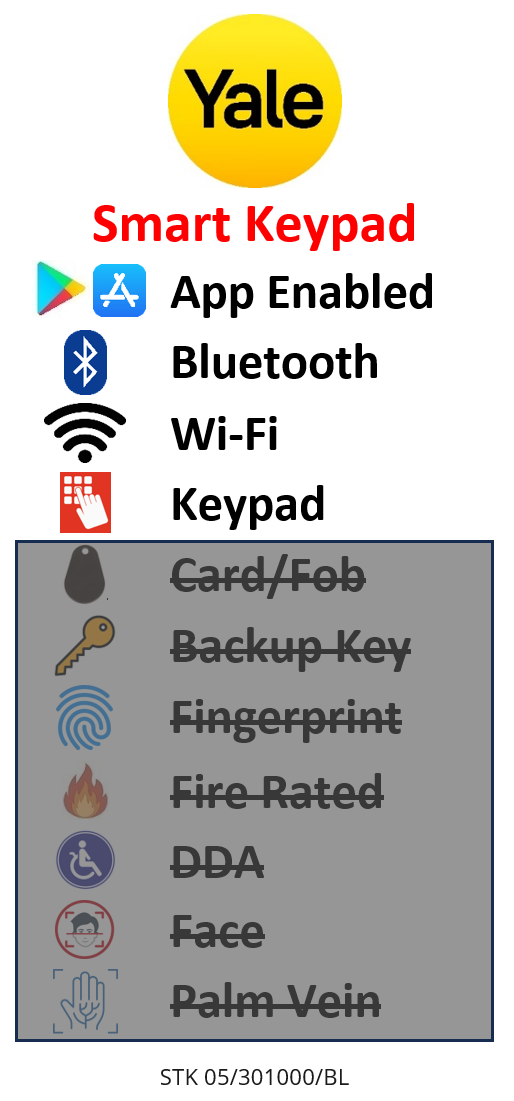
The keypad adds PIN code entry to a compatible Yale Smart Lock and is set up and managed in the Yale Home app over Bluetooth. It has no fingerprint reader - for fingerprint access choose the Yale Smart Keypad 2. Learn how the credential types compare in our access methods guide.
 Key Features
- Secure PIN code entry - lock and unlock a compatible Yale Smart Lock with a code, no key or phone required at the door.
- Supports up to 220 PIN codes - create permanent codes for household members and temporary codes for guests, cleaners or tradespeople.
- Know who comes and goes - the Yale Home app records entries and can notify you, so you can keep track of access with a unique code per person.
- One-touch locking - lock the door on your way out with a single touch.
- Three ways to operate the door - the keypad, the Yale Home app on your phone, or your traditional key; the choice is always yours.
- Battery powered - runs on 2 x AAA alkaline batteries, so there is nothing to hard-wire.
- Easy, tool-light installation - surface mounts beside the door with the supplied screws and wall anchors or the double-sided tape.
- Peace of mind - because codes are validated at the lock, you can still get in even if your phone battery dies or you lose your phone or keys.
- Effortless hosting - paired with a Yale Smart Lock you can manage guest check-in from anywhere, ideal for short-stay and holiday rentals.
- Bluetooth Smart connection to the lock - no hub required for the keypad itself.
 What's in the Box
- 1 x Yale Smart Keypad
- 2 x AAA batteries
- 2 x screws
- 2 x wall anchors
- Double-sided mounting tape
- Quick start guide
Note: a compatible Yale Smart Lock and the Yale Home app are required and are not included.
 Suitable Uses
- Households wanting key-free, code-based entry alongside a Yale Smart Lock.
- Homes that share access with family members, cleaners, dog walkers or tradespeople using individual PIN codes.
- Short-stay and holiday rentals managing guest check-in with time-limited codes - see our Airbnb and short-stay guide and whether you need Wi-Fi.
- Anyone who wants a backup way in when a phone battery dies or keys are misplaced.
 Available Finish
 Matt Black
(This Product)
STK 05/301000/BL
The Yale Smart Keypad is supplied in a single black nylon finish.
 Yale Keypad Range
This product (bold row) is the original Yale Smart Keypad. The Yale Smart Keypad 2 adds fingerprint access.
 Full Specifications
 Dimensions
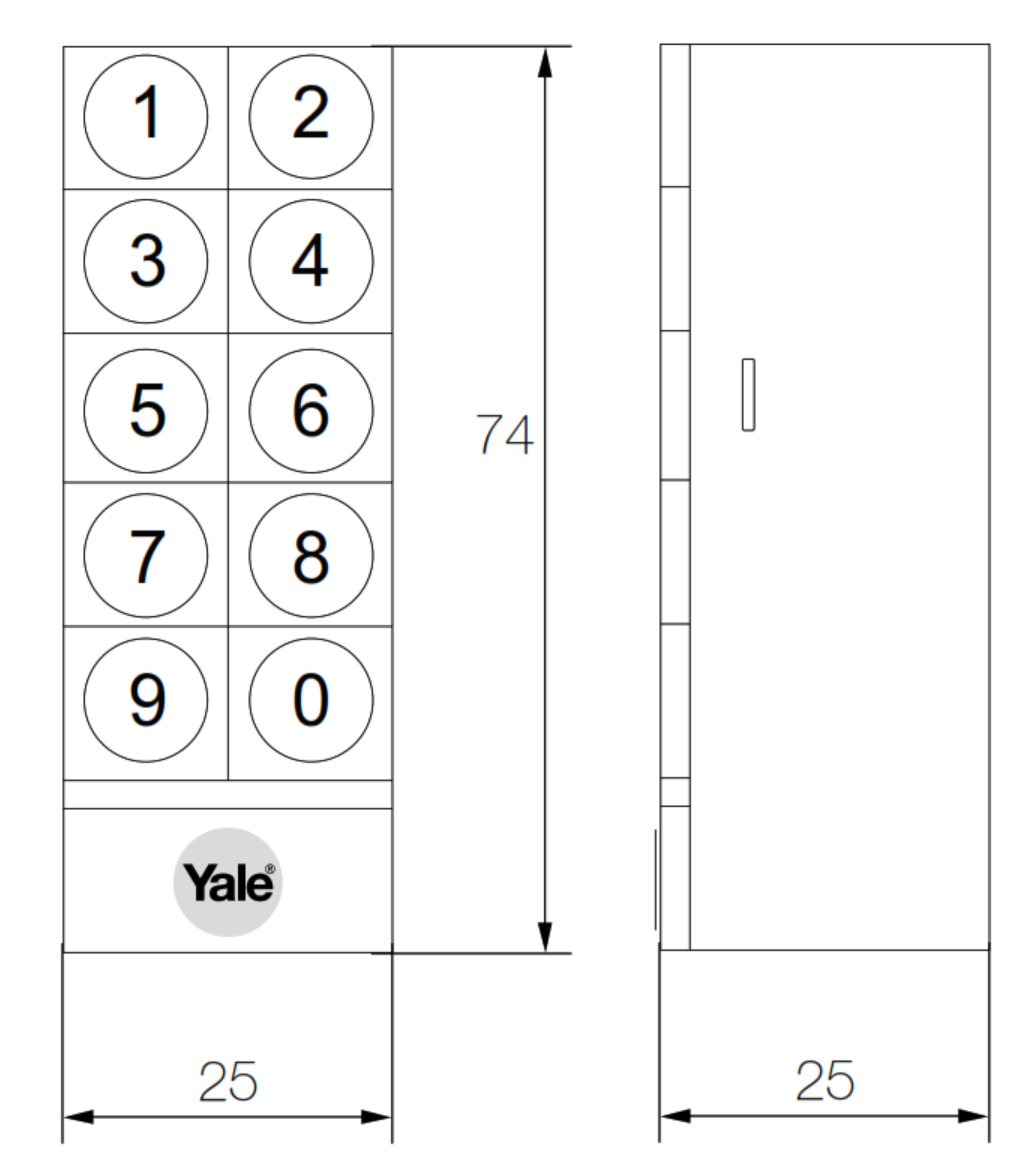
Compact surface-mount body approximately 25mm wide, 74mm high and 25mm deep (published specification 25 x 75 x 23mm; 50g including batteries).
 Frequently Asked Questions
No. The Yale Smart Keypad is an accessory. It requires a compatible Yale Smart Lock and the Yale Home app - it sends the unlock command to the lock over Bluetooth and does not contain a lock mechanism itself.
It is designed for Yale Smart Locks in the Yale Home ecosystem, such as the Yale Unity Entrance Lock and the Yale Unity Security Screen Door Lock. Confirm your specific lock model in the Yale Home app before ordering.
It supports up to 220 PIN codes. Using the Yale Home app you can create permanent codes for household members and temporary or scheduled codes for guests, cleaners and tradespeople, then revoke them at any time.

No. This original Yale Smart Keypad is PIN only. If you want fingerprint access as well as PIN codes, choose the Yale Smart Keypad 2.
It runs on 2 x AAA alkaline batteries (included) so there is no wiring. It surface mounts beside the door using the supplied screws and wall anchors, or the included double-sided tape for a no-drill option.
Additional Information
- Accessory, not a standalone lock: the keypad extends a Yale Smart Lock with code entry. It must be paired to a compatible lock and set up in the Yale Home app before use.
- Remote code management: the keypad connects to the lock over Bluetooth. To create or change codes and receive alerts while away from home, your Yale Smart Lock needs a network connection - for example via the Yale Connect Plus Hub 2. For how the platform works, see our app platforms guide.
- Backup entry: because PIN codes are validated at the lock, entry still works if a phone is flat or misplaced. A Yale Contactless Key Tag is another key-free option on compatible locks.
- Batteries: powered by 2 x AAA alkaline batteries (included). Batteries are a consumable and are excluded from warranty.
- For background on the Yale range, see our Yale brand profile, our honest guide to Yale smart locks in Australia, and which platform is right for you.
 Other Keypads You May Consider
The Yale Smart Keypad only pairs with Yale Smart Locks. If you are on a different platform, these keypads may suit - or browse the full keypad range and the entire Yale smart lock range.
 Igloohome Keypad
Offline algoPIN, Igloohome platform McGrath ML-A02 Controller
Hardwired PIN + RFID access controller

Genuine Yale products bought new in Australia from authorised retailers are covered against defects in materials and workmanship for:
- Mechanical parts: 10 years
- Electrical and electronic components: 3 years (batteries excluded)
- Keys: 12 months
 PDF Downloads
Yale Smart Keypad - FAQ, Setup and Owner's Guide
Everything below is here to help you set up, use and get the most from your Yale Smart Keypad. For general smart-lock questions see our Smart Lock FAQ (Chapter 13), and for how PIN entry compares with other access methods see Chapter 03.
The Keypad and What It Works With
No. The Yale Smart Keypad is a code-based entry accessory, not a standalone lock. It pairs over Bluetooth to a compatible Yale smart lock and is set up in the Yale Home app before use, then adds PIN entry and one-touch locking at the door. If the batteries in the lock or the keypad are flat, entry still works through the lock's own methods.

It pairs with the Yale Unity range - the Unity Security Screen Door Lock (Matt Black) and the Unity Entrance Lock (Matt Black). It also works on the screen-door Lock + Hub 2 bundles (Matt Black). One keypad connects to one lock at a time and is managed in the Yale Home app.

No. This original Yale Smart Keypad is PIN only. If you want fingerprint entry as well as PIN codes, choose the Yale Smart Keypad 2 instead. Both keypads share the same IP55 weather-resistant housing.
No - a keypad pairs to a single lock. If you run two Yale Unity locks with DualDoor, pair the keypad to the outer door (the screen door); when that lock is locked or unlocked, the linked entrance lock follows. Without DualDoor set up, the keypad only operates the one lock it is paired to.
 PIN Codes and Guest Access
Entry codes are 6 digits, and a lock can hold up to 220 codes at once. You can give each household member, guest, cleaner or tradesperson their own code, so the activity feed shows who came and went. See the PIN access method in Buyer's Guide Chapter 03.

In the Yale Home app, open the house from your keychain, go to the Guest List and select yourself to reach My Access; your personal code appears under the associated lock. To use it, key the 6-digit code on the keypad and press the red Yale button - the light pulses, then flashes once the lock has operated.
Three types, set in the Guest List against each user: Always (open-ended until you delete it), Recurring (chosen days and time windows) and Temporary (a one-off with a set start and end). You can apply the schedule to app access, PIN access, or both.
Always and Recurring codes stay in your Guest List until an Owner deletes them. Temporary codes expire at their access end date, and once expired they are removed from the Guest List automatically after 7 days - this frees up code memory on the lock for new codes.

Only if the lock has a network connection. Creating, editing or deleting codes remotely needs a Yale Connect bridge such as the Connect Plus Hub 2 and the latest Yale Home app; a "Cannot Connect to Lock" message when making a code usually means there is no bridge. Without one, codes can still be managed while you are beside the lock over Bluetooth.
Using the Keypad Day to Day
To unlock, enter your 6-digit code and press the red Yale button; the keypad light pulses and then flashes when the lock has finished operating. One-Touch Lock lets you lock the door on the way out with just the Yale button - no code needed.
Count the buzzes. One buzz after a code means the code was entered incorrectly - try again (codes are 6 digits). Two buzzes means the keypad is not communicating with the lock; first check the lock connects to your phone and reboot the lock (remove and replace one battery), then if needed reset the keypad. See our keypad-unresponsive troubleshooting notes.
DualDoor and Pairing to Two Locks
A keypad can only be paired to one lock, so you disconnect it from the entrance lock and pair it to the screen door lock. With both locks joined to a bridge, DualDoor can then be switched on - locking or unlocking the screen door also drives the entrance lock. Any users and PIN codes held under the keypad on the entrance lock have to be re-added to the screen door lock; that data cannot transfer across for privacy reasons. More on how dual unlock works.
Pair the keypad to the outer door - the security screen door - so a code at the outside keypad opens both doors in one action through DualDoor.
 Installation and Mounting
Press the tab on the back to remove the back panel, hold it level on the wall and mark the two holes through the rubber feet, then drill (do not drill through the feet). Peel the adhesive and press the back panel to the wall, drive the two screws through it, remove the battery tab inside the keypad, then hook the keypad onto the top of the panel and rock it down until it clicks. Finish setup in the Yale Home app.
Keep it within Bluetooth range of the lock - the closer it is, the quicker it responds. The box includes both screws and wall anchors and a double-sided sticker so you can mount it where it suits.

It carries an IP55 rating, meaning it is dust protected and protected against low-pressure water jets, so it is suitable on the exterior of the door. Yale still recommends you avoid mounting it in direct driving rain or full sun where possible. Coastal and exposed sites should also read our notes on choosing outdoor-ready hardware.
 Power and Battery
The keypad runs on 2 x AAA alkaline batteries (included) and there is nothing to wire. Enabling Power Saving Mode turns off the proximity sensor, so the keypad lights up only when a key is pressed rather than when a hand approaches - a simple way to extend battery life. See battery guidance in Chapter 13.
Open Keypad Settings in the Yale Home app and select Keypad Info, which shows hardware details including battery level, serial number and the current firmware version.
Settings and Managing the Keypad
From the Settings (gear) tab, tap the keypad icon to reach: Enable/disable Keypad (temporarily switch it off without removing it), One-Touch Lock, Disconnect (removes the keypad from the lock), Keypad Info (battery, serial, firmware) and Power Saving Mode. You need to be within Bluetooth range of the keypad to change most of these.
Use the Enable/disable Keypad setting in Keypad Settings. It switches the keypad off without you having to uninstall it, and you can switch it back on the same way.
 Firmware and Updates
Firmware and app updates are released in a phased rollout, so it can take several days for the newest version to reach you. Firmware updates for the keypad are applied through the Yale Home app when a firmware pop-up appears.
Restart your phone, remove and reinsert one battery in the keypad, and make sure your phone is not connected to other Bluetooth devices such as headphones or speakers. Open the Yale Home app so the phone connects to the lock over Bluetooth, select Retry Firmware when the pop-up appears, and hold the keypad button when prompted until the progress bar shows. If it still fails, contact Yale support in Australia.
Troubleshooting and Reset
You must be an Owner of the lock. In the Yale Home app go to House Settings, open Keypad Settings, choose Disconnect Keypad and confirm; the app sends a reset code to your phone. Push the logo button on the keypad, then tell the app whether the keypad is slowly pulsing red - if it is, follow the in-app setup; if not, reinsert a battery and re-enter the reset code, or repeat the steps.
Within Bluetooth range, open Keypad Settings, choose Disconnect Keypad and confirm; the app sends a unique reset code. Enter that code on the keypad and press the logo button to finish - the keypad is then no longer connected to the lock.
Yes. A full keypad reset wipes all existing entry codes, so it is a last resort - they have to be added again after the keypad is set up. Before resetting, reboot the lock (remove and replace one battery) in case the fault is with the lock rather than the keypad. Broader reset help is in the Yale Unity reset and troubleshooting guide.
If the keypad no longer appears in the Yale Home app, run the keypad setup again from the installation guide's "Set up in the App" step; putting the device back into Setup Mode restores it.
App, Access Sharing and Account
The keypad is managed in the Yale Home app (previously called Yale Access), free on iOS and Android.
Set up your lock first, then add the keypad to it.
Owners have full control - they can manage users, change settings, put the keypad in setup mode and see the activity feed. Guests get limited access and unlock via the app or a keypad code. A guest who has a keypad code shows a blue circle with a hashtag beside their name in the Guest List. Compare Yale's ecosystem in Chapter 15 and which platform is right for you.
Related Products, Guides and Chapters
This keypad and its sibling: Yale Smart Keypad (this product, PIN only, Matt Black) · upgrade to the Yale Smart Keypad 2 (PIN + fingerprint)
Locks this keypad works with: Unity Screen Door - Silver · Screen Door - Matt Black · Screen Door + Hub 2 - Silver · Matt Black · Unity Entrance - Silver · Unity Entrance - Matt Black
Works alongside: Connect Plus Hub 2 (remote code management) · Contactless Key Tag (another key-free option) · Screen Door Mortice Body (spare part)
Buyer's Guide chapters: Ch 03 Access Methods (PIN) · Ch 13 Smart Lock FAQ · Ch 15 App Platforms · Quick Start: choosing an access method
Helpful blog reading: Which Smart Lock Platform Is Right for You? · Keypad Troubleshooting and Reset · Yale Smart Locks: An Honest Guide · Digital Door Locks: The Smarter Way
What's in the Box - Yale Smart Keypad
- 1 x Yale Smart Keypad
- 2 x AAA batteries
- 2 x screws
- 2 x wall anchors
- Double-sided mounting tape
- Quick start guide
Dimensions
Yale Smart Keypad - Brochure


Yale Warranty
Yale branded products are manufactured and warranted in Australia by ASSA ABLOY Australia Pty Ltd. Coverage is tiered by component type - mechanical parts, electrical and electronic components, and keys each carry their own warranty period. The summary below sets out each period, what is excluded, and how to make a claim through Gold Coast Smart Locks.
This warranty applies to genuine Yale products purchased new in Australia from ASSA ABLOY or its authorised resellers. It operates in addition to your rights under the Australian Consumer Law.
Warranty Summary
How to Make a Claim
For full returns and warranty claim procedures, visit our Returns & Warranty page - this is kept up to date and is the authoritative reference for current claim steps.
- Keep your proof of original purchase (invoice or receipt).
- Contact Gold Coast Smart Locks - operated by Terry's Tradies Pty Ltd and its associated websites, trading names, and subsidiaries - as your authorised retailer, and follow the steps on our Returns & Warranty page.
- Return the product securely packed to protect it in transit, together with your proof of purchase and your name, address, email and phone number.
- ASSA ABLOY assesses the claim. Where the warranty applies, they will (at their option) repair the product, replace it with the same or closest equivalent Yale product, or refund the price you paid.
Claims made directly to ASSA ABLOY require a Case Number from their Customer Service Department before goods are returned - products sent back without a Case Number may not be accepted. Costs of returning a product are the customer's responsibility.
 What Is Not Covered
- Normal wear and tear.
- Misuse, abuse, accident, or use outside Yale's published technical specifications.
- Improper maintenance or neglect, or failure to follow ASSA ABLOY's care and maintenance recommendations.
- Use of batteries other than those specified; batteries themselves are not covered.
- Unauthorised alteration, modification or repair by anyone other than ASSA ABLOY authorised personnel.
- Custom orders made to components or specifications supplied by someone other than ASSA ABLOY.
- Goods that were not new when purchased, second-hand goods, or products not originally sold in Australia through ASSA ABLOY or an authorised reseller.
- Products with brands, marks, plates, numbers or other ASSA ABLOY information defaced or removed.
- Use of substitute, replacement or non-genuine ASSA ABLOY parts or cylinders.
- Corrosive exposure, including vapours, chemicals, abrasive compounds, contamination, pollution, coastal air, salt spray and high humidity.
- Removal, refitment or replacement of products, and any associated charges.
Important Notes
Batteries are consumable and are not covered. Cosmetic finishes and appearance are excluded. Stainless steel resists staining but is not stain-proof - tea staining is a natural process and is not covered where cleaning and maintenance guidelines have not been followed.
Damage from salt spray, coastal air, high humidity and other corrosives is excluded. In Gold Coast and coastal locations, choose a suitable finish and follow the care and maintenance guidance to protect your hardware and preserve your cover.
Your Rights Under the Australian Consumer Law
This manufacturer's warranty is in addition to other rights and remedies you may have under the law. Our goods come with guarantees that cannot be excluded under the Australian Consumer Law. You are entitled to a replacement or refund for a major failure and to compensation for any other reasonably foreseeable loss or damage. You are also entitled to have the goods repaired or replaced if they fail to be of acceptable quality and the failure does not amount to a major failure.
Further Information
Returns & Warranty - goldcoastsmartlocks.com.au
Download the Yale Warranty (PDF)
Official Yale warranty terms - yalehome.com.au
Manufacturer: ASSA ABLOY Australia Pty Ltd, 235 Huntingdale Road, Oakleigh VIC 3166. Tel: 1300WARRANTY. Email: 1300warranty@assaabloy.com
1 Review Hide Reviews Show Reviews
-
Digital Yale pad
Having as yet installed, however I am pleased with the reports on the digital pad and its compatibility with my newly installed smart lock on my screen guard door.
It can be overwhelming with all the choices out there. We can help! We are experts with decades of experience in fitting locks of all types, not just Smart Locks. It is a free service we offer, and with just some photos and a few minutes of your time you can get expert advice and product recommendations tailored precisely to suit your needs.
Click on the image below to begin your expert Smart Lock consultation