


Yale Smart Keypad 2 - Fingerprint Recognition Keypad (Matt Black)
The Yale Smart Keypad 2 (05/303000/BL) is a wireless fingerprint and PIN code keypad accessory for the Yale Home smart lock ecosystem. It adds key-free fingerprint and keypad entry to a compatible Yale Unity smart lock without any hardwiring - mount it beside the door with the supplied screws or adhesive pad, pair it over Bluetooth, and it acts as an additional credential input for your lock.
Beyond unlocking, the Smart Keypad 2 includes a built-in doorbell button that sends alerts to the Yale Home app and through compatible voice assistants, so you know when someone arrives even when you are not near the door. A one-touch locking button and a proximity-activated backlight make it fast to use day or night.
Biometric data is encrypted and handled under two-factor authentication guidelines. The keypad is rated IP55 for water and dust resistance. It is powered by four AAA batteries (included) with an approximate six-month battery life, so no mains power connection is required.

Usually ships same day if ordered before 11am AEST (excludes weekends and Queensland public holidays).

This listing is the Smart Keypad 2 on its own. It has no lock mechanism and cannot lock or unlock a door by itself - it pairs over Bluetooth with a Yale Unity smart lock you already have, such as the Unity Entrance Lock or the Unity Security Screen Door Lock. The full list is under Compatible Locks, and the Yale Unity Kit bundles the keypad with both locks and a Connect Plus Hub 2.

Fingerprint

PIN Code

Bluetooth 5.3

IP55

4 x AAA
 Compatible Locks
The Smart Keypad 2 pairs over Bluetooth with the Yale Unity Series smart locks within the Yale Home ecosystem:
- Yale Unity Entrance Lock (Silver and Matt Black)
- Yale Unity Entrance Lock Fire Rated
- Yale Unity Entrance Lock Fire Rated with DDA Lever
- Yale Unity Security Screen Door Lock (Silver and Matt Black), including the lock + Hub 2 bundles in Silver and Matt Black
 Key Features
- Fingerprint recognition - fast biometric unlock for up to 10 registered fingerprint users.
- Numeric keypad - manage custom PIN codes (up to 220 with the Yale Unity series) for family, guests and tradespeople through the Yale Home app.
- One-touch locking button - lock the door instantly as you leave.
- Built-in doorbell button - triggers push notifications in the Yale Home app and alerts through compatible voice assistants.
- Proximity backlight - the keypad illuminates automatically as you approach, with light and sound feedback.
- Wireless Bluetooth 5.3 connection - no hardwiring; pairs to your compatible Yale Unity smart lock.
- Works with Google Home and Amazon Alexa (Yale Connect Plus Hub 2 required for locks without built-in Wi-Fi).
- Biometric data encrypted and protected under two-factor authentication guidelines.
- IP55 rated - water and dust resistant for external installation.
- DIY installation - mount using two screws and anchors or the double-sided adhesive pad. No electrician required.
- Battery powered - 4 x AAA batteries (included), approximately 6-month battery life.
- Part of the Yale Home ecosystem - managed via the Yale Home app (iOS and Android).


The Yale Smart Keypad 2 works with Google Home and Amazon Alexa for voice assistant integration. For Yale smart locks with built-in Wi-Fi, no additional hardware is required. The Yale Unity locks this keypad pairs with connect over Bluetooth, so on those a Yale Connect Plus Hub 2 is required to enable smart home integration and remote features - see our gateway comparison guide for how the bridge fits in.
 Suitable Uses
- Adding fingerprint and keypad access to an existing compatible Yale Unity smart lock.
- Homes and apartments where multiple access credential types are required.
- Short-term rental or holiday properties - manage guest PIN codes remotely via the Yale Home app. See our guide to Airbnb and short-stay smart locks and whether you really need Wi-Fi.
- Providing temporary fingerprint or PIN access for household visitors, cleaners or tradespeople.
- Adding a doorbell notification to a Yale Unity Entrance or Screen Door smart lock installation.
 What's in the Box
- 1 x Yale Smart Keypad 2 - Fingerprint unit (Matt Black)
- Mounting screws and wall anchors
- Double-sided adhesive pad
- Quick-start installation guide
- 4 x AAA batteries (included)
 Available Finish Options
 Matt Black
(This Product)
STK 05/303000/BL
Finish selection does not affect functionality, compliance, or performance.
 Full Specifications
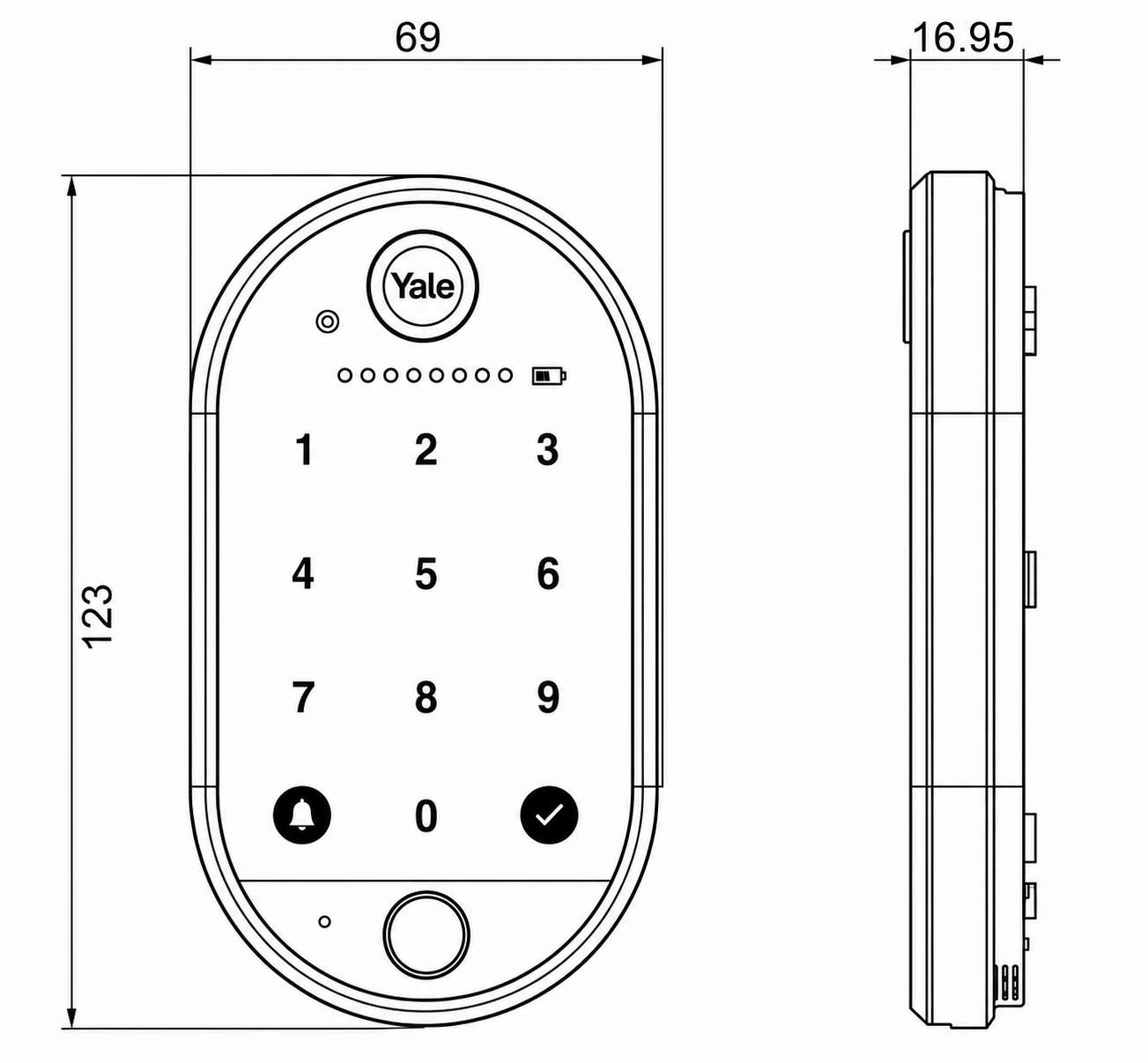
 Dimensions
Battery & Power
- Powered by 4 x AAA batteries - included in the box.
- Approximate battery life is 6 months under normal usage conditions.
- Low battery alerts are delivered through the Yale Home app before the batteries are fully depleted.
- No mains power or hardwiring required - the keypad is fully wireless.
 Frequently Asked Questions
No. The Smart Keypad 2 is a wireless accessory that pairs over Bluetooth with a compatible Yale Unity smart lock. It cannot lock or unlock a door on its own - it sends commands to the paired smart lock. You must already have a compatible Yale Unity lock installed, such as the Unity Entrance Lock or Unity Security Screen Door Lock.
No. The keypad is fully battery-powered (4 x AAA, approximately 6 months) and communicates with the smart lock wirelessly over Bluetooth 5.3. Mount it using the supplied screws and anchors or the double-sided adhesive pad - no electrician or cabling required.
Up to 10 fingerprint users can be registered, and up to 220 PIN codes can be set up and managed through the Yale Home app when used with the Yale Unity series. For a breakdown of how PIN and fingerprint credentials work, see our access methods guide.

The doorbell button sends notifications to smartphones running the Yale Home app and triggers alerts through connected voice assistants (Google Home and Amazon Alexa). It does not connect to a traditional wired doorbell chime - it works as a smart app-based doorbell notification.
On the Yale Unity locks, yes. The keypad has no Wi-Fi of its own, and the Unity Entrance and Screen Door locks connect over Bluetooth, so Google Home and Alexa integration, remote access and doorbell alerts away from home all run through a Yale Connect Plus Hub 2. Only a Yale lock with built-in Wi-Fi would do without it. What a gateway does is explained in Chapter 08.
 Additional Information
- This is Yale's second-generation keypad: fingerprint recognition, Bluetooth 5.3, a doorbell button and an adaptive backlight, with up to 220 PIN codes and an IP55 weather rating. Every keypad we stock is in the keypads for smart locks category.
- The keypad is one of several ways to grant access on a Yale Unity lock. If you prefer a physical credential, the Yale Contactless Key Tag is an alternative for the same Unity locks.
- On a Yale Unity Screen Door and Entrance Lock pairing, a single keypad entry can release both doors - see how dual unlock works.
- For how the Yale Home app compares with other smart lock platforms, see our app platforms guide and which platform is right for you; for background on the Yale range, see our Yale brand profile and our honest guide to Yale smart locks in Australia.
- Confirm you have a compatible Yale Unity smart lock before ordering - the keypad is an accessory and does not operate on its own.
 Warranty
Genuine Yale products bought new in Australia from authorised retailers are covered against defects in materials and workmanship for:
- Mechanical parts: 10 years
- Electrical and electronic components: 3 years (batteries excluded)
- Keys: 12 months
 Download PDF Resources
Yale's two-page Smart Keypad 2 sheet: fingerprint and PIN entry, up to 10 fingerprints, IP55, 4 x AAA (about 6 months), Bluetooth 5.3, 69 x 122 x 19mm and 142g. This is Yale's international edition - its Works With list names locks not sold in Australia; here the keypad pairs with the Yale Unity locks listed under Compatible Locks.
Yale's 2025 Australian smart lock catalogue, opened at the Smart Keypad 2 page; pages 8 and 13 cover the Unity Entrance series and page 39 the Yale Home App.
Step-by-step guide to the Yale Home App, opened at the Unity Security Screen Door Lock page with its keypad-pairing answers; it also covers guest access, schedules and auto-unlock.
One-page quick start card: download the Yale Home App and scan the QR code to begin setup.
Installation guide for the Yale Unity Entrance Lock (standard and Fire Rated), the lock this keypad pairs with - door preparation, handing, cabling and batteries.
Installation guide for the Yale Unity Security Screen Door Lock, the other lock this keypad pairs with - mortice, furniture, cabling, batteries and the 3-point strikes.
Yale's Australian warranty terms (P/No 999-521): 3 years on electrical and electronic components (batteries excluded), the claim procedure and the exclusions, including coastal corrosion.
Yale Smart Keypad 2 - FAQ, Setup and Owner's Guide
Everything below helps you set up, use and get the most from your Yale Smart Keypad 2. For general smart-lock questions see our Smart Lock FAQ (Chapter 13), and for how fingerprint and PIN compare with other access methods see Chapter 03.
The Keypad 2 and What It Works With
No. It is a credential accessory that adds fingerprint and PIN entry to a compatible Yale Unity smart lock, and it is set up in the Yale Home app. It has to be paired to a lock and placed within Bluetooth range of it to work - it does not secure a door on its own.
The Yale Unity range: the Unity Entrance Lock (standard, Fire Rated and Fire Rated with DDA Lever) and the Unity Security Screen Door Lock (Matt Black). One keypad pairs to one lock at a time.
Fingerprint recognition for up to 10 users, PIN codes (up to 220 with the Yale Unity series), a built-in doorbell button, Bluetooth 5.3 and an adaptive backlight, all in an IP55 weather-resistant housing. It is Yale's second-generation keypad.
Yes. Each user can unlock with a registered fingerprint or a numeric PIN, whichever suits. Codes are stored on the paired lock; fingerprints are encrypted and stored on the keypad itself.
Fingerprints
Up to 10, with one fingerprint per user. The fingerprint credentials are encrypted and stored on the keypad. See how fingerprint compares with other methods in Buyer's Guide Chapter 03.
You are offered fingerprint registration during first-time setup; if you skip it, add it later in the Yale Home app via Guest List, select yourself to reach My Access, choose the Fingerprint tab and follow the prompts. A yellow fingerprint icon then appears beside your name. To unlock, place the registered finger on the sensor - the lights flash green when the lock operates.
Yes, but only an Owner can do it, and the guest must be physically at the keypad to enrol. First give the guest Yale Home app access (Guest List, Invite, App Access), then open their profile, choose Fingerprint and follow the in-app enrolment while they place their finger on the keypad.
Only the keypad Owner can remove a fingerprint - open the person's profile, choose the Fingerprint tab and tap Unregister Fingerprint. If you have reached 10, remove one to free a slot before enrolling another; refreshing the keychain afterwards helps push the change through.
PIN Codes and Guest Access

Up to 220 unique codes, stored on the paired Yale Unity lock. The Yale Home app's Manage Entry Code screen accepts codes of 4 to 8 digits (some Yale material quotes 4 to 6 - contact us if you need it confirmed for your lock). See the PIN access method.
In the app open Guest List, select yourself to reach My Access and choose the Entry Code tab, then Manage Entry Code to set or change it. To use it, key the code on the keypad and press the green tick - the lights flash green when the lock operates (and bleep, if keypad sounds are on).
Guest List, Invite, then either Entry Code Only (keypad access with no app) or App Access (app plus a code). Set the schedule and save; the new guest appears in your list with a # symbol, and you can text the code to them at the same time.
Codes can be Always, Recurring (chosen days and times) or Temporary (set start and end), applied via the guest's Access Schedule. To remove one, open the guest, choose Manage Entry Code and tap Deactivate Entry Code.

A security option that requires your phone's authentication (passcode or biometrics) before entry codes can be viewed in the app. Turn it on under a lock's Security settings; once on, it applies for all Owners of that lock, and a Bluetooth or bridge connection is needed to view a code.
Only if the lock is networked. Remote code changes need a Yale Wi-Fi bridge such as the Connect Plus Hub 2 or a lock with built-in Wi-Fi; a "Cannot Connect to Lock" message means there is no bridge, and codes can then only be managed over Bluetooth beside the lock.
Using the Keypad Day to Day
Enter a code and press the green tick, or place a registered finger on the sensor. A green flash on the top LED bar means the code or fingerprint was accepted; a red flash means it was not accepted; a steady red battery icon means the batteries are low.
One bleep with a row of orange LEDs means the code was entered incorrectly - try again and remember to press the green tick. One bleep with flashing red LEDs means the keypad is not communicating with the lock; unlock via the app, then reboot the lock (remove and replace one battery) and, if needed, reset the keypad.
For security, five incorrect entry codes - or five incorrect fingerprints - trigger a 5-minute timeout, during which the keypad will not accept further attempts.
It lets you lock the door with just the Yale button on the keypad, no code needed. One-Touch notifications are off by default and need built-in Wi-Fi or a Yale bridge to be delivered; note this feature is lock-dependent, and it is switched off whenever the keypad itself is disabled.
Doorbell and Notifications
The doorbell works when the lock is networked - built-in Wi-Fi or a Yale Wi-Fi bridge. Once enabled in Keypad Settings, the doorbell icon lights up as someone approaches; a press sends a notification to your phone and sounds on the keypad, and if you have Alexa or Google set up it can chime on those speakers too.
No - it is a smart notification button, not a wired chime. It alerts your phone (and voice speakers) that someone is at the door; it does not connect to or replace a hard-wired doorbell circuit.
Voice Assistants and the App
The Yale Home app on iOS and Android.
After removing the battery tab, open the app, choose Set Up New Device and scan the QR code on the back of the keypad; the app installs any firmware update, then asks which Yale lock to link.
Yes. Voice control runs through the Yale Home ecosystem; for a lock without built-in Wi-Fi you need the Connect Plus Hub 2. Compare Yale's platform in Chapter 15 and which platform is right for you.
Installation and Mounting

Unclip the back panel, pull out the battery-insulating tab to power it on (the LED dots blink), then in the Yale Home app choose Set Up New Device and scan the QR code above the batteries. Mount the back panel with the supplied double-sided adhesive or the two screws and wall plugs, clip the keypad on, and finish the in-app steps. See install guidance in Chapter 13.
During first install you use the pull tab. If the tab is gone, or the keypad is already mounted, use the removal pin supplied in the box - push in the tab at the bottom to release the keypad from the back panel and reach the battery compartment.
It is rated IP55 - water and dust resistant - so it suits an exterior door position. Keep it within Bluetooth range of the lock; the closer it is, the more reliably it responds.
Power and Battery
It runs on 4 x AAA batteries (included), with an expected life of about 6 months; good-quality branded batteries are recommended and it cannot be run from mains power. See battery guidance in Chapter 13.
When the batteries run low the keypad's battery symbol flashes red with an audible tone, and Owners get an in-app message plus an email. You can also check the level in the keypad's settings in the Yale Home app, shown as Full, Medium or Low.
Push in the tab at the bottom of the keypad to release it from the back panel and reach the battery compartment, remove the old cells and fit 4 brand-new AAA batteries (replace all four together), then clip the keypad back on.
Settings
From the Settings (gear) tab, tap the keypad icon to reach Enable Keypad, One-Touch Locking, Enable Doorbell, Adaptive Brightness, Keypad Sound, the notification options, Reset Keypad and Keypad Info (battery, serial, firmware). You need to be within Bluetooth range to change most settings, and some options vary by lock model.
In Keypad Settings, toggle Keypad Enabled to Off; toggle it back On the same way. Note that One-Touch Locking is also disabled while the keypad is off.
It lets the keypad's lights adjust automatically to the surrounding light, so the display is easy to read by day and not glary at night. It is one of the keypad settings you switch on in the Yale Home app.
Firmware, Reset and Troubleshooting
The app installs firmware during first-time setup. Later, open the Yale Home app within Bluetooth range, go to the lock status screen for the linked lock and tap Start if an update is offered, staying on the screen until it finishes. If an update will not begin, press the Yale button on the front for 10 seconds; if it is interrupted, start over.
In Keypad Settings choose Reset Keypad under Utilities and confirm - you must be an Owner and within Bluetooth range. A reset removes the keypad from the lock and your Yale Home account and wipes all entry codes, so treat it as a last resort and re-onboard afterwards.
In the Yale Home app open the keypad's settings and read it below Device Information, or look on the back of the keypad under the battery cover. Broader reset and troubleshooting help is in the Chapter 13 troubleshooting section.
Related Products, Guides and Chapters
This keypad and the kit it comes in: Yale Smart Keypad 2 (this product, fingerprint + PIN, Matt Black) · Yale Unity Kit - entrance lock, screen door lock, Smart Keypad 2 and Hub 2 · all keypads for smart locks
Locks this keypad works with: Unity Entrance - Silver · Unity Entrance - Matt Black · Unity Entrance - Fire Rated · Fire Rated with DDA Lever · Unity Screen Door - Silver · Screen Door - Matt Black · Screen Door + Hub 2 - Silver · Screen Door + Hub 2 - Matt Black
Works alongside: Connect Plus Hub 2 (voice + remote codes) · Contactless Key Tag (another credential) · Screen Door Mortice Body (spare part)
Buyer's Guide chapters: Ch 03 Access Methods (fingerprint + PIN) · Ch 13 Smart Lock FAQ · Ch 15 App Platforms · Quick Start: choosing an access method
Helpful blog reading: Dual Unlock Explained · Which Smart Lock Platform Is Right for You? · Yale Smart Locks: An Honest Guide · Digital Door Locks: The Smarter Way
What's in the Box - Yale Smart Keypad 2 (Matt Black)
- 1 x Yale Smart Keypad 2 - Fingerprint unit (Matt Black)
- Mounting screws and wall anchors
- Double-sided adhesive pad
- Quick-start installation guide
- 4 x AAA batteries
Yale Smart Keypad 2 - Matt Black - Real Installations


Yale Smart Keypad 2 - Dimensions
Yale Smart Keypad 2 - Product Brochure


PDF Files - Yale Smart Keypad 2 (05/303000/BL)
Yale's two-page Smart Keypad 2 sheet: fingerprint and PIN entry, up to 10 fingerprints, IP55, 4 x AAA (about 6 months), Bluetooth 5.3, 69 x 122 x 19mm and 142g. This is Yale's international edition - its Works With list names locks not sold in Australia; here the keypad pairs with the Yale Unity locks listed under Compatible Locks.
Yale's 2025 Australian smart lock catalogue, opened at the Smart Keypad 2 page; pages 8 and 13 cover the Unity Entrance series and page 39 the Yale Home App.
Step-by-step guide to the Yale Home App, opened at the Unity Security Screen Door Lock page with its keypad-pairing answers; it also covers guest access, schedules and auto-unlock.
One-page quick start card: download the Yale Home App and scan the QR code to begin setup.
Installation guide for the Yale Unity Entrance Lock (standard and Fire Rated), the lock this keypad pairs with - door preparation, handing, cabling and batteries.
Installation guide for the Yale Unity Security Screen Door Lock, the other lock this keypad pairs with - mortice, furniture, cabling, batteries and the 3-point strikes.
Yale's Australian warranty terms (P/No 999-521): 3 years on electrical and electronic components (batteries excluded), the claim procedure and the exclusions, including coastal corrosion.
Yale Warranty
Yale branded products are manufactured and warranted in Australia by ASSA ABLOY Australia Pty Ltd. Coverage is tiered by component type - mechanical parts, electrical and electronic components, and keys each carry their own warranty period. The summary below sets out each period, what is excluded, and how to make a claim through Gold Coast Smart Locks.
This warranty applies to genuine Yale products purchased new in Australia from ASSA ABLOY or its authorised resellers. It operates in addition to your rights under the Australian Consumer Law.
Warranty Summary
How to Make a Claim
For full returns and warranty claim procedures, visit our Returns & Warranty page - this is kept up to date and is the authoritative reference for current claim steps.
- Keep your proof of original purchase (invoice or receipt).
- Contact Gold Coast Smart Locks - operated by Terry's Tradies Pty Ltd and its associated websites, trading names, and subsidiaries - as your authorised retailer, and follow the steps on our Returns & Warranty page.
- Return the product securely packed to protect it in transit, together with your proof of purchase and your name, address, email and phone number.
- ASSA ABLOY assesses the claim. Where the warranty applies, they will (at their option) repair the product, replace it with the same or closest equivalent Yale product, or refund the price you paid.
Claims made directly to ASSA ABLOY require a Case Number from their Customer Service Department before goods are returned - products sent back without a Case Number may not be accepted. Costs of returning a product are the customer's responsibility.
 What Is Not Covered
- Normal wear and tear.
- Misuse, abuse, accident, or use outside Yale's published technical specifications.
- Improper maintenance or neglect, or failure to follow ASSA ABLOY's care and maintenance recommendations.
- Use of batteries other than those specified; batteries themselves are not covered.
- Unauthorised alteration, modification or repair by anyone other than ASSA ABLOY authorised personnel.
- Custom orders made to components or specifications supplied by someone other than ASSA ABLOY.
- Goods that were not new when purchased, second-hand goods, or products not originally sold in Australia through ASSA ABLOY or an authorised reseller.
- Products with brands, marks, plates, numbers or other ASSA ABLOY information defaced or removed.
- Use of substitute, replacement or non-genuine ASSA ABLOY parts or cylinders.
- Corrosive exposure, including vapours, chemicals, abrasive compounds, contamination, pollution, coastal air, salt spray and high humidity.
- Removal, refitment or replacement of products, and any associated charges.
Important Notes
Batteries are consumable and are not covered. Cosmetic finishes and appearance are excluded. Stainless steel resists staining but is not stain-proof - tea staining is a natural process and is not covered where cleaning and maintenance guidelines have not been followed.
Damage from salt spray, coastal air, high humidity and other corrosives is excluded. In Gold Coast and coastal locations, choose a suitable finish and follow the care and maintenance guidance to protect your hardware and preserve your cover.
Your Rights Under the Australian Consumer Law
This manufacturer's warranty is in addition to other rights and remedies you may have under the law. Our goods come with guarantees that cannot be excluded under the Australian Consumer Law. You are entitled to a replacement or refund for a major failure and to compensation for any other reasonably foreseeable loss or damage. You are also entitled to have the goods repaired or replaced if they fail to be of acceptable quality and the failure does not amount to a major failure.
Further Information
Returns & Warranty - goldcoastsmartlocks.com.au
Download the Yale Warranty (PDF)
Official Yale warranty terms - yalehome.com.au
Manufacturer: ASSA ABLOY Australia Pty Ltd, 235 Huntingdale Road, Oakleigh VIC 3166. Tel: 1300WARRANTY. Email: 1300warranty@assaabloy.com
1 Review Hide Reviews Show Reviews
-
Coding pad
Impressive & hassle free now from keys. Can able to track through mobile apps to lock & unlock, finger prints or code are the other options. Keyless & secured. Just little bit tricky on installation but it's worth it though. Happy customer here.

Confused? Overwhelmed? We get it.
Choosing the right smart lock can be genuinely tricky - door types, backsets, app platforms, compatibility with your existing hardware... there is a lot to consider. We have decades of experience fitting locks of all types, including smart locks, and we are happy to help.
Our expert recommendation service is free. Upload a few photos of your door and describe what you need, and one of our qualified locksmiths will give you a personalised recommendation.
Get Your Free Recommendation →How it works - three easy steps:
1. Upload photos
A few clear shots of your door, lock and frame - inside and out.
2. We assess
Our locksmith reviews your setup and requirements - door type, weather exposure, how you want to use it.
3. You get a recommendation
A personalised recommendation tailored to your door, budget and needs. No pressure, no upsell.
Also useful while you are deciding:


