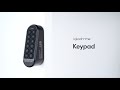
Igloohome Keypad - PIN Code Add-On Keypad for igloohome Smart Locks
The Igloohome Keypad (model EK1) is a PIN entry accessory that pairs with a compatible igloohome smart lock to enable keypad-based access without a smartphone. It has no lock mechanism of its own - it is always linked to a lock and works by sending a Bluetooth signal to that lock when a valid PIN code is entered. The Keypad is designed to sit outside the door, on a door stile, wall, or gate post, giving visitors, guests, and household members a simple way to enter without needing the igloohome app. It sits in our keypads for smart locks range.
The most common use is pairing the Keypad with the Igloohome Retrofit Lock. The Retrofit Lock attaches to the inside of a euro cylinder door and is excellent for Airbnb properties - but without the Keypad, guests arriving at the door have no exterior PIN entry point. They must either use the igloohome app on their phone (which requires Bluetooth range and a downloaded app) or use a physical key. Adding the Keypad eliminates this gap: guests receive an algoPIN code before check-in, arrive at the door, enter the PIN on the Keypad, and the Retrofit Lock releases the latch from the inside - no app, no physical key, no waiting.
algoPIN codes work offline - they are generated and validated on the connected lock itself. If your property's Wi-Fi or internet is unavailable, guest codes continue to work. The igloohome app manages all PIN code creation - one-time codes, permanent codes, recurring codes, and duration-based codes - and the Keypad delivers them to the lock via Bluetooth at the moment of entry. For Airbnb hosts already using Hospitable, Uplisting, RemoteLock, or other booking platforms integrated through iglooconnect, codes are generated and sent automatically at booking confirmation. See also our comparison of igloohome versus TTLock for Airbnb hosting and the full algoPIN explainer in Chapter 07.

Usually ships same day if ordered before 11am AEST (excludes weekends and Queensland public holidays).

The Keypad has no standalone function and does not contain a lock mechanism. It must be linked to a compatible igloohome lock (see the compatibility table below) before it can be used. Order a compatible lock alongside this Keypad if you do not already own one. The most common pairing at Terry's is the Keypad with the Igloohome Retrofit Lock; the Smart Mortice Lock V2, the Smart Mortice Lock V2 + Fingerprint and the Keybox 3 also take it.

The Retrofit Lock is one of the most popular igloohome products for Airbnb properties because it requires no drilling and no locksmith for fitting - but it works from the inside, and without a Keypad on the outside, guests need the igloohome app to unlock remotely or a physical key to open. The Keypad solves this: guests receive an algoPIN code before arrival, enter it on the Keypad at the door, and walk straight in - no app, no key handover, no site visit. For the complete guide to igloohome and Airbnb, see Using igloohome for Airbnb in Australia, the Airbnb Connect setup checklist, and Chapter 07 - Airbnb and Short-Stay Rentals in the Buyer's Guide.

The Keypad is IP66 certified (dustproof and protected against powerful water jets). Despite this rating, igloohome advises installing the Keypad under a sheltered area and avoiding direct exposure to wet weather conditions. Mounting under an eave, door frame overhang, or covered entry provides the best environment for long-term performance and battery life. See realistic smart lock battery expectations. For what IP ratings mean in practice, see Chapter 11 - IP Ratings.
 Key Features
- PIN entry point for compatible igloohome locks - guests and household members enter a PIN code and the paired lock unlocks automatically via Bluetooth.
- Supports all algoPIN code types: one-time, permanent, recurring, and duration-based codes created and managed in the igloohome app. See how algoPIN validates a code without internet.
- Links up to 5 igloohome locks and can unlock them simultaneously with a single PIN code - for example, one Keypad controlling both a front-door lock and a gate lock.
- Decoy PIN code: up to 8 random digits may be entered before the actual PIN code, so an observer cannot pick the real code out of the sequence or read it from wear patterns on the keys.
- Manual relock: press and hold the unlock button on the Keypad to trigger locking on the paired lock(s) without needing the igloohome app.
- PIN code activity logs are recorded and retrievable in the igloohome app (updated when the Keypad syncs with the app).
- Security Lockout: a configurable number of incorrect attempts (1 to 10) before the keypad disables itself, with an escalating alarm and lockout period on successive triggers.
- Volume adjustable from 0 (mute) to 5 (loudest) via the igloohome app.
- Dual mounting method: adhesive tape on the mounting plate for no-drill installations, or screw-anchored for permanent fixing. All hardware included.
- IP66 rated - dustproof and protected against powerful water jets. Manufacturer advises installation under shelter.
- Powered by 2 x AA alkaline batteries (included); up to 12 months battery life.
- Low battery alerts via audio tones and a pulsing red LED when the battery runs low - see the audio and LED indications table for what each tone means.
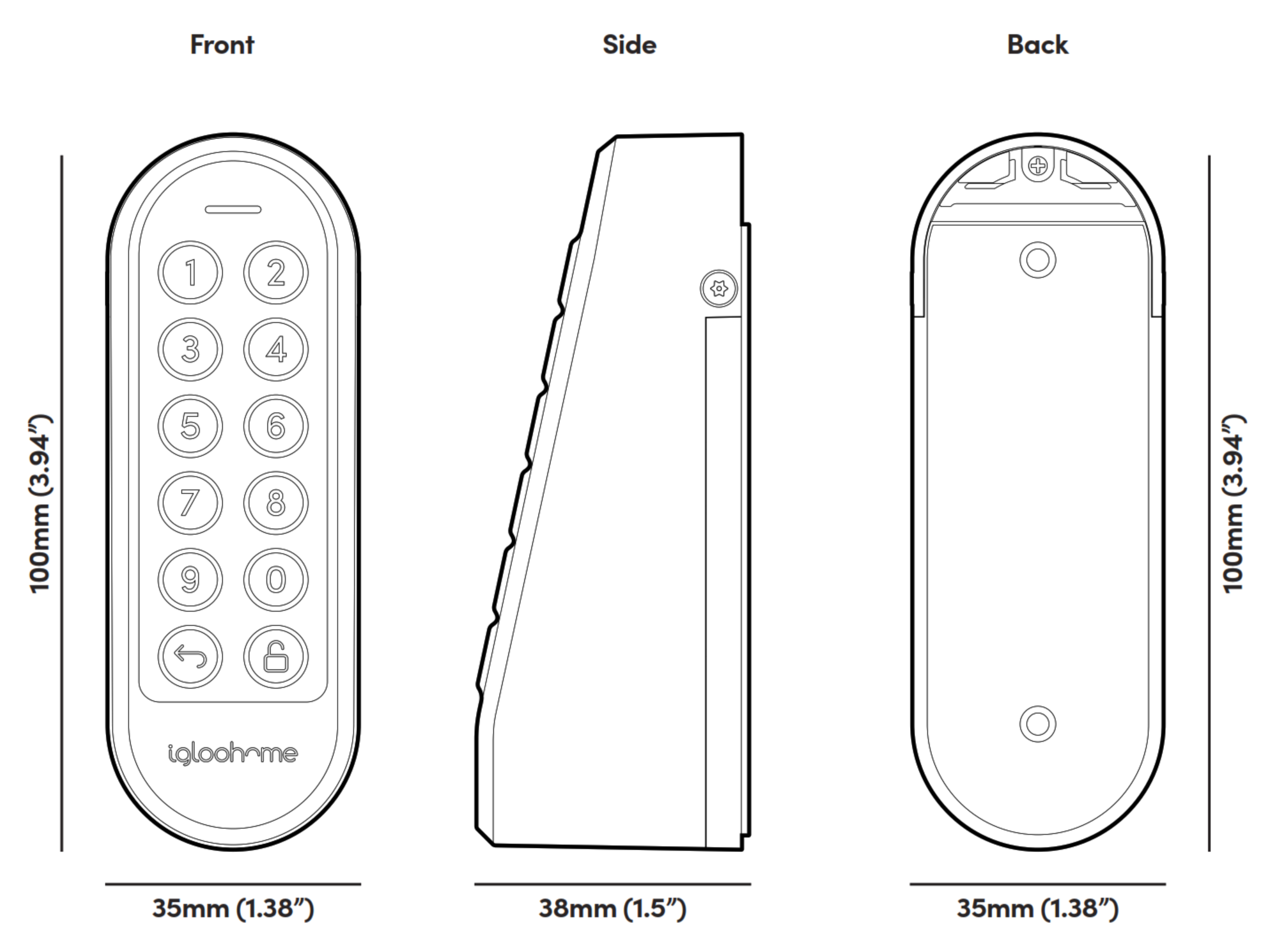
- Compact form factor: 35 x 100 x 38mm. Body materials: ABS, polycarbonate, silicone.
- Bluetooth 5.0 communication with the paired lock(s).
 Access Methods
The Keypad is a single-credential device: PIN code in, Bluetooth signal out to the paired lock. The greyed rows below are the credentials buyers most often ask about on a keypad accessory - they are listed so you can see at a glance what this unit does not do. Those credentials may still be available on the lock itself; check the host lock's own access method list.
 Fingerprint
 Fob / Card
 Mechanical Key
Manual p.16 states the Keypad's modes of access as entry by PIN code only, with no separate exit method - relocking is done by press-and-hold on the unlock button.
 Compatible Locks - igloohome Range at Gold Coast Smart Locks
One Keypad can be linked to up to five compatible igloohome locks and can trigger them with a single PIN code. It talks to each lock over Bluetooth 5.0, so it has to be mounted within Bluetooth range - and that range is different for each lock. The figures below are the maximum distances igloohome quotes for each model.
Ranges are the manufacturer's maximum figures in clear air. Walls, glass, aluminium framing and solid doors all cut them down, so pair and test the Keypad at the intended mounting position before you fix it permanently - see Chapter 12 - Installation and Troubleshooting. igloohome's own list also names several models we do not stock locally, and for the latest version of that list see igloohome's support portal. One note on padlocks: igloohome lists a "Padlock" as Keypad-compatible, but the Smart Bluetooth Padlock 2 we stock is a later model with its own built-in keypad, so it does not need this accessory - check with us before specifying the two together. All of these locks sit in our smart lock range.
 What's in the Box

- 1 x Igloohome Keypad (EK1)
- 1 x Mounting plate with adhesive tape
- 2 x AA alkaline batteries (pre-installed)
- 2 x Torx screws
- 1 x Torx screwdriver
- 1 x Mounting screws and anchors
- 1 x Battery cover screw

Batteries are included. Use only Duracell, Energizer, or Panasonic alkaline AA batteries when replacing. Do not use Heavy Duty, Eveready, GP, or rechargeable batteries - igloohome specifically advises against them, and they shorten both performance and keypad lifespan.
 Suitable Uses
- Airbnb and short-stay properties using the Retrofit Lock - the Keypad provides exterior PIN entry so guests can check in without the igloohome app, without a physical key, and without the host being present. Codes are auto-generated and expire at checkout via iglooconnect integrations with Hospitable, Uplisting, RemoteLock, and similar platforms. See the igloohome Retrofit Lock case study and Chapter 07 on property management systems.
- Residential homes where occupants - including children, elderly family members, or regular visitors - prefer PIN entry over carrying a physical key or using a phone app. This is the standard front door application.
- Rental properties, serviced apartments, and managed buildings where a keypad at the entry point gives tenants and authorised visitors a simple and consistent access method. For the multi-property picture, see Chapter 07 on multi-property management.
- Additions to existing igloohome Smart Mortice Lock installations where a wall-mounted keypad is preferred over using the lock's own keypad - for example gate-side mounting at a distance from the door. Keep inside the 10m Bluetooth range for that lock.
- Multi-access configurations where a single property needs keypad entry controlling more than one lock - one Keypad can link up to five igloohome locks and unlock them with a single PIN.
- Sheltered gate and outbuilding entries where an overhang or recess keeps direct rain off the unit - the IP66 rating covers dust and water jets, but igloohome still asks for shelter.
 Available Finish Options
 White
White
(This Product)
STK Igloo Keypad
Finish selection does not affect functionality, compliance, or performance.
 Full Specifications
Security Lockout and Decoy PIN
Two features protect the Keypad against someone standing at the door guessing codes or watching one being typed. Both are worth setting up on a rental or short-stay property.
Decoy PIN. Up to 8 random digits can be entered before the real PIN code. Someone watching over a guest's shoulder sees a long string with no obvious start point, and worn keys no longer give the code away. Nothing needs to be enabled - just type the extra digits before the real code.
Security Lockout. Set the number of incorrect attempts allowed - anywhere from 1 to 10 - in the igloohome app. Once that threshold is passed the Keypad sounds an alarm and disables itself, and both periods get longer each time it is triggered again:
Set the attempt threshold with some room in it. A guest arriving late at night with the code on their phone will sometimes miskey once or twice, and a threshold of one or two attempts turns an honest mistake into a ten-minute wait on the doorstep. For the wider security picture, see Chapter 13 - Smart Lock FAQ, security section.
 Audio and LED Indications
The Keypad has no screen, so every state it reports comes through a tone pattern and an LED colour. This is the full list from the manual - worth keeping to hand, because "what do the beeps mean" is the most common question we get on these units after installation.
Two sets of two short beeps with a pulsing red LED means you have roughly a fifth of the battery left - order replacements then rather than waiting for the four-set pattern. Volume is set 0 to 5 in the igloohome app, and at 0 the Keypad is silent, so the LED becomes your only feedback.
 Dimensions
Battery and Power
- Powered by 2 x AA alkaline batteries, included in the box and pre-installed.
- Battery life is up to 12 months under typical usage. Life is shorter in cold conditions - the battery operating range is -10°C to 50°C, narrower than the Keypad's overall operating range of -20°C to 50°C, so the batteries are the limiting factor in cold weather, not the electronics. See realistic smart lock battery expectations and Chapter 13 - power and battery questions.
- Use only Duracell, Energizer, or Panasonic alkaline AA batteries when replacing. Do not use Heavy Duty, Eveready, GP, or rechargeable batteries - igloohome names these specifically, and they cut both performance and keypad lifespan.
- Low battery alerts: at roughly 20% remaining the Keypad gives two sets of two short beeps with a pulsing red LED; below 10% that becomes four sets of two short beeps. The full list is in the audio and LED indications table.
- There is no emergency power port on the Keypad. If the Keypad batteries fail completely, PIN access via the Keypad is unavailable. The paired lock may still be accessible via the igloohome app if the lock itself has power - which is one reason to keep the host lock's own batteries fresh as well.
 Frequently Asked Questions
Yes - that is its primary purpose. Guests receive a time-limited algoPIN code before check-in, arrive at the door, enter the PIN on the Keypad, and the paired lock releases. No app download, no Bluetooth pairing, and no internet connection is needed on the guest's end. The code validates offline on the lock. When the Keypad is used with the Retrofit Lock, the latch releases from inside and the door opens. This is the same algoPIN system used across all igloohome locks - the Keypad is simply the exterior entry point that makes it work on the outside of a door where the lock itself is fitted internally. See Using igloohome for Airbnb in Australia and Chapter 07 of the Buyer's Guide for the complete workflow.
Yes. According to igloohome's specifications, one Keypad can be linked to up to five igloohome locks and can unlock them simultaneously with a single PIN code. For example, a single Keypad could control both a front-door lock and a side-gate lock with the same code. Each lock must be within Bluetooth range of the Keypad - and that range differs by model, from under 30m on the Retrofit Lock down to under 8m on the Keybox 3, so the shortest-range lock in the group sets your mounting position. The full list is in the compatible locks table.

No, not necessarily. The mounting plate has adhesive tape on the back for no-drill installations on smooth surfaces. For permanent fixing on masonry or textured surfaces, screw anchors and mounting screws are included. igloohome recommends pairing and testing the Keypad at the intended location before committing to permanent mounting, to confirm it is within Bluetooth range of the lock. See the Installation and Troubleshooting chapter in the Buyer's Guide, or book us for the job through Advice and Installation.
If the Keypad batteries are fully depleted, PIN entry via the Keypad is unavailable. The paired lock can still be operated via the igloohome app using Bluetooth, provided the lock itself has power. Unlike the Smart Bluetooth Padlock 2, the Keypad has no USB-C jumpstart port - there is no way to temporarily power it from a power bank. Watch for the low battery pattern in the audio and LED table and replace before it fails. Keep spare Duracell, Energizer, or Panasonic AA batteries on site. More on battery behaviour in Chapter 13.

The Retrofit Lock fits on the inside face of the door and has no exterior keypad of its own. Without the Keypad, a guest arriving at the door cannot enter a PIN code from outside - they must either open the igloohome app on their phone (which requires them to download the app and be within Bluetooth range) or use a physical key. The Keypad adds an exterior PIN entry point that gives guests simple one-step access with just a code. For Airbnb properties, this removes the requirement for guests to have the app at all. See the Retrofit Lock case study for a real-world example of this pairing in use, and our guide on key storage options for the alternative.
 Additional Information
Host fits the Retrofit Lock inside the door and mounts the Keypad on the exterior stile, then connects iglooconnect to their booking platform (Hospitable, Uplisting, RemoteLock, Hosthub, SabeeApp, or Cloudbeds). At booking confirmation a duration-based algoPIN code is generated and delivered to the guest 1 to 48 hours before check-in. The guest arrives, enters the PIN on the Keypad, the Retrofit Lock releases the latch, the door opens, and the code expires at checkout automatically - no key handover, no rekeying between guests, no site visit by the host. The system works even when your property's Wi-Fi is down, because algoPIN validates offline. See the Airbnb Connect setup checklist, do you really need Wi-Fi for Airbnb? and what happens when Wi-Fi drops mid-stay.
igloohome's installation guidance explicitly recommends pairing the Keypad with the lock and testing it at the intended mounting location before permanent installation. Bluetooth range through glass, aluminium frames, and internal walls varies, and the quoted maximums differ sharply between locks - under 30m for the Retrofit Lock, under 8m for the Keybox 3. A mounting position that looks ideal may fall outside reliable range. Run a full pair-and-test sequence at the planned location first, confirm the Keypad unlocks the lock every time, then proceed to adhesive or screw-mount. A video installation guide is available at igloohome's support site and via the QR code in the included manual. See also Chapter 12 - Installation and Troubleshooting and common DIY installation mistakes.
IP66 certifies the Keypad as dustproof and resistant to powerful directed water jets. However, igloohome's own specification sheet advises installing the Keypad under sheltered areas and avoiding direct exposure to wet weather. In Queensland conditions, this means mounting under an eave, inside a covered entry, or in a recess where rain does not directly hit the keypad. Exposed installations - such as gate posts with no overhang - may expose the Keypad to sustained rain despite the IP66 rating. For gate-post or fence-mounted applications, consider whether the location provides adequate shelter before proceeding, and look at our gate locks rated for rain exposure if it does not. For a discussion of IP ratings, see Chapter 11 - Australian Smart Lock Standards.

PIN code entries made at the Keypad are logged and accessible in the igloohome app, but only after a Bluetooth sync between the Keypad and the app. The Keypad stores logs locally and uploads them when the app is brought within Bluetooth range and synced. For Airbnb hosts who want near real-time access to activity logs and remote notifications, adding the igloohome Wi-Fi Bridge to the installation provides this capability alongside the Keypad's PIN entry function - the Bridge is in our modules and Wi-Fi gateways range. See Chapter 08 - Smart Lock Gateway Comparison and what changes when you add the Bridge.
Both features are worth configuring on the day you install, not later. Decoy PIN needs nothing enabled - up to 8 random digits typed before the real code defeat both shoulder-surfing and key wear patterns, and it costs a guest two seconds to use. Security Lockout does need setting in the app: pick a threshold between 1 and 10 incorrect attempts, keeping in mind that a guest arriving at night with the code on their phone will sometimes miskey. The alarm and lockout both escalate on repeat triggers, from 30 seconds and 1 minute up to 90 seconds and 10 minutes - the full ladder is in Security Lockout and Decoy PIN. See Chapter 13 - security questions for the wider context.
 Warranty
1-year manufacturer warranty against defects in materials, design and workmanship of hardware components. Proof of purchase, a video clip of the defect, and proof of ownership are required for all claims. Software, consumables, cosmetic damage and normal wear and tear are not covered. Returns & Warranty | igloohome Warranty Policy
 Download PDF Resources
The 23-page manual for this Keypad (Model EK1) - what's included, full specifications, keypad anatomy, features, app onboarding, the 8-step installation sequence, modes of access, Security Lockout and Decoy PIN detail, the compatible locks table with Bluetooth ranges, and the full audio and LED indications list.
Platform-wide igloohome procedure covering connecting your Airbnb account, linking a listing and setting check-in and check-out times, when guest PINs are sent (1 to 48 hours before check-in, configurable), how changing times affects an already-sent PIN, and the disconnect procedure.
The 47-page manual for the Retrofit Lock (Model OE1), the host lock this Keypad is most often paired with - installation requirements and cylinder dimensions, key and thumbturn installation, door sensor fitting, lock calibration, features, and app onboarding.
A 7-page compatibility checklist for the Retrofit Lock, the Keypad's primary host - euro cylinder requirement, minimum 32mm cylinder backset, cylinder position relative to the handle, and the key and thumbturn dimension limits. Worth checking before ordering the pair.
The 23-page guide for the Keybox 3, another host this Keypad can be linked to - specifications, PIN and Bluetooth access, shackle and wall-mount installation, and the app onboarding sequence.
Igloohome Keypad (EK1) - FAQ, Setup and Owner's Guide
Everything we get asked about the igloohome Keypad, from what it will and will not pair with through to what the beeps mean at two in the morning. For general smart lock questions that are not specific to this unit, see the Smart Lock FAQ in Chapter 13, and for the whole buying picture start at the Smart Lock Quick Start Guide.
What the Keypad Is and What It Does
No. It is a PIN entry pad and nothing else - there is no bolt, no latch and no cylinder inside it. When someone types a valid code, the Keypad sends an unlock instruction over Bluetooth 5.0 to a paired igloohome lock, and that lock does the actual work. On its own, mounted on a door, it will not secure anything. You need a compatible igloohome lock as well - most often the Retrofit Lock.
EK1. It is the only keypad accessory igloohome currently makes for its lock range, so there is no variant to choose between. Our stock code is STK Igloo Keypad. If you are cross-referencing against igloohome's own documentation, the manual is titled for the EK1 and is downloadable from this page.
Yes, by press-and-hold. Holding the unlock button sends a lock instruction to the paired lock, so you can secure the door from outside without opening the app. igloohome calls this Manual Relock. The manual lists no separate exit method beyond it - the Keypad's official modes of access are entry by PIN code and nothing else, with relocking handled by that press-and-hold. If the host lock has its own auto-lock function, that continues to work independently of the Keypad.
Compatibility and Pairing
Of the igloohome range we stock, the Keypad pairs with the Retrofit Lock, the Smart Mortice Lock V2, the Smart Mortice Lock V2 + Fingerprint and the Keybox 3. The Smart Deadbolt Go came out after this Keypad's manual was written and is not on its compatibility list, so confirm with us or with igloohome before ordering the two together. Full detail, including the Bluetooth range for each, is in the compatible locks table.

It depends entirely on which lock. igloohome quotes under 30m for the Retrofit Lock, under 10m for both Smart Mortice Lock V2 models, and under 8m for the Keybox 3. Those are clear-air maximums. Every wall, glass panel and aluminium frame between the two cuts into them, and an 8m figure on paper can become two or three metres through a masonry wall. If you are linking several locks to one Keypad, the shortest-range lock in the group dictates where the Keypad can go. Always pair and test at the intended position before you fix anything - see Chapter 12 - Installation and Troubleshooting.

Yes - up to five igloohome locks can be linked to a single Keypad, and one PIN code triggers all of them that are in Bluetooth range at the time. A practical example is a front door and a side gate that guests should be able to open with the same code. Note that "in range" is doing real work in that sentence: a lock that is out of range simply will not respond, so a five-lock setup only behaves as one unit if all five are genuinely within reach of where the Keypad is mounted.
No. The Smart Bluetooth Padlock 2 has its own keypad built into the body, so there is nothing for this accessory to add. igloohome's compatibility list does name a "Padlock" as Keypad-compatible, but that refers to an earlier model in their range rather than the Padlock 2 we stock - check with us before specifying the two together. Padlocks are in our smart padlock range.
The Keypad and the Wi-Fi Bridge (EB1) both attach to the same igloohome account and the same locks, but they do different jobs and do not talk to each other. The Keypad gives people a way in from outside; the Bridge gives you remote unlocking, remote code management and near real-time notifications from wherever you are. Plenty of Airbnb setups run both. The Bridge is 2.4GHz only, which trips people up - see Chapter 08 - Gateway Comparison and how far the Bridge can sit from each lock.
Codes, Access and the App
Four, all created in the igloohome app: one-time codes that die after a single use, permanent codes for household members, recurring codes for a cleaner who comes every Tuesday, and duration codes that are live between a set start and end - the type most Airbnb hosts use. There is also a Master PIN, which is the owner's own code. All of them are algoPIN codes, meaning the lock works out whether the code is valid using its own internal clock and algorithm rather than checking anything online. Read how algoPIN validates a code without internet for the mechanism, and Chapter 03 on PIN and keypad access for how it compares with other credential types.

The owner does; the person walking up to the door does not. Codes are created, edited and revoked in the igloohome app, which is free on iOS and Android
 . Once a code exists, anyone can type it on the Keypad with no app, no account and no phone at all. That gap between owner and guest is exactly why the Keypad exists - it is what makes an igloohome lock usable by someone who has never heard of igloohome. For a comparison of the app ecosystems, see Chapter 15 - Smart Lock App Platforms.
Yes, but not instantly. The Keypad records PIN entries locally and hands them to the app the next time the two are in Bluetooth range and you open it. That is fine if you visit the property; it is no use if you are managing it from another suburb. Adding the Wi-Fi Bridge closes that gap by pulling logs and sending notifications over the internet. See what changes when you add the Bridge.
Yes. Volume runs from 0 to 5 in the igloohome app, and 0 is genuinely silent. Worth knowing before you set it: at volume 0 the LED becomes your only confirmation that a code was accepted, and the Security Lockout alarm goes quiet as well, which removes a useful deterrent. Most people settle around 2 or 3 - audible enough at the door, not loud enough to wake the house at a 2am check-in.
Security
Not if you use the Decoy PIN. Up to 8 random digits can be typed before the real code, so the keys wear evenly and anyone watching over a shoulder sees a long string with no obvious beginning. Nothing has to be switched on - the feature is always available, you simply type extra digits first. It is the single most useful habit to teach guests and cleaners at a short-stay property. See Security Lockout and Decoy PIN on this page.

Security Lockout. You choose how many wrong attempts are allowed, anywhere from 1 to 10, and once that is passed the Keypad sounds an alarm and refuses further input. Both periods escalate if it keeps happening: 30 seconds of alarm and a 1 minute lockout the first time, 60 seconds and 5 minutes the second, then 90 seconds and 10 minutes for every trigger after that. Pick a threshold with a little slack in it - a guest arriving at night reading a code off a phone screen will sometimes fat-finger it, and a threshold of one turns that into a ten-minute wait outside. The full ladder is in Security Lockout and Decoy PIN.

Not in the way people expect. The Keypad holds no lock mechanism, so prising it off the wall gains an intruder nothing - there is no bolt behind it and no wiring into the door. What it does hold is a Bluetooth radio that has to be paired to your account before it will talk to anything. The genuine risks with any keypad are behavioural rather than physical: a code shared too widely, a code never changed between guests, or a code read off worn keys. Decoy PIN, one-time and duration codes, and a sensible Security Lockout threshold deal with all three. For the broader discussion see Chapter 13 - security and Chapter 11 - cyber security.
Installation and Mounting
For most doors, yes. The mounting plate carries adhesive tape for a no-drill fix on a smooth surface, and screws and wall anchors are in the box for masonry or textured surfaces. A Torx screwdriver is included too. The part people skip - and the part that causes the callbacks - is pairing and testing the unit at the exact spot it will live before the tape goes down or the holes get drilled. If the door is awkward, or you would rather it was done once and done right, we install these across the Gold Coast: see Advice and Installation.
The Keypad body is 35mm wide, 100mm tall and projects 38mm from the surface, which fits the great majority of aluminium and timber stiles without overhanging the glazing bead. Measure the flat area you have before ordering if the stile is unusually slim - Chapter 02 covers how to measure stile width. Remember the Keypad does not have to go on the door at all: a wall, a post or the frame beside the door all work, as long as you stay inside the paired lock's Bluetooth range.
It is IP66 rated, which means dust-tight and able to take powerful directed water jets, and yet igloohome still asks for it to be mounted under shelter and kept out of direct wet weather. Both things are true: the seal is good, but a unit taking driven Queensland rain day after day will not last as well as one under an eave. In practice, mount it under an overhang, in a recessed entry, or on a covered porch. An open gate post with nothing above it is the installation we would push back on. See Chapter 11 on what IP ratings actually mean, and our gate locks built for rain exposure if shelter is not available.

The FCC compliance section of the manual asks for the Keypad to be installed and operated at least 20cm from the body. This is standard radio-equipment wording and no practical constraint on a wall-mounted unit - you reach out to type a code and step back. It is listed here because it appears in the specifications and occasionally comes up in commercial or strata specification documents.
Power and Batteries
Up to twelve months on the two AA alkalines supplied, under normal household use. A short-stay property with heavy daily traffic will get less; a holiday house used a few weekends a year will get more. Cold shortens it noticeably - the batteries are rated from -10°C, a narrower window than the Keypad electronics themselves at -20°C, so in a cold climate the batteries give out first. See the realities of electronic door lock battery life for what to expect generally.
Duracell, Energizer or Panasonic alkaline. igloohome names those three, and specifically tells you not to use Heavy Duty, Eveready, GP or rechargeable cells. This is not brand preference for its own sake - rechargeables sit at a lower nominal voltage and drop off a cliff rather than tapering, so the Keypad gets little warning before it dies, and cheaper alkalines are more prone to leaking in a sealed outdoor housing. Keep a spare pair at the property if it is a rental.
The Keypad stops working and the PIN will not open anything, because the Keypad is the thing sending the signal. The lock itself is unaffected - if it has its own power it can still be opened by the igloohome app over Bluetooth, or by whatever backup the lock provides. There is no jumpstart port on the Keypad, so unlike the Smart Bluetooth Padlock 2 you cannot revive it from a power bank. This is the strongest argument for acting on the first low-battery warning rather than the second - see the audio and LED table for both patterns.
Sounds, Lights and Troubleshooting
Four ascending tones with two green flashes is a successful unlock. One long beep with a green flash is a lock. Four short beeps with two red flashes is a wrong PIN. A low-to-high siren is Security Lockout, and two long beeps is the lockout ending. Two sets of two short beeps with a pulsing red LED means the battery is under 20%; four sets means under 10%. Three fast ascending tones means the Keypad has paired successfully, and three slow descending tones means it has been hard reset. The complete table is on this page under Audio and LED Indications.
If the Keypad gives you the four ascending tones and green flashes, it has accepted the code and sent the instruction - so the problem is between the Keypad and the lock, not the code. Nine times out of ten that is range: the lock is further away than it seemed, or something was added between the two after installation. Take the Keypad off its mount if you can, hold it right beside the lock and try again. If it works there, the mounting position is the fault. If it does not, re-pair the two in the app. Check the paired lock's own batteries as well - a lock low on power can hear the instruction and not have the torque to act on it. Chapter 12 covers the general sequence, and this post covers the three installation mistakes that cause most of these calls.
Check the volume setting first - at 0 it is meant to be silent, and if the LED is also not lighting then the batteries are the likely cause. Replace them with fresh Duracell, Energizer or Panasonic alkalines and try again before assuming a fault. If it still does nothing, the unit is within the one-year hardware warranty; igloohome asks for proof of purchase, proof of ownership and a short video of the fault, so film it before you take it off the wall.
Airbnb and Short-Stay Hosting
Yes, and this is the whole point of algoPIN. The code is validated by the lock itself using its own clock and algorithm - nothing is checked against a server at the moment of entry. Wi-Fi at the property can be down, the router can be unplugged, the NBN can be out for the street, and a guest with a valid code still gets in. What you lose without internet is the remote side: you cannot issue a brand-new code on the spot, and you will not get live notifications unless a Wi-Fi Bridge is fitted and online. See the Wi-Fi drops mid-stay scenario and igloohome for Airbnb without Wi-Fi.
They can be. Connect your Airbnb account in the igloohome app, link the listing, and a duration code covering the stay is generated and emailed to the guest between 1 and 48 hours before check-in - you choose the window. The code dies at checkout on its own. The same works through iglooconnect with Hospitable, Uplisting, RemoteLock, Hosthub, SabeeApp and Cloudbeds. The step-by-step is in the Connect with Airbnb procedure attached to this page, and in our Airbnb Connect setup checklist. Note that changing check-in times in the igloohome app does not update the Airbnb listing itself - you have to change both.
Broadly: igloohome if the property's internet is unreliable or you would rather not depend on it, because codes validate offline; a TTLock-based brand such as McGrath if you are running several properties and want everything driven through gateways and a property management system. Neither is simply better. We have set the argument out properly in Chapter 07 - igloohome versus TTLock and in this side-by-side comparison.
If the front door already has a euro cylinder, the Retrofit Lock plus this Keypad is usually it - no drilling, no change to the outside of the door, existing keys still work, and the whole thing comes off again when you sell or the lease ends. If you only need to hand over a physical key occasionally rather than give full keyless entry, the Keybox 3 is cheaper again - see the simplest option for occasional hosts. Browse the whole key storage range if that is the direction you go.
Related Products, Guides and Chapters
Host locks this Keypad pairs with: Igloohome Retrofit Lock · Smart Mortice Lock V2 · Smart Mortice Lock V2 + Fingerprint · Keybox 3 · Smart Deadbolt Go (confirm compatibility first)
Rest of the igloohome range: All igloohome products · Wi-Fi Bridge (EB1) · Smart Bluetooth Padlock 2
Browse by category: Keypads for smart locks · PIN code smart locks · Bluetooth smart locks · Modules and Wi-Fi gateways · All smart lock accessories · Key storage · All smart locks
Buyer's Guide chapters: Ch 02 Measuring Your Door · Ch 03 Access Methods · Ch 04 Door Type Compatibility · Ch 07 Airbnb and Short-Stay · Ch 08 Gateway Comparison · Ch 10 igloohome Brand Profile · Ch 11 Standards and IP Ratings · Ch 12 Installation and Troubleshooting · Ch 13 Smart Lock FAQ · Ch 15 App Platforms
Helpful blog reading: Using igloohome for Airbnb in Australia - algoPIN explained · Airbnb smart locks - do you really need Wi-Fi? · igloohome Retrofit Lock case study · The realities of electronic door locks · Three common DIY installation mistakes · Mechanical key override and key storage
Start here if you are still choosing: Smart Lock Quick Start Guide · Advice and Installation
What's in the Box - Igloohome Keypad (EK1)
- 1 x Igloohome Keypad (EK1)
- 1 x Mounting plate with adhesive tape
- 2 x AA alkaline batteries (pre-installed)
- 2 x Torx screws
- 1 x Torx screwdriver
- 1 x Mounting screws and anchors
- 1 x Battery cover screw
Batteries are included and come pre-installed. When replacing, use only Duracell, Energizer, or Panasonic alkaline AA. Do not use Heavy Duty, Eveready, GP, or rechargeable batteries - igloohome names these specifically. See Battery and Power for the low-battery warning patterns.
The Keypad is an accessory and contains no lock mechanism. A compatible igloohome lock is required and is sold separately - most commonly the Retrofit Lock, and also the Smart Mortice Lock V2, the Smart Mortice Lock V2 + Fingerprint or the Keybox 3. The full list with Bluetooth ranges is in the compatible locks table.
Igloohome Keypad - Real Installations by Terry's Locksmiths
Keypads we have fitted around the Gold Coast. Note in each case how the unit sits on the door stile within easy Bluetooth reach of the lock - the positioning decision covered in the compatible locks table. If you would like us to do yours, see Advice and Installation.


Igloohome Keypad - Dimensions
Igloohome Keypad - Product Brochure


PDF Files - STK Igloo Keypad (EK1)
The 23-page manual for this Keypad (Model EK1) - what's included, full specifications, keypad anatomy, features, app onboarding, the 8-step installation sequence, modes of access, Security Lockout and Decoy PIN detail, the compatible locks table with Bluetooth ranges, and the full audio and LED indications list.
Platform-wide igloohome procedure covering connecting your Airbnb account, linking a listing and setting check-in and check-out times, when guest PINs are sent (1 to 48 hours before check-in, configurable), how changing times affects an already-sent PIN, and the disconnect procedure.
The 47-page manual for the Retrofit Lock (Model OE1), the host lock this Keypad is most often paired with - installation requirements and cylinder dimensions, key and thumbturn installation, door sensor fitting, lock calibration, features, and app onboarding.
A 7-page compatibility checklist for the Retrofit Lock, the Keypad's primary host - euro cylinder requirement, minimum 32mm cylinder backset, cylinder position relative to the handle, and the key and thumbturn dimension limits. Worth checking before ordering the pair.
The 23-page guide for the Keybox 3, another host this Keypad can be linked to - specifications, PIN and Bluetooth access, shackle and wall-mount installation, and the app onboarding sequence.
igloohome Warranty
Warranty Summary
How to Make a Claim
- Gather the required documents: your original invoice, a video clip clearly showing the defect, and proof of ownership.
- Contact Terry's Tradies Pty Ltd and its associated websites, trading names, and subsidiaries - your authorised igloohome reseller - using the Returns & Warranty page above. Warranty claims must be lodged from the country of original purchase.
- igloohome may conduct diagnostic tests to determine the nature and cause of the defect. Their assessment is final.
- If the claim is approved within the warranty period, igloohome will repair the product, replace it with the same or closest available product, or refund the amount paid - at igloohome's discretion. Repaired or replaced products continue to be covered for the remainder of the original warranty period.
- Any replaced or fully refunded product becomes the property of igloocompany and must be returned in accordance with their returns policy. Delete all personal data from the device before returning it.
 Exclusions
This warranty does not cover, and will be voided by, any of the following:
- Damage from impact, shock, accident, fire, flood, earthquake, lightning or other acts of nature
- Exposure to sand, extreme temperatures or environmental conditions outside the product's specifications
- Battery corrosion or chemical corrosion
- Abuse, mishandling, improper installation, improper operation, or failure to follow igloohome's care and maintenance recommendations
- Use of incorrect electrical supply or voltage
- Damage caused by software, apps, accessories or peripheral equipment not supplied or approved by igloohome
- Unauthorised alteration, modification, adjustment or tampering
- Replacement of parts with components not supplied or approved by igloohome
- Missing accessories or external parts, unless reported within 3 calendar days of original retail purchase
- Cosmetic damage to the outer surface or finish (e.g. scratches, dents, stains)
- Deterioration due to normal wear and tear, including corrosion or rust
- Damage occurring during transit, delivery, packing, unpacking, or installation not carried out by an igloohome-authorised installer
- Non-failure problems such as reception/incompatibility issues, software updates, password resets, routine servicing, battery changes, cleaning or product demonstrations
- Software and consumable items, even if packaged or sold with the product
- Minor imperfections within design specifications that do not materially affect functionality
Important Notes
Our products come with guarantees that cannot be excluded under the Australian Consumer Law. You are entitled to a replacement or refund for a major failure and compensation for any other reasonably foreseeable loss or damage. You are also entitled to have the goods repaired or replaced if they fail to be of acceptable quality and the failure does not amount to a major failure. Nothing in this manufacturer warranty limits or excludes your rights under the ACL.
igloohome offers an Extended Product Warranty (an additional 24 months) for products purchased and installed in Singapore only. This extended warranty is not available to customers in Australia.
igloohome requires warranty claims to be made in the country where the product was originally purchased. Claims for products purchased in Australia must be lodged through Terry's Tradies Pty Ltd and its associated websites, trading names, and subsidiaries - not through igloohome's Singapore or US offices.

Confused? Overwhelmed? We get it.
Choosing the right smart lock can be genuinely tricky - door types, backsets, app platforms, compatibility with your existing hardware... there is a lot to consider. We have decades of experience fitting locks of all types, including smart locks, and we are happy to help.
Our expert recommendation service is free. Upload a few photos of your door and describe what you need, and one of our qualified locksmiths will give you a personalised recommendation.
Get Your Free Recommendation →How it works - three easy steps:
1. Upload photos
A few clear shots of your door, lock and frame - inside and out.
2. We assess
Our locksmith reviews your setup and requirements - door type, weather exposure, how you want to use it.
3. You get a recommendation
A personalised recommendation tailored to your door, budget and needs. No pressure, no upsell.
Also useful while you are deciding: