

FORGE GY04 Double-Sided Smart Deadbolt Rim Lock - Gates, TUYA
At A Glance
 At A Glance
 DISPATCHUsually Ships in 24 Hours

 Fingerprint
(Both Sides)
 PIN Code
 RFID Card
 Forge Smart (Tuya) App
(Wi-Fi)
 Remote Unlock
(On Request)
 Mechanical Key
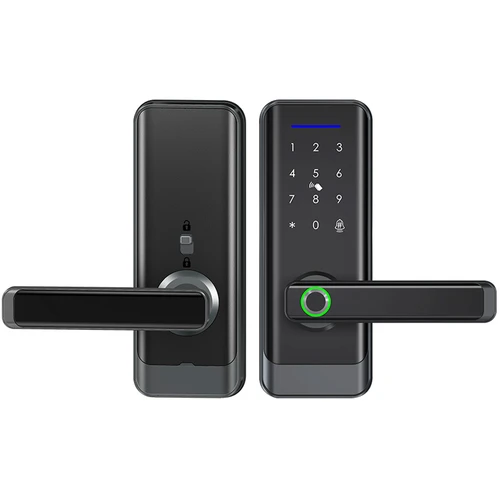
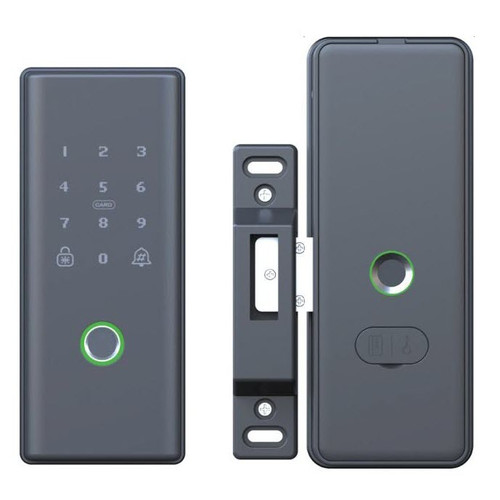
The FORGE GY04 Double-Sided Smart Deadbolt Rim Lock (FESMTLKGY04BA) is a surface-mounted rim lock for garden and side gates, with a fingerprint reader on both sides: the outside panel takes fingerprints, PIN codes and cards, and the inside panel a fingerprint or the key - so the gate cannot be opened from either side without one.
It runs on the Forge Smart (Tuya) app with Wi-Fi built in (2.4 GHz) - no gateway - for temporary passcodes and entry logs. A motorised dead latch locks it, it suits gates 35-60 mm thick with a 30 mm backset, and it works with exit buttons. It runs on 4 x AA batteries for up to 210 days, with a USB backup port. The inside panel needs a weather shield or veranda.
For an IP-rated gate lock with a mortice, see the FORGE H100; for an automatic rim lock for security doors, the FORGE double-sided automatic rim lock. Made in China for FORGE, an Australian brand based in Ringwood, Victoria. Backed by a 2-year manufacturer warranty.
Usually ships in 24 hours.

Owned by FORGE Electrical (Australia) · Manufactured in China. Our independent FORGE brand profile sets out how the range compares with the other brands we stock.
Access Methods
Double-sided means the inside needs a fingerprint or the key too - plan an exit button or a key where people must get out quickly. Until an administrator is registered, any fingerprint, code or card opens the lock (OEM sheet).

 Forge Smart (Tuya) App

Set the GY04 up in the Forge Smart (Tuya) app, for iOS and Android . Register an administrator on the outside panel first - press 1 for administrator settings, then 1 again, and enter a fingerprint (four presses), a 6-8 digit password twice followed by #, or a card (FORGE setting note). The GY04 connects to your phone over 2.4 GHz Wi-Fi.
Wi-Fi is built into the GY04, so there is no gateway to buy for remote access. Remote unlock works on request: someone at the gate asks to come in and you approve it in the app. Forge Smart (Tuya) locks do not unlock on demand from off-site, have no scheduled passage mode in the app and no Alexa or Google, and have no API. Online and offline passwords, entry records, notifications and Tuya automations work from the app - see the Forge Smart (Tuya) platform in Chapter 15. Temporary passcodes for visitors and the entry log - who came in and when - are the GY04's main app features.
Which platform suits you is set out in our TTLock vs Tuya comparison and which smart lock platform is right for you. For on-demand remote unlock on a gate, look at the TTLock versions of the H1 or H60 gate locks with a gateway.
 Key Features
- Double-sided lock for garden and side gates - your fingerprint or the physical key is needed on both sides (what double-sided means on a gate).
- Surface-mounted rim lock design that adapts to a wide range of gates - a 30 mm backset and a 60 mm minimum lock stile.
- Motorised dead latch for effortless locking.
- Fingerprint on both panels, PIN code and card outside, and a key on the inside panel.
- Passcode privacy - add random digits before or after your code; voice prompts and a low-battery warning.
- Wi-Fi built in (2.4 GHz) on Forge Smart (Tuya) - temporary passcodes and entry logs in the app, no gateway.
- Works with exit buttons, so people can leave without a credential where you wire one in.
- Tempered glass touch panels with a matt black aluminium alloy finish.
- 4 x AA batteries for up to 210 days, with a USB backup power port for a power bank - what happens when the battery dies.
- For external gates - one of our app-enabled smart locks.
 What's in the Box
- Outside panel (keypad, card area and fingerprint reader)
- Inside panel (fingerprint reader, latch and keyhole)
- Mounting plate and fixing screws
- Mechanical keys
- User sheet and setting note
Batteries (4 x AA) are not included.
 Suitable Uses
- Garden gates and side gates where both sides need a credential (external gate smart locks).
- Gates 35-60 mm thick with a lock stile of at least 60 mm, or a flat panel.
- Entrances wired for an exit button - the GY04 works with exit buttons.
- Homes that want app passcodes and entry logs on a gate without buying a gateway.

- A gate where the inside panel takes the weather - a weather shield or veranda is required for the internal panel.
- A gate people must be able to leave without a fingerprint, key or exit button.
- Gates thinner than 35 mm or thicker than 60 mm, or a lock stile under 60 mm.
- 5 GHz-only Wi-Fi - the GY04 needs a 2.4 GHz network.
- Sites that need on-demand remote unlock or scheduled passage mode - choose a TTLock model with a gateway.

 Door and Gate Fit
The will-it-fit figures for the GY04 are below - they tell you whether it can replace your existing lock. The backset is fixed at 30 mm - there is no backset choice. How to measure backset.

- Door thickness - the most common in Australia is 35 mm; some doors and gates are 40 mm or more (measuring door thickness).
- Lock stile - the distance from the edge of the gate to any glass, bars or inlays; ignore it on a flat panel (stile width).
- Faceplate size - the size of the panels on the door surface. It is much easier to replace a smaller faceplate with a larger one, so check what your old lock leaves uncovered.
- Backset - the distance from the keyhole to the edge of the door. The most common in Australia is 60 mm; the GY04's is 30 mm.
- Not sure? Send us photos of both sides of the gate (helpful photo examples) and we will help you find the right lock.

 Available Finish Options
 Black
(This Product)
STK FESMTLKGY04BA
Matt black aluminium alloy with tempered glass touch panels.
 FORGE Outdoor Gate, Door and Rim Smart Locks


This product is the bold row. 'Both sides' means credentials can be used from inside as well as outside - see what double-sided means. A '-' in the Weather column means that model has no IP rating. Compare the gate models in our external gate range.
 Accessories and Spares


No gateway is needed - Wi-Fi is built in; the two Tuya gateways are optional hubs for the rest of a Tuya setup. Other gateways and bridges are in our modules and Wi-Fi gateways range.
 Battery and Emergency Power
The GY04 runs on 4 x AA alkaline batteries (not included) - they are rated at up to 210 days, depending on use. Voice prompts warn when they run low. If they go flat, plug a power bank into the USB backup port and open it normally, or use the key on the inside panel. More on what really affects battery life and power and battery FAQs.
 Weather - Shelter the Inside Panel
The GY04 has no IP rating. It suits garden and side gates, but a weather shield or veranda is required for the internal panel. Where the gate is fully exposed, a gate lock with an IP rating - such as the IP68 FORGE H100 - is the better fit. See IP ratings explained and coastal environments.
 FORGE GY04 - Technical Specifications
Dimensions


Check the thickness (35-60 mm), the 60 mm minimum stile and the 30 mm backset - see Door and Gate Fit above.
 Installation
The GY04 surface-mounts on the gate: the gate is drilled to the mounting plate's pattern, the outside panel fixes through the gate with its cable passing through, and the inside panel closes over the plate. The OEM installation sheet shows the eight steps.

- Take the iron mounting plate off the inside panel and use it to mark and drill the gate.
- Fix the plate, pass the connection cable through the gate and fix the outside panel.
- Open the inside panel's battery cover, connect the cable, fix the panel with its screws, fit the batteries and close the cover.
- Reset before first use if needed - open the rear panel and hold the reset button for about 8 seconds; the default code is 123456 (FORGE setting note).
- Register fingerprints on both panels separately. Terry's offers installation across the Gold Coast.
Exit-button wiring is on the OEM sheet's wiring diagram - ask us if you want one fitted. Which way a gate is handed is explained in how to tell which way your door or gate opens.
 Frequently Asked Questions
Yes, or the key - the GY04 is double-sided, so the inside panel needs a fingerprint or the key. It works with exit buttons if you want people to leave without one.
A weather shield or veranda is required for the internal panel, and there is no IP rating. For a fully exposed gate, see the IP68 FORGE H100.

No - Wi-Fi is built in, so the GY04 needs no gateway for remote access; the FORGE Tuya gateways are optional hubs.
A 30 mm backset on gates 35-60 mm thick, with a lock stile of at least 60 mm (or a flat panel).
4 x AA alkaline batteries (not included) for up to 210 days, with a USB backup port and the key on the inside panel.
Additional Information
- Register fingerprints on both panels. They are not shared between the outside and inside panels.
- Plan the way out. Double-sided means a fingerprint, key or exit button is needed to leave.
- Shelter the inside panel. A weather shield or veranda is required for it.
- Use a 2.4 GHz network. 5 GHz is not supported.
- Keep the keys away from the gate (key storage ideas).
 Warranty
2-year FORGE warranty from the date of delivery - covers defects in materials and workmanship under normal use. Excludes improper installation or maintenance, misuse, accident, normal wear and tear (including fading or dulling of finishes) and water damage beyond the product's rated IP protection. Proof of purchase required for all claims. Returns & Warranty | FORGE warranty terms
 Download PDF Resources
Two-page note for the GY04 - resetting the lock, adding the administrator and users on the outside panel, and registering fingerprints on the inside panel separately.
The manufacturer's one-sheet manual - wiring diagram (batteries, exit button), the eight installation steps, the keypad menus and the technical parameters. It also covers features for other markets that do not apply here.
A generic two-page pairing sheet for Tuya Wi-Fi locks - pairing mode, 2.4 GHz Wi-Fi, remote unlock on a bell press and 7-digit temporary passwords. Its screens show the Tuya Smart app; this lock's app is Forge Smart (Tuya).
FORGE GY04 Double-Sided Smart Deadbolt Rim Lock - FAQ, Setup and Owner's Guide
Everything below is here to help you choose, fit, set up and live with the FORGE GY04. For general smart lock questions see our Smart Lock FAQ (Chapter 13), and for measuring and fitting the Buyer's Guide.
Choosing the GY04
The GY04 is a surface-mount rim lock with fingerprint on both sides, on Forge Smart (Tuya) Wi-Fi, with no IP rating. The H100 is an IP68 lever gate lock on a mortice; the RD6 an IP66 rim lock with a video doorbell; the RD1T an IP66 rim lock with its keypad outside.

It needs a lock stile of at least 60 mm (or a flat panel) and has a 30 mm backset. For very narrow gate frames see narrow stile gates.
Credentials and Setup
On the outside panel press 1 then 1, and enter a fingerprint (four presses), a 6-8 digit password twice with #, or a card. Keep the administrator credential with the owner (FORGE setting note).
On the inside panel press 2 then 1 and present the finger four times - fingerprints are registered on each panel separately (FORGE setting note).
Add random digits before and/or after your real code and press # - the lock still opens, and anyone watching sees a longer number.
Five wrong attempts within five minutes lock the keypad for 90 seconds.
Open the rear panel and hold the reset button for about 8 seconds until it beeps - this removes all users and records from both panels; the default code is 123456 (FORGE setting note).
Forge Smart (Tuya) App and Wi-Fi
The Forge Smart (Tuya) app, over 2.4 GHz Wi-Fi.
Yes - the app keeps entry logs of who came in and when, and issues temporary passcodes for visitors.
Forge Smart (Tuya) remote unlock answers a request made at the lock - it does not open on demand without someone there.
Platform and Data
The GY04 runs on the Forge Smart (Tuya) app, with Wi-Fi built in - it joins your 2.4 GHz network directly, with no gateway. Remote unlock answers a request at the lock. Tuya is a Chinese company headquartered in Hangzhou with regional data centres; Tuya provisions Australian accounts to its Central Europe data centre, and there is no Australian data centre. The region the Forge Smart (Tuya) app uses for Australian accounts is being confirmed. For the platform-by-platform picture see where each smart lock platform hosts its data, and for how Tuya compares with TTLock data sovereignty in our TTLock vs Tuya comparison.
Power, Weather and Exit
Up to 210 days on 4 x AA alkaline cells - not included.
Plug a power bank into the USB backup port and open it normally, or use the key on the inside panel.
Yes - a weather shield or veranda is required for the internal panel.

Yes - the GY04 works with exit buttons; the OEM sheet's wiring diagram shows the exit-button terminal. Ask us to fit one.
Related Products, Guides and Chapters
Related FORGE products: FORGE H100 · FORGE RD6 · FORGE RD1T · FORGE double-sided automatic rim lock
Buyer's Guide chapters: Ch 02 Measuring Your Door · Ch 10 FORGE profile · Ch 11 IP ratings · Ch 15 Forge Smart (Tuya)
Helpful blog reading: Double-Sided Locks for Gates · Which Platform - Gates · Your Data and China
What's in the Box - FORGE GY04 Double-Sided Smart Deadbolt Rim Lock
- Outside panel (keypad, card area and fingerprint reader)
- Inside panel (fingerprint reader, latch and keyhole)
- Mounting plate and fixing screws
- Mechanical keys
- User sheet and setting note
FORGE GY04 Double-Sided Smart Deadbolt Rim Lock - Dimensions
PDF Files - FORGE GY04 Double-Sided Smart Deadbolt Rim Lock
Two-page note for the GY04 - resetting the lock, adding the administrator and users on the outside panel, and registering fingerprints on the inside panel separately.
The manufacturer's one-sheet manual - wiring diagram (batteries, exit button), the eight installation steps, the keypad menus and the technical parameters. It also covers features for other markets that do not apply here.
A generic two-page pairing sheet for Tuya Wi-Fi locks - pairing mode, 2.4 GHz Wi-Fi, remote unlock on a bell press and 7-digit temporary passwords. Its screens show the Tuya Smart app; this lock's app is Forge Smart (Tuya).
 FORGE GY04 Double-Sided Smart Deadbolt Rim Lock - Product Gallery


FORGE Warranty
FORGE Electrical products sold by Terry's Tradies Pty Ltd and its associated websites, trading names, and subsidiaries are covered by FORGE's 2-year warranty against defects. All warranty claims are lodged with us, and we liaise with FORGE on your behalf.
Warranty Summary
How to Make a Claim
- Notify us in writing within the 2-year warranty period, including your proof of purchase and a description of the fault.
- We will assess your claim with FORGE and advise the next steps. The product may need to be returned for assessment.
- Where the defect is covered, FORGE will repair or replace the product or faulty part at no charge.
 Exclusions
The FORGE warranty does not cover:
- Improper installation, maintenance or operation, including not following FORGE's product specifications or instructions
- Normal wear and tear
- Misuse, abuse, negligence or accident
- Modification by anyone other than FORGE Electrical
- External causes such as natural disasters
- Damage from excessive rain, water ingress, flooding or other liquid exposure beyond the product's rated IP protection level
- Cosmetic ageing of outdoor finishes - light colour fading, surface dulling or minor oxidation from UV exposure, humidity and temperature changes
IP ratings on FORGE outdoor locks are intended for general outdoor conditions - rain, sun and dust. They do not guarantee performance under extreme exposure such as driving rain, hailstorms, constant salt spray, flooding or immersion.
Important Notes
In unusually harsh or exposed locations, FORGE strongly recommends fitting a rain cover or protective hood over the lock to shield it from direct weather and driving rain. If your product has been exposed to water, contact us for support.
Our goods come with guarantees that cannot be excluded under the Australian Consumer Law. You are entitled to a replacement or refund for a major failure and compensation for any other reasonably foreseeable loss or damage. You are also entitled to have the goods repaired or replaced if the goods fail to be of acceptable quality and the failure does not amount to a major failure.
The FORGE warranty is in addition to these rights.

Confused? Overwhelmed? We get it.
Choosing the right smart lock can be genuinely tricky - door types, backsets, app platforms, compatibility with your existing hardware... there is a lot to consider. We have decades of experience fitting locks of all types, including smart locks, and we are happy to help.
Our expert recommendation service is free. Upload a few photos of your door and describe what you need, and one of our qualified locksmiths will give you a personalised recommendation.
Get Your Free Recommendation →How it works - three easy steps:
1. Upload photos
A few clear shots of your door, lock and frame - inside and out.
2. We assess
Our locksmith reviews your setup and requirements - door type, weather exposure, how you want to use it.
3. You get a recommendation
A personalised recommendation tailored to your door, budget and needs. No pressure, no upsell.
Also useful while you are deciding: