What is the Holdback Function and how does it work on Borg Mechanical Digital Locks?
Posted by Jim Noort on 17th Oct 2026

Where the snib is, how to switch holdback on and off, when it helps, when to take it out, and which models have it.
Most Borg keypad locks re-lock themselves every time the door closes. That's exactly what you want, right up until you're carrying boxes through the side gate for the tenth time and entering the code on every trip. Holdback is the fix: a small snib on the inside handle that holds the latch back, so the door or gate opens freely until you switch it off.
It's useful in the right place and a liability in the wrong one. This guide covers:
- What holdback does and where the snib is
- How to switch it on and off — the direction depends on how your door is hung
- When you're likely to need it, and when you should take it out
- How to remove it, and which Borg models have it
For how holdback compares with passage mode, see Passage Mode vs Holdback Mode, and for the bigger picture, the passage and holdback section of Buyer's Guide Chapter 16.
What the Holdback Function Does
A Borg lock normally works like this: the latch springs out every time the door or gate closes, and the outside stays locked until someone enters the code. Holdback lets you park the inside handle in its turned position, which keeps the latch withdrawn. While it's on, the door or gate opens from both sides without the code and won't latch when it closes. Release it and the lock is back to normal.
Getting out is never the issue — on Borg's single-sided locks the inside handle opens the door whether holdback is on or off. Holdback is about getting in without the code.

The snib is the small slide on the inside handle's plate, right beside the handle hub — the part circled here. It only comes into play once the handle is fully turned.
A Borg inside handle on a black aluminium gate, installed by Terry's, with the holdback snib circled.
How to Turn Holdback On and Off
The direction depends on which way your door is hung, read from the keypad (outside) side as Borg's manual does. Not sure which yours is? Our guide to working out your door's handing shows how to tell.
 Turning holdback on

- Turn the inside handle a full 90° — to the right (clockwise) on a left hand hung door, or to the left (anticlockwise) on a right hand hung door.
- Hold it there and push the snib across — to the left on a left hand hung door, or to the right on a right hand hung door.
- Let go. The handle stays turned and the latchbolt stays withdrawn into the edge of the door.
Borg's diagram: the inside handle turned through 90°, with the holdback snib on the plate.
 Turning holdback off

- Put a little pressure on the handle, in the direction it's turned, to take the load off the snib.
- Push the snib back across.
- The handle springs back to vertical and the latchbolt reappears in the edge of the door.
Before you walk away, look for the latchbolt. If you can't see it, holdback is still on and the door or gate is unlocked.
Working the holdback snib on a Borg inside handle installed by Terry's.
When Are You Likely to Need Holdback?
The short answer: when the same door or gate will be opened again and again over a few hours, by people who shouldn't have to stop and enter the code each time — and someone will be there to switch holdback off afterwards.
Typical situations:
- Moving day, deliveries and loading — furniture, shopping, tools or wheelie bins through a side gate or garage door with your hands full.
- Business hours — a shop, office reception, clinic or clubhouse door used all day by staff and customers, and coded again at closing.
- Busy internal doors — staff rooms, storerooms and print rooms that should be free during the working day and coded after hours.
- Trades, cleaners and changeovers — a landscaper, builder or cleaning crew making dozens of trips through the same gate or service door, including short-stay changeovers.
- Events — a party, open home or club game day where guests come and go through the side gate.

When Should You Remove Holdback?
The short answer: when a door or gate left unlatched would be a safety, compliance or security problem — or when the people who can reach the snib aren't the people responsible for the door. Removing it takes the option away, so nobody can leave it on by accident or on purpose.
Two situations come with hard rules:


Beyond those, it's worth taking holdback out on:
- Shared and strata gates — anyone inside can set holdback and walk away, leaving the gate open to everyone; our note on holdback on apartment and shared gates covers the risk.
- Childcare, schools and aged care — anywhere an unlatched gate means a child or resident could leave unnoticed. For childcare, outdoor areas must be fenced so young children can't get out, with the aim that they can't leave "unaccompanied or undetected" (Regulation 104 fencing guidance).
- Homes with dogs or toddlers — a gate on holdback won't latch, so a gust of wind or a nudge can swing it open.
- Rentals and workplaces — if you can't control who uses the snib and it's nobody's job to switch it off, it's likely to be left on sooner or later.
How to Remove the Holdback Function
Holdback is optional, and taking it out is a small bench job. Borg's manual puts it in the preparation steps, so it's easiest before the lock goes on the door. On a lock that's already fitted, the inside handle has to come off first.
 The holdback snib blank

Look for the holdback snib blank in the box. In Borg's BL2000 Series parts list it's part 7, marked "Holdback Models Only" — the piece that fills the snib's hole once the snib is out. The tweezers and red and blue tumblers in the same box are for changing the code.
Some Borg instruction sheets show a plastic clip in place of the blank — use whichever blanking piece came with your lock.
Borg BL2000 Series box contents, with part 7 — the holdback snib blank — highlighted.
 Removing the snib
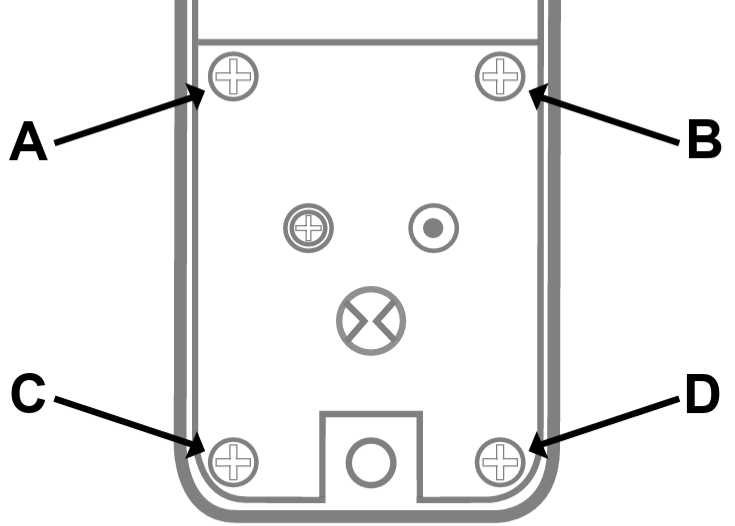
- On the back of the inside handle (part 2), undo the four screws marked A, B, C and D.
- Lift the plate out of position. This reveals the holdback snib, with its spring and ball bearing.
- Take out the snib, the spring and the ball bearing.
- Fit the holdback snib blank (part 7) in the hole.
- Refit the plate and its four screws, then check the handle springs back to vertical and the latch works.
The back of a Borg inside handle, with the plate screws marked A to D.


Borg Locks With a Holdback Function

These are the Borg locks we carry with a holdback function, plus the two spare parts that carry it. Each model links to the holdback section of its product page where it has one. ECP is Easicode Pro, Borg's on-door code change, and MG Pro is Borg's Marine Grade Pro finish — both decoded in MG Pro & ECP Explained.
 Holdback models and parts
| Model | Type and finish | Code change |
|---|---|---|
| Knob and lever door locks | ||
| BL2200 | Knob keypad, 60mm latch, satin chrome or polished brass | On The Bench |
| BL2201SCECP | Knob keypad, 60mm latch, satin chrome | Easicode Pro |
| BL2202SC | Knob keypad, 28mm latch for narrow stiles, satin chrome | On The Bench |
| BL2301SC | Lever keypad, satin chrome | On The Bench |
| BL2401SCECP | Lever keypad, satin chrome | Easicode Pro |
| BL2501SSECP | Knob keypad, medium duty, satin stainless | Easicode Pro |
| BL2701SCECP | Knob keypad with key override, satin chrome | Easicode Pro |
| BL2702SCECP | Knob keypad with key override, 28mm latch, satin chrome | Easicode Pro |
| BL2901SCECP | Anti-ligature knob, holdback on the lever face, satin chrome | Easicode Pro |
| Marine grade knob locks | ||
| BL2600MGBC | Knob keypad, marine grade, satin chrome | On The Bench |
| BL2601MGPRO | Knob keypad, MG Pro, matt black | On The Bench |
| BL2601MGPROECP | Knob keypad, MG Pro, black | Easicode Pro |
| BL2605MGPRO | Knob keypad with rim-mounted deadbolt, holdback on the inner knob, MG Pro, matt black | On The Bench |
| BL2701MGPRO | Knob keypad with key override, MG Pro, matt black | On The Bench |
| Gate locks | ||
| BL3100BLK | Single-keypad metal gate lock, marine grade, black | On The Bench |
| BL3400GATE | Single-keypad metal gate lock, marine grade, black | On The Bench |
| BL3400MGPROECP | Single-keypad metal gate lock, MG Pro, black | Easicode Pro |
| BL3400DKOMGPROECP | Single-keypad metal gate lock with double key override, MG Pro, black | Easicode Pro |
| BL4401MGPRO | Lever/lever gate lock, MG Pro, black | On The Bench |
| BL4401MGPROECP | Lever/lever gate lock, MG Pro, black | Easicode Pro |
| BL4409MGPROECP | Rim-fixed slam latch gate lock, holdback on the slam latch's snib, MG Pro, black | Easicode Pro |
| Spare parts | ||
| BLS202 | Replacement inside handle with holdback, satin chrome — suits Borg 2000 Series knob keypad locks | — |
| BLS09MK2 | Replacement BL4409 slam latch with hold back, marine grade, black | — |
Not every Borg lock has holdback — the 5000 Series, for example, uses a free passage function (code, then F) instead. To compare the rest, browse our full range of mechanical digital locks.
Frequently Asked Questions
 Is holdback the same as passage mode?
No. Passage mode lets the outside open without the code but leaves the latch working, so the door still latches when it closes. Holdback keeps the latch withdrawn, so the door or gate doesn't latch at all until holdback is released.
Can I use holdback on a pool gate?
Only when a compliant self-latching pool latch, such as a MagnaLatch, is fitted and doing the gate's self-latching. The keypad lock provides access control only and is never the barrier latch. A licensed pool safety inspector has the final word.
Can holdback be used on a fire door?
No. Fire doors are required to be self-closing and latching, so holdback must never be engaged on one.
Do I have to remove holdback if I won't use it?
No, it's optional. But if other people can reach the snib — on a shared gate, a rental or a workplace — removing it and fitting the holdback snib blank means nobody can leave the door or gate unlatched.
Related Guides
How these battery-free locks work, the three brands we stock, passage and holdback, gates and commercial doors.
The two free-access functions compared, with the fire door exclusion and the pool gate rule.
What self-latching means, plus our full position on pool safety barrier gates.
How to tell a left hand door from a right hand door before you set up or order a lock.
What Marine Grade Pro and Easicode Pro mean in Borg model names.
Brand-by-brand code changes, including Borg's Easicode Pro and the bench method.
Not Sure Which Borg Lock You Need?
Tell us about your door or gate and how it's used, and we'll recommend a lock with — or without — holdback.
Ask an ExpertVisit Australia’s leading Smart Lock showroom and workshop:
Gold Coast Smart Locks
9/2 Prosper Crescent
Burleigh Heads, QLD
See working models, compare gateways, and get real advice before you commit.