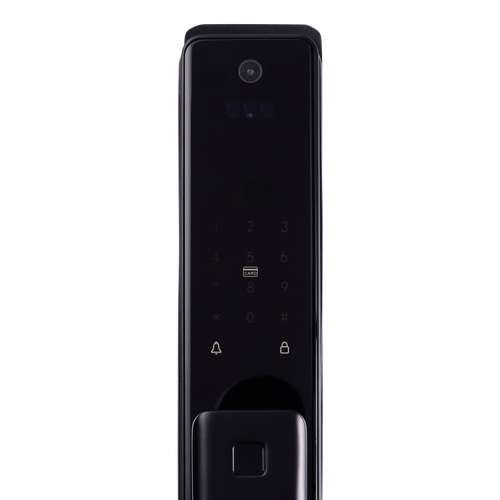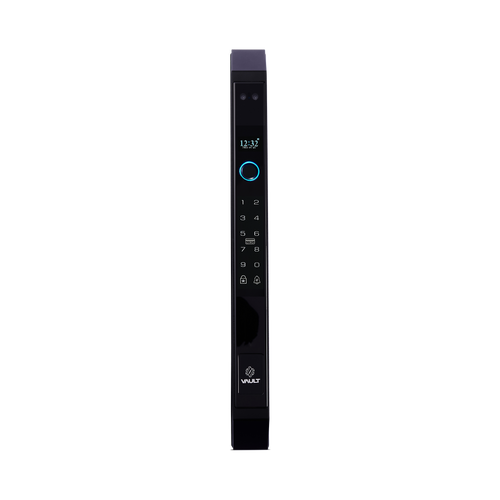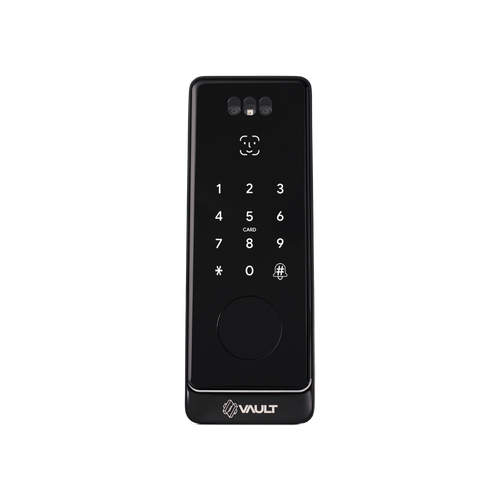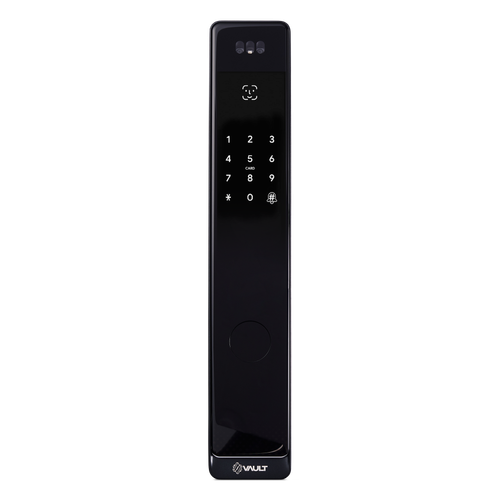


Vault Fortress Push Pull Smart Mortice Lock with 3D Face Recognition
 At A Glance
At A Glance
 DISPATCH3 Business Days




 Face
Face
 Fingerprint
 PIN Code
 RFID Card
 App
App
 Key
Key
 Wi-Fi Via G5
The Vault Fortress (Vault_Fortress) is a push pull smart mortice lock for homeowners who want a feature-rich entry lock with advanced biometric access. It sits in Vault's signature range and combines 3D facial recognition with a modern long-body push pull format.
The Fortress supports facial recognition, fingerprint, PIN code, RFID card, Bluetooth and app control, with optional remote access when paired with the Vault G5 Wi-Fi Gateway. It suits hinged entry doors 35mm to 55mm thick and uses the auto-locking Vault Innovative Mortice as its lock body - the 35mm backset version is included, and 60mm and 70mm backsets are available separately. A video-intercom variant, the Fortress Vision, adds an indoor screen, fish-eye camera and built-in Wi-Fi.
Estimated warehouse dispatch is 3 business days.

The Vault Fortress comes with the Vault Innovative Mortice in a 35mm backset, included in the base price. It also works with the 60mm and 70mm backset versions of the same mortice. Those are an additional-cost option and are not swapped in for you: if your door needs one, add the 60mm or 70mm Innovative Mortice to your cart as a separate item. The 35mm mortice is still supplied in the box. Measure your backset before ordering - see Mortice and Door Fit.
 Key Features
- Push pull smart mortice lock with an integrated long-body handle design.
- 3D facial recognition (50 face profiles per the manual) plus fingerprint, PIN code, RFID card, Bluetooth and app control.
- Uses the auto-locking Vault Innovative Mortice - the deadbolt engages as the door is pushed closed. The 35mm backset version is included; 60mm and 70mm are an additional-cost option, added to the cart separately.
- Optional remote access and smart-home integration via the Vault G5 Wi-Fi Gateway.
- Mechanical key backup included - two keys supplied per the manual.
- IP66 weather-rated external module for exposed outdoor residential entries.
- Suits aluminium and timber hinged doors 35mm to 55mm thick.
Facial Recognition Access
The Fortress uses 3D structured-light facial recognition for fast, touch-free entry, storing up to 50 face profiles (per the supplied manual). 3D recognition reads facial depth rather than a flat image - see Chapter 06 - 2D vs 3D facial recognition for the difference.
Face recognition works alongside fingerprint, PIN, RFID card, Bluetooth app control and backup key access - compare them all in Chapter 03 - Access Methods, or browse every face-recognition smart lock we stock.
User capacity and performance depend on the model-specific hardware and setup.

The external (outside) module is IP66 weather rated for exposed outdoor use - strong protection against dust and powerful water jets. The internal module, which houses the battery compartment, is for interior use only and is not weather rated. See Chapter 11 - IP ratings for what the figures mean.
Access Methods
The Fortress offers six ways in, plus optional Wi-Fi remote access. For a plain-English comparison of what each method does well, see Chapter 03 - Access Methods.
 Palm Recognition
 What's in the Box
- Vault Fortress exterior and interior lock body set
- Mortice - the Vault Innovative Mortice, 35mm backset
- Strike and strike box
- Mechanical override keys x2 (per the manual)
- RFID cards x3
- Fixing screw sets for aluminium and timber doors
- Installation template
- Digital manual
- Batteries not included (4 x AA required)
- 60mm and 70mm Innovative Mortices not included - sold separately
 Mortice and Door Fit
The Fortress push-pull range uses the Vault Innovative Mortice - an auto-locking, electrified mortice body whose sensor engages the deadbolt as the door is pushed closed, driven by the lock itself. The Fortress comes with the 35mm backset version in the box, included in the base price.
It also works with the 60mm and 70mm backset versions of the same mortice. These are an additional-cost option and are not swapped for the 35mm body: if your door has a 60mm or 70mm backset, add that Innovative Mortice to your cart as a separate item. The 35mm mortice still arrives in the box. Installation notes are on the mortice page.
Confirm the door preparation and door thickness (35mm to 55mm) before ordering - the most common DIY mistakes are all measuring mistakes. Our full mortice range is under Mortice Locks for Smart Locks.
 Battery, Power & Backup Access
The Fortress is powered by 4 x AA batteries (6V; not included, per the manual). A low-voltage alarm warns you once the supply drops below 4.8V, so you can change the batteries before the lock stops responding.
A mechanical key backup remains available in every power condition. For charge and maintenance expectations, see our guide to smart lock battery life, and confirm battery condition and backup-key operation as part of setup.
 Suitable Uses
- Residential front entry doors - one side facing the weather
- Premium hinged-door smart lock applications on timber or aluminium leaves
- Homes wanting touch-free, multi-user biometric access
- Doors where a vertical push pull handle is preferred over a lever smart lock
 Available Finish Options
 Black
Black
(This Product)
STK Vault_Fortress
Finish selection does not affect functionality, compliance, or performance.
 Vault Push-Pull Face-Recognition Range
Confirm the exact specification of each model on its own product page. For the full lineup, manuals and background, see the Vault Smart Lock Range guide and the Vault brand profile.
 Dimensions

 Full Specifications

 Wi-Fi Remote Access (Optional)
The Fortress is controlled over Bluetooth from the Vault Smart Locks app as standard, available for iOS and Android . Bluetooth control works when you are near the door and needs no internet connection.
Adding the optional Vault G5 Gateway bridges the lock to your home Wi-Fi so you can unlock remotely, issue and revoke passcodes from anywhere, review unlock records, and add supported Alexa and Google Home voice control - see what the G5 adds. The dual-band G5 avoids the band-steering problem that affects single-band gateways; for how a gateway works and whether you need one, see Chapter 08 - what a gateway does or the blog on whether you need a gateway at all.
Browse the wider range of modules and Wi-Fi gateways or Terry's full WiFi smart lock selection.
Mechanical Key Backup
The Fortress includes a mechanical key override, so entry remains available if the battery is depleted or electronic access cannot be used. Two keys are supplied (per the manual).
Keep a spare key somewhere off-site rather than inside the door it opens. For where the keyhole is hidden and what to do when the battery goes flat, see where the keyhole is and what to do when the battery dies. More locks with a physical fallback are in the Has Backup Key category.
 Frequently Asked Questions
3D. The Fortress uses 3D structured-light recognition, which reads facial depth rather than a flat image, and stores up to 50 face profiles per the manual. See 2D vs 3D facial recognition.

The Fortress push-pull range uses the auto-locking Vault Innovative Mortice. A 35mm backset version is in the box and included in the price; 60mm and 70mm backset versions are an additional-cost option that you add to your cart separately. Confirm your door preparation and thickness (35mm to 55mm) before ordering.
Yes, when paired with the Vault G5 Wi-Fi Gateway. Without the gateway it works locally over Bluetooth, face, fingerprint, PIN, RFID and mechanical key. See what a gateway does.

No. Vault smart locks are not certified for fire-rated doors. For Queensland fire-door compliance requirements, see Chapter 05 of the Buyers Guide.

Yes. The Vault Fortress Vision adds a two-way video intercom, an indoor display screen, an external fish-eye camera and built-in 2.4GHz Wi-Fi (no separate gateway needed), in the same push-pull format.
 Additional Information
The Fortress Vision is the video-intercom variant of this lock, adding an indoor display screen, fish-eye camera and built-in Wi-Fi. If you do not need the camera or screen, the standard Fortress offers the same biometric access. The lever Guardian Vision and deadbolt Nexus Vision round out the Vision range - see the Vault range overview.

Deploying facial recognition in a commercial, strata or managed rental setting may trigger obligations under the Australian Privacy Act. Review these requirements before installation.
The Fortress comes with the 35mm backset Vault Innovative Mortice - check it against the actual door preparation before ordering, and if the backset is 60mm or 70mm, add that mortice to your cart as well. See our guide to common hardware selection mistakes and backset mistakes.

The IP66 rating applies to the external module only, and salt air accelerates wear on all electronic hardware regardless of IP figures - see our notes on coastal Queensland environments and lock lifespan near the coast.

Vault's warranty policy includes a refundable assessment holding fee of $200 (metro) or $250 (elsewhere) when a returned lock is booked in for assessment - see the Vault warranty policy for how it works, and talk to us first so your claim starts in the right lane.
 Warranty
Vault Smart Locks products purchased in Australia are covered against defects in materials and workmanship under normal residential or commercial use for:
- Standard range: 12 months from the date of purchase
- Select Signature Range models: 24 months (as stated on the product listing or packaging)
Returns & Warranty|View Vault Warranty Policy
This warranty operates in addition to your rights under the Australian Consumer Law.
 Download PDF Resources
The 12-page Fortress manual - inclusions, specifications, system initialisation, the six-step installation sequence and the Vault app operation chapters (passcodes, eKeys, cards, fingerprints, face enrolment and gateway management).
The guide to the optional G5 Wi-Fi gateway - app registration, connecting a lock, and the gateway's role in remote access and record keeping.
Vault Fortress Push Pull Smart Mortice Lock with 3D Face Recognition - FAQ, Setup and Owner's Guide
The deeper questions we get asked about the Fortress, answered in one place. For the basics across every brand, start with Chapter 03 - Smart Lock Access Methods and the Vault Smart Lock Range guide.
Access and Credentials
Up to 50 face profiles (per the supplied manual), 200 fingerprints, 150 PIN codes and 200 RFID cards or fobs. Every credential is added, renamed and removed from the Vault Smart Locks app, so you can run the whole household or a small team from one screen. For what each credential type does well, see Chapter 03 - Access Methods compared.
Yes. The app issues permanent, timed and one-time PIN codes. Standing next to the door, Bluetooth is all you need; to send or cancel a code from somewhere else you need the optional Vault G5 Gateway - see whether you need a gateway at all.
The Fortress reads the Vault RFID cards and fobs supplied with the lock, with capacity for up to 200. Browse other card and fob smart locks if RFID is your main credential.
Up to 50 face profiles per the supplied manual - the only figure in the Vault push-pull family that is document-stated. Enrolment is done at the door through the app.
Face Recognition
It uses 3D structured-light recognition, which reads the depth of a face rather than a flat image - a printed photo does not have depth, so it does not read as a face. For the plain-English difference between camera types, see Chapter 06 - 2D vs 3D facial recognition, and for how liveness detection works across face-recognition locks, the liveness detection section.
3D structured-light systems project their own pattern rather than relying on ambient light, so they are not dependent on daylight the way a plain camera is. Enrol faces carefully at the installed height and keep a PIN or fingerprint as the everyday backup - see Chapter 06 for realistic expectations.
Deploying facial recognition in a commercial, strata or managed rental setting may trigger obligations under the Australian Privacy Act - review the Privacy Act notes in Chapter 06 before installation. For homes there is no such hurdle. Other face-capable models are in the Palm or Face Recognition category.
Yes - the Vault Fortress Vision adds a two-way video intercom, an indoor display screen, an external fish-eye camera and built-in 2.4GHz Wi-Fi (no separate gateway needed) in the same push-pull format.
Door Fit and Mortice
The Fortress push-pull range uses the auto-locking Vault Innovative Mortice - an electrified mortice body on 85mm centres whose sensor engages the deadbolt as the door is pushed closed, driven by the lock itself. The 35mm backset version is in the box and included in the price. If your door has a 60mm or 70mm backset, the same mortice is made in both: add the one you need to your cart as a separate item, at additional cost - the 35mm body still comes with the lock. Installation notes and the host-lock list are on the mortice page.

It suits aluminium and timber hinged doors 35mm to 55mm thick, with a recommended 52mm side clearance. Measure before ordering - Chapter 02 - Measuring Your Door shows how, and sending door photos before purchase is the cheapest insurance there is.

Rebated (overlapping) pairs need the Vault Rebate Kit, which converts the Vault mortices for double-door use - confirm latch and strike alignment against your pair before ordering. Flush pairs and single doors do not need it.
No. Vault smart locks are not certified for fire-rated doors. For where fire-door compliance applies in Queensland, see Chapter 05 - Fire Door Smart Locks.
Power and Batteries
Four AA batteries (6V), which are not included - fit a fresh set of quality alkalines at installation. For charge and maintenance expectations across electronic locks, see the realities of electronic door locks.
A low-voltage alarm warns you once the supply drops below 4.8V, well before the lock stops responding - change the batteries when you hear it rather than waiting. The mechanical key covers you in every power condition.
Use the mechanical override key. Two mechanical keys are supplied (per the manual), and the key works in every power condition. See what to do when the battery dies and where the keyhole is hidden.
Remote Access and the Vault App
No. It runs on Bluetooth as standard - every credential works at the door with no internet at all. Wi-Fi only enters the picture if you add the optional Vault G5 Gateway for remote features. See what a gateway does and does not add.
Remote lock and unlock, remote passcode creation and deletion, unlock-record viewing and supported Alexa and Google Home voice control - the lock talks Bluetooth to the G5, and the G5 talks to your router. The full list is on the G5 Gateway page, with the range comparison in Chapter 08.
Smart lock gateways use the 2.4GHz band, and routers that auto-merge 2.4GHz and 5GHz cause most dropouts. The dual-band G5 avoids the worst of the band-steering problem; if you have had dropouts before, read why smart locks drop off Wi-Fi before setup.

The Vault Smart Locks app, available for iOS and Android
. One app manages every Vault lock in the house plus the G5 Gateway. Vault runs its own app platform - do not follow TTLock or Tuya setup guides for this lock.Weather and Coastal Exposure
The external (outside) module is IP66 weather rated - strong protection against dust and powerful water jets, on the outside module only. The internal module houses the battery and electronics and is for interior use only. For what IP figures actually mean, see Chapter 11 - IP ratings.
Salt air accelerates wear on every electronic lock, whatever its IP rating - rinse-free coastal care and realistic lifespan expectations are covered in coastal environments and how long digital locks last near the coast. A covered entry makes a real difference.
Installation and Setup

A confident DIYer with the right door preparation can, but most fit problems trace back to measuring - see when DIY makes sense and the common installation mistakes. On the Gold Coast, Terry's offers a site survey and installation service - or start with our advice and installation page.
Door thickness first - the Fortress suits doors 35mm to 55mm thick - then the backset against the 35mm Vault Innovative Mortice it ships with (60mm and 70mm are optional extras), and side clearance (the drawing recommends 52mm). Start with Chapter 02 - door thickness and the backset mistakes to avoid.
Handle direction is set in the Vault Smart Locks app after the lock is added (per the manual) - there is no mechanical reconfiguration to do at the door.
Warranty and Support
Vault covers the standard range for 12 months from purchase, with select Signature Range models carrying 24 months where stated on the listing or packaging - the full terms are in the Warranty section above and the Vault warranty policy.
Yes - Vault's warranty policy includes a refundable assessment holding fee of $200 (metro) or $250 (elsewhere) when a returned lock is booked in for assessment. The fee and how it is refunded are set out in the Vault warranty policy; talk to us first and we will point your claim in the right direction.

Contact Terry's first - we sold it, and we will manage the claim path with Vault on your behalf. Start at Returns and Warranty.
Related products, guides and chapters
Vault range: Vault Quantum - Vault Olympus - Vault Titan - Vault Nexus - Vault Zenith - Fortress Vision (video intercom) - Guardian Vision - Nexus Vision
Mortices and accessories: Vault Innovative Mortice - Vault 6068 Mortice - Vault Hinged/Swinging Mortice - Vault Sliding Hook Mortice - Vault Rebate Kit - Vault G5 Gateway
Buyer's Guide chapters: Ch 01 - What Is a Smart Lock (mortice deadbolts) - Ch 02 - Measuring Your Door - Ch 03 - Access Methods - Ch 05 - Fire Door Smart Locks - Ch 06 - Facial Recognition - Ch 08 - Gateway Comparison - Ch 10 - Vault Brand Profile - Ch 11 - Australian Standards and IP Ratings - Ch 12 - Installation and Troubleshooting
Blogs: Introducing the Vault Smart Lock Range - Mechanical Key Override on Smart Locks - The Realities of Electronic Door Locks - G2, G3, G4 and G5 Gateways Compared - Why Smart Locks Drop Off Wi-Fi - Site Survey and Installation Services
Browse by category: Palm or Face Recognition - Fingerprint - PIN Code - Fob, Card and RFID - Bluetooth - Has Backup Key - Regular Front Door - Vertical Push/Pull Handle - Mortice Locks for Smart Locks - Modules and Wi-Fi Gateways
What's in the Box - Vault Fortress
- Vault Fortress exterior and interior lock body set
- Mortice - the Vault Innovative Mortice, 35mm backset
- Strike and strike box
- Mechanical override keys x2 (per the manual)
- RFID cards x3
- Fixing screw sets for aluminium and timber doors (mortise screws, screw stubs and machine screws)
- Installation template
- Digital manual

The Fortress takes 4 x AA batteries (6V), which are not included - fit a fresh set of quality alkalines at installation. The optional Vault G5 Gateway is sold separately and is required only for remote access and voice control. The 60mm and 70mm Innovative Mortices are sold separately too - the 35mm body is the one in the box.
Vault Fortress - Dimensions
Vault Fortress - Product Brochure (User Manual)
The pages below are the Vault Fortress user manual. For the video-intercom variant, see the Vault Fortress Vision.


PDF Files - Vault Fortress Push Pull Smart Mortice Lock with 3D Face Recognition
The 12-page Fortress manual - inclusions, specifications, system initialisation, the six-step installation sequence and the Vault app operation chapters (passcodes, eKeys, cards, fingerprints, face enrolment and gateway management).
The guide to the optional G5 Wi-Fi gateway - app registration, connecting a lock, and the gateway's role in remote access and record keeping.
Vault Warranty
Vault Smart Locks products are backed by a manufacturer's warranty against defects in materials and workmanship under normal residential or commercial use. All claims are handled locally by Terry's Tradies Pty Ltd and its associated websites, trading names, and subsidiaries - start with us and we'll manage the process with Vault on your behalf.
Warranty Summary
How to Make a Claim
- Contact Terry's Gold Coast Smart Locks through the Returns & Warranty page above, with your proof of purchase (invoice or receipt).
- Have your product model and serial number (if applicable) ready, along with a brief description of the fault and your installation address.
- We assess your claim with Vault and advise the outcome and next steps. You may be asked to return the product for inspection.
 What This Warranty Does Not Cover
- Normal wear and tear.
- Cosmetic damage that does not affect performance.
- Damage caused by incorrect installation, misuse, neglect, modification, or accident.
- Damage due to improper handling, or installation by an unlicensed technician.
- Products that have been disassembled, tampered with, or where the security seal or warranty label has been removed.
- Battery leakage or failure, or damage caused by incorrect battery usage.
- Environmental or weather damage caused by use outside recommended operating conditions.
- Labour, installation, or removal costs associated with replacing or reinstalling products.
- Work performed before warranty approval or assessment.
Important Notes
Where a Vault product carries an Ingress Protection (IP) rating, that rating is stated on the individual product listing, packaging or technical documentation. Unless stated otherwise in writing, the IP rating applies only to the external-facing side of the lock - not to the internal assembly, handle, battery compartment, electronics, cables or connectors. The internal side must be installed in a dry, sheltered position. An IP rating describes water resistance, not waterproofing: the lock must not be submerged, pressure washed, or exposed beyond its stated rating, and all seals, gaskets and covers must be correctly fitted and undamaged.
Vault's manufacturer policy applies a warranty assessment holding fee, which is refundable if the fault is found to be covered under warranty. If a product is assessed as outside warranty or damaged by an excluded cause, a discounted replacement may be offered. We will confirm any applicable fees and options with you before any assessment proceeds.
This warranty is provided in addition to your rights under the Australian Consumer Law (ACL). Our goods come with guarantees that cannot be excluded under the ACL. You are entitled to a replacement or refund for a major failure, and to have goods repaired or replaced if they fail to be of acceptable quality and the failure does not amount to a major failure.
1 Review Hide Reviews Show Reviews
-
Outstanding
Finally a quality lock strong , sleek & reliable !!

Confused? Overwhelmed? We get it.
Choosing the right smart lock can be genuinely tricky - door types, backsets, app platforms, compatibility with your existing hardware... there is a lot to consider. We have decades of experience fitting locks of all types, including smart locks, and we are happy to help.
Our expert recommendation service is free. Upload a few photos of your door and describe what you need, and one of our qualified locksmiths will give you a personalised recommendation.
Get Your Free Recommendation →How it works - three easy steps:
1. Upload photos
A few clear shots of your door, lock and frame - inside and out.
2. We assess
Our locksmith reviews your setup and requirements - door type, weather exposure, how you want to use it.
3. You get a recommendation
A personalised recommendation tailored to your door, budget and needs. No pressure, no upsell.
Also useful while you are deciding: