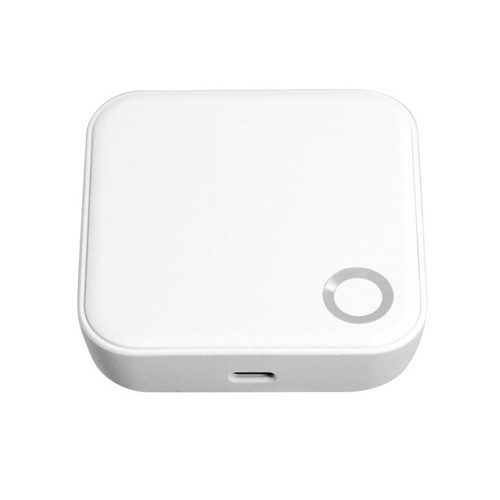
McGrath G4 Gateway - 4G SIM & Wi-Fi 2.4GHz
The McGrath G4 Gateway connects compatible McGrath smart locks and devices to the internet over a mobile 4G network via a Nano SIM card, and also supports a 2.4GHz Wi-Fi network. It enables secure remote management through the McGrath Locks App - so you can add and remove access rights, lock and unlock devices, and review activity from anywhere in the world.
This is not a lock. The G4 does not provide any locking hardware and does not store user credentials independently. It acts purely as a communication bridge between Bluetooth-enabled McGrath devices and the network.
The G4 is the right choice for sites with no fixed internet connection - the 4G SIM slot lets the gateway reach the internet using mobile data instead of relying on building Wi-Fi. For a plain-English explanation of what a gateway does, see Chapter 08 - Gateway Comparison.

Usually same day if ordered before 11am AEST (excluding weekends and QLD public holidays).
 Key Features
- 4G SIM card compatible (Nano SIM) - reach the internet over mobile data where there is no fixed line.
- Also supports a 2.4GHz Wi-Fi network.
- Recommended lock range of approximately 10-15 metres (environment dependent).
- Supports up to 100 compatible locks per gateway.
- Mesh networking capability - gateways link to each other so an offline gateway is supported by others in range.
- Micro USB powered.
- Wall or ceiling mountable.
- Managed through the McGrath Locks App on iOS and Android.

The 4G Nano SIM card is not supplied - provide your own mobile data SIM. The G4 is powered by Micro USB, and the Micro USB cable is also not included.
 How the G4 Gateway Works
The G4 connects to the internet over a 4G mobile network (via its Nano SIM) or over 2.4GHz Wi-Fi, and communicates with compatible McGrath locks over Bluetooth. When you issue a remote command in the McGrath Locks App, the instruction travels over the internet to the gateway, which then relays it locally to the lock over Bluetooth. The gateway does not perform any locking function itself - it acts purely as a secure communication bridge. This is the same Bluetooth-plus-gateway model used across the TTLock platform.
The McGrath gateways also act as a mesh system: multiple gateways link to one another, so if one gateway goes offline, other connected gateways within range can support that gateway's devices.
Remote features rely on the gateway having both power (Micro USB) and an active internet connection (4G or Wi-Fi). If either drops, the lock still works normally in person and over local Bluetooth - only remote access is paused until the connection is restored. See what happens when the internet goes down.


 App Platform & Data Hosting

The G4 is managed through the McGrath Locks App - a customised, McGrath-branded platform available on iOS and Android.
The platform is managed, supported and distributed locally in Australia, with Australian staff handling warranty, troubleshooting and account queries. The underlying cloud infrastructure is provided by TTLock, a globally deployed IoT platform. To see where the app fits across brands, read Chapter 15 - Smart Lock App Platforms and the which app platform is right for you guide. Remote Management
Once paired and online, the G4 lets an administrator do all of the following from anywhere with an internet connection:
- Remotely open (unlock) a device.
- Remotely change user permissions.
- Remotely delete users.
- Remotely change passwords / passcodes.
- Remotely view the audit trail.
Compatible McGrath Locks & Devices
The G4 adds remote access to Bluetooth-enabled McGrath locks and controllers listed as gateway-optional. Commonly paired devices include:
- McGrath Ashgrove smart deadbolt (raised-button keypad with Braille).
- McGrath Kedron smart deadbolt (tempered-glass screen with fingerprint).
- McGrath Grange entrance pull handle smart lock.
- McGrath UltraSecua digital security screen-door smartlock.
- McGrath MLA02-S single-door access controller.
Not every McGrath device requires or supports a gateway - some controllers include built-in Wi-Fi. Confirm your specific model is gateway-optional before ordering. For the platform-wide rules on when a gateway is needed, see the gateway selection guidance in Chapter 14.
 Available Finish Options
 White
White
(This Product)
STK MLG4GW4G
The G4 is supplied in a single white housing. Finish does not affect functionality or performance. [CONFIRM: housing colour - nearest swatch used pending confirmation.]
 Full Specifications
 Gateway Model Family - McGrath G-Series
The G4 is the mobile-data (4G) option in the current McGrath gateway range. The table below shows how the current models differ so you can choose the right one for your network.
Not sure which generation suits your setup? Read the full G2 vs G3 vs G4 vs G5 gateway comparison, or the G4 section of Chapter 08.
 Accessories & Spares
 Suitable Uses
- Sites with no fixed internet connection - the 4G SIM provides mobile-data connectivity.
- Remote, rural or temporary locations, construction sites, and pop-up installations.
- Short-stay and rental properties where hosts issue and revoke access remotely - see using TTLock for Airbnb and managing multiple properties.
- Multi-device sites needing up to 100 devices per gateway, or mesh-linked gateways for larger coverage.
 Frequently Asked Questions
No. The G4 takes a 4G Nano SIM, but the SIM card is not supplied - provide your own mobile data SIM.
Micro USB. Note the Micro USB cable is also not included, so provide a cable and a USB power source.
No. The G4 is a network bridge only - it has no locking hardware and stores no user credentials. It relays commands between the app and your McGrath lock.

Around 10-15 metres, depending on walls and interference. Multiple gateways mesh together for wider coverage. See placement guidance.
The lock still works in person and over local Bluetooth. Only remote (off-site) app control is paused until the connection returns.
The McGrath Locks App on iOS and Android.
It is a McGrath-branded platform, supported locally in Australia, running on TTLock cloud infrastructure. For day-to-day tips, see TTLock tips and tricks. Additional Information
- The G4 is the answer when a site has no fixed internet - the G3 needs wired Ethernet, and the G5 needs a Wi-Fi router, whereas the G4 can reach the internet over 4G mobile data.
- A gateway is only needed for remote (off-site) control. If a lock is only ever operated in person or over local Bluetooth, a gateway is optional - see do you really need Wi-Fi.
- For property managers, the McGrath/TTLock platform supports PMS and channel-manager integration for automated guest access.
- For a commercial-grade alternative on other platforms, compare the Lockton E-Series G2 gateway (TTLock, Wi-Fi) or the KAS S1 access-control gateway (BLE + Sub-GHz, PoE).
- Terry's supplies McGrath through LSC, giving local warranty and support - see why that matters for long-term confidence.
 Warranty
12-month warranty against defects in materials and workmanship (24-month on ALBION, ASCOT, WINDSOR, ULTRA SECUA, HAMILTON, BARDON and STAFFORD models). McGrath Locks will repair, replace, or refund at their discretion. Proof of purchase required for all claims. Returns & Warranty | McGrath Locks Warranty
 What's In The Box - McGrath G4 Gateway
- 1 x McGrath G4 Gateway
McGrath Locks Warranty
Warranty Summary
 How to Make a Claim
- Contact Terry's Tradies Pty Ltd and its associated websites, trading names, and subsidiaries (the place of purchase) within the applicable warranty period.
- Supply your proof of original purchase - a receipt or tax invoice is required.
- Provide a clear description of the fault and your contact details.
- You may be asked to return the product for assessment before a remedy is determined.
- McGrath Locks will, at their discretion, repair the product, replace it with the same or an equivalent model, or provide a refund of the purchase price.
 Exclusions
This warranty does not cover:
- Normal wear and tear
- Products that have been disassembled
- Damage caused by improper handling, incorrect installation, misuse, abuse, neglect, modification, or accident
- Installation by unlicensed persons (including non-licensed locksmiths or technicians)
- Products not used in accordance with the supplied instructions
- Cosmetic damage that does not affect functionality
- Labour or installation costs related to the removal or reinstallation of products
- Exposure to conditions outside normal environmental use
- Work completed before warranty approval
- Damage caused by battery leakage, battery failure, or force majeure
Our goods come with guarantees that cannot be excluded under the Australian Consumer Law. You are entitled to a replacement or refund for a major failure and compensation for any other reasonably foreseeable loss or damage. You are also entitled to have the goods repaired or replaced if they fail to be of acceptable quality and the failure does not amount to a major failure. This warranty is provided in addition to your rights and remedies under the Australian Consumer Law.


Confused? Overwhelmed? We get it.
Choosing the right smart lock can be genuinely tricky - door types, backsets, app platforms, compatibility with your existing hardware... there is a lot to consider. We have decades of experience fitting locks of all types, including smart locks, and we are happy to help.
Our expert recommendation service is free. Upload a few photos of your door and describe what you need, and one of our qualified locksmiths will give you a personalised recommendation.
Get Your Free Recommendation →How it works - three easy steps:
1. Upload photos
A few clear shots of your door, lock and frame - inside and out.
2. We assess
Our locksmith reviews your setup and requirements - door type, weather exposure, how you want to use it.
3. You get a recommendation
A personalised recommendation tailored to your door, budget and needs. No pressure, no upsell.
Also useful while you are deciding: