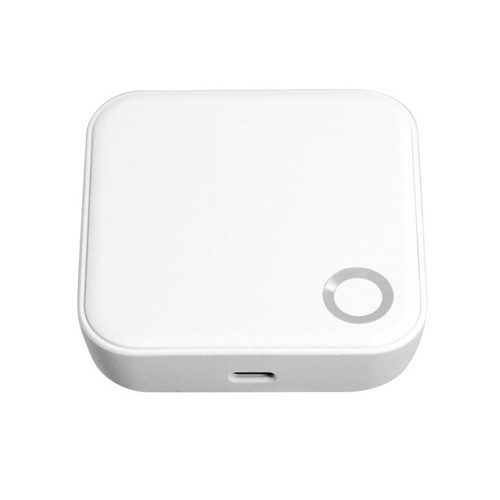
KAS S1 Access Control Gateway - Ceiling Mount, Wireless BLE and Sub-GHz, LAN PoE or Wi-Fi
The KAS S1 Access Control Gateway (HGM301) is a ceiling-mounted wireless network gateway that connects KAS-compatible door locks and access-control readers to the KAS cloud management platform (KAS Access). It forms the central communication hub of a KAS Cloud access-control system, bridging the wireless signal from door hardware to the site network and enabling remote credential management, real-time monitoring, and cloud-based administration. For context on what a gateway does and how gateway-based access control compares to offline operation, see What a Gateway Does in the Smart Lock Gateway Comparison Guide.
The S1 Gateway supports dual radio — 2.4 GHz Bluetooth Low Energy (BLE) for initial configuration and 915 MHz Sub-GHz (Sub-1, AU) for ongoing lock communication — enabling reliable connection with KAS NEO, ACR, and PLATINUM lock ranges across a variety of commercial building environments. Each gateway supports up to 60 connected locks and can be powered via LAN Power over Ethernet (PoE) or Wi-Fi with a separate DC power supply. The KAS S1 is explicitly a commercial PoE gateway option — see PoE Commercial Gateways in the Gateway Comparison Guide for how this compares to consumer gateway alternatives. For a broader cross-brand comparison see Other Gateway Systems.
The unit mounts to the ceiling via a supplied clip-on bracket and is designed to be positioned centrally, away from obstructions, to maximise wireless range. It suits new installations and retrofit projects across commercial, strata, and multi-tenancy buildings.

Usually ships in 1-2 business days

The gateway, fixing bracket, and 3 screws are supplied. The AC/DC transformer (for Wi-Fi options) or a PoE-enabled network switch (for LAN PoE) must be sourced separately. Refer to the Wiring and Installation tab for transformer and cable specifications.
 Connectivity Options
- Wi-Fi (2.4 GHz)
 Bluetooth BLE (2.4 GHz)
 Key Features
- Connects KAS NEO, ACR, and PLATINUM lock ranges to the KAS cloud management platform
- Supports up to 60 locks per gateway — suitable for large multi-door commercial installations
- Dual radio: 2.4 GHz BLE for initial configuration; 915 MHz Sub-GHz (AU) for ongoing lock communication
- Three power and network options: LAN PoE (preferred), Wi-Fi with GPO transformer, or Wi-Fi with DC loop cable from a remote transformer
- LAN PoE provides remote power cycling and individual IP address management without requiring physical site visits
- Ceiling mount with clip-on bracket — installation workflow aligns with existing Wi-Fi access point trades
- Recommended working range: up to 15 m line of sight, or 10-12 m through obstructions
- Initial configuration via BLE using the KAS mobile app — no specialist equipment required
- Compact circular housing (168 mm diameter, 45 mm height) suited to commercial ceiling environments
- Minimum 500 mm offset from all walls, beams, and obstructions required for full wireless range
 Gateway Wireless Range

 Wiring and Power Options
The S1 Gateway supports three wiring and power configurations. LAN PoE is the preferred option for new installations. See the Wiring and Installation tab for full diagrams, decision chart, and DC circuit design data.
Options 2 and 3 both require the gateway to connect to building Wi-Fi. Many modern routers and enterprise access points use band steering, which can cause 2.4 GHz devices to be pushed onto 5 GHz and then disconnect. This is one of the most common causes of gateway instability in Wi-Fi deployments. LAN PoE (Option 1) avoids this entirely. See Band Steering — The Most Common Culprit and WiFi Band Requirements in the Gateway Comparison Guide for detail. For Wi-Fi FAQ, see Smart Lock FAQ — WiFi Drops.
 Suitable Uses
- Commercial office buildings with multiple access-controlled doors
- Strata and multi-tenancy residential buildings
- Retail and hospitality environments
- Education and healthcare facilities
- New-build access-control installations using LAN PoE infrastructure
- Retrofit access-control upgrades using Wi-Fi with DC loop cabling
- Any site deploying KAS NEO, ACR, or PLATINUM wireless lock systems that requires remote management, real-time monitoring, or cloud-based administration
 Available Finish Options
 White
White
(This Product)
HGM301
Finish does not affect functionality, compatibility, or performance.
 Full Specifications
 Installation Tips
- Mount to the ceiling using the supplied clip-on bracket. Route the LAN or power cable through the centre of the bracket before clipping the gateway into place.
- Install with a minimum 500 mm offset from all walls, beams, and other obstructions to preserve wireless range.
- Position centrally relative to the doors being served. Avoid locations above metal ducting, concrete beams, or structural steel without range testing.
- LAN PoE (Option 1) is the preferred method for new installations and sites with more than 4 gateways. Each gateway requires an independent Cat-5/6 cable from the site patch panel.
- Wi-Fi with GPO transformer (Option 2) suits small installations or where LAN cabling is impractical — but requires stable 2.4 GHz Wi-Fi. See the How to Improve Wi-Fi Stability guide before deploying.
- DC loop cable from a remote transformer (Option 3) suits retrofit sites. Refer to the Wiring and Installation tab for DC circuit design data including maximum cable distance and transformer output requirements.
- Gateway commissioning is completed via BLE using the KAS mobile app and should be performed simultaneously with final door lock commissioning.
- Physical gateway installation is typically completed after ceiling painting. Commissioning is performed during the final stage of door lock commissioning — separating these two activities avoids returning to the ceiling after commissioning.

 Frequently Asked Questions
Each S1 Gateway supports a maximum of 60 locks. For larger sites, multiple gateways are deployed and mapped to cover the required floor area. See Gateway Placement for coverage planning guidance.
The recommended range is 15 m unobstructed (maximum 20 m). Through walls or other obstructions such as plaster or concrete, this reduces to 10-12 m. Local site conditions, building materials, and atmospheric factors may affect actual range.
No. The gateway supports three connection options: LAN PoE (wired, strongly preferred), Wi-Fi via GPO-powered transformer, and Wi-Fi via DC loop cable from a remote transformer. LAN PoE is strongly recommended for new installations with more than 4 gateways, as it allows remote power cycling and IP management without physical site access. Wi-Fi options require stable 2.4 GHz connectivity — see the band-steering callout above.

No. The gateway, fixing bracket, and screws are supplied. The AC/DC transformer (for Wi-Fi options) or a PoE-enabled network switch (for LAN PoE) must be sourced separately. Refer to the Wiring and Installation tab for transformer and cable specifications.

The S1 Gateway is compatible with KAS NEO, KAS ACR, and KAS PLATINUM ranges. Compatibility with other devices should be confirmed with KAS prior to installation.
Core lock operation — RFID credentials, PIN entry, and proximity Bluetooth — continues without internet connectivity. Only remote management features (real-time monitoring, remote credential issue, web console) require an active internet connection. See What Happens When the Internet Goes Down for full detail.
Additional Information
LAN PoE is the preferred option for all new commercial installations, particularly where 4 or more gateways are required. It provides the most management flexibility, including remote power cycling via the network switch. Wi-Fi options introduce dependency on stable 2.4 GHz building Wi-Fi and may require MAC address whitelisting or a custom SSID on some networks. See What Causes Smart Lock Wi-Fi Dropouts before committing to a Wi-Fi option on a commercial site.
When using Option 3 (DC loop from a remote transformer), cable voltage drop must be calculated before installation. A 12V DC supply is recommended when significant cable runs are anticipated. Full DC Circuit Design Chart data is available in the Wiring and Installation tab.
KAS recommends mapping gateway positions on a site floor plan prior to installation. Each gateway coverage radius should be plotted at the applicable range to confirm all doors fall within range — gaps in coverage require an additional gateway. See Gateway Placement Guide. For complex multi-gateway commercial projects, Terry's Site Survey and Installation Service covers site planning as part of the supply-and-install offering.
Metal objects, concrete beams, and dense building materials can significantly reduce effective wireless range. Gateways should not be installed directly above or adjacent to metal cable trays, HVAC ducting, or structural steel without prior range testing. If persistent connectivity problems occur after installation, see Smart Lock Troubleshooting Guide.
The S1 Gateway must be used as part of a complete KAS access-control installation. It does not operate as a standalone device and requires the KAS cloud platform and compatible KAS lock hardware to function. For context on where KAS sits in the commercial access-control landscape, see Commercial and Institutional Smart Lock Brands.
As a central communication hub for a commercial access-control system, the S1 Gateway is a long-term infrastructure component. See How Long Do Digital Door Locks Last? — Installation Quality and The Realities of Electronic Door Locks — Not Set and Forget for honest context on infrastructure lifespan expectations.

KAS products are covered by a 24-month manufacturer's warranty against defects in materials and workmanship.
- Return-to-base repair or replacement (subject to KAS assessment)
- Technical support provided during the warranty period

KAS S1 Access Control Gateway Datasheet
 What's in the Box — KAS S1 Gateway
- KAS S1 Access Control Gateway (HGM301)
- Ceiling fixing bracket (clip-on)
- 3 x mounting screws
The AC/DC power transformer (for Wi-Fi options) and PoE-enabled network switch (for LAN PoE) are not included and must be sourced separately based on the chosen wiring option. Refer to the Wiring and Installation tab for transformer and cable specifications.
KAS S1 Gateway - Wiring and Installation Guide
The S1 Gateway supports three wiring and power configurations. The correct option should be selected based on site infrastructure, number of gateways, and network management requirements. All three options use the KAS mobile app via BLE for initial gateway configuration.
Option 1: LAN PoE - Preferred Option
Cat-5/6 PoE LAN cable with an active DHCP network. Each gateway is individually supplied by an independent LAN cable from the site internet patch panel rack. This is the strongly recommended option for new installations and sites with more than 4 gateways.
- Each gateway receives its own IP address, configurable and power-cyclable remotely
- No dependency on building Wi-Fi stability or MAC address whitelisting
- Remote power cycling via the PoE-enabled network switch — no physical site visit required

Option 2: Wi-Fi + GPO - 240V AC with AC/DC Transformer
A 240V AC GPO with a DC transformer is installed at each gateway location within building Wi-Fi range. The gateway connects wirelessly to the site Wi-Fi system. Power supply: AC/DC transformer 5V 1A plug (if supplied separately).
- Recommended for small installations with a limited number of gateways
- Requires stable 2.4 GHz building Wi-Fi — see band-steering note in product body
- Power cycling requires a physical visit to the gateway location
Option 2 requires a stable 2.4 GHz connection. Many enterprise Wi-Fi systems use band steering, which can push 2.4 GHz devices to 5 GHz and cause disconnections. Configure a dedicated 2.4 GHz SSID or consult the network administrator before deploying. See Band Steering — The Most Common Culprit.

Option 3: Wi-Fi + DC Loop Cable from Remote Transformer
A twin wire pair cable is connected in series between multiple gateways on a floor, powered from a single AC/DC transformer. This option suits retrofit installations where LAN PoE is not feasible and multiple gateways per floor can share a single transformer.
- Avoids the cost and time of running independent Cat-5/6 cabling to each gateway from the LAN patch panel
- Cable voltage drop must be calculated before installation — refer to the DC Circuit Design Chart below
- A 12V DC supply is recommended where significant cable runs or voltage drop is anticipated
- Requires stable 2.4 GHz building Wi-Fi — same band-steering risk as Option 2
- Power cycling requires a physical visit to the gateway or transformer location
Option 3 also requires a stable 2.4 GHz Wi-Fi connection. See The Hardware Fix for Persistent Band-Steering Issues if instability occurs after installation.

Wiring and Network Decision Chart
DC Circuit Design Chart (Option 3)
Use the following table to determine the recommended power transformer output for Option 3 DC loop installations, based on the number of gateways per circuit and maximum one-way cable distance.
Cable specification: 1.04 mm-sq copper cable (Figure 8 Cable 32/0.20 mm at 1.00 mm-sq, or Security Cable 6 Core 14 Strand with 3 cores twisted at 1.29 mm-sq). Cable distance is one-way to the furthest gateway — not round trip. Maximum peak gateway current draw: 500 mA. Maximum gateway voltage supply: 5-11V DC. Use 12V DC supply only where high voltage drop is anticipated.
Source: KAS S1 Gateway Datasheet, Appendix A - DC Circuit Design Charts (Revision 15/03/2020). Use as a guide only. Verify calculations with your electrician or KAS technical support prior to installation.
KAS S1 Access Control Gateway Datasheet
KAS S1 Access Control Gateway Datasheet
KAS Warranty Overview
KAS electronic locking products are supplied with a 24-month manufacturer’s warranty covering defects in materials and workmanship under normal operating conditions.
This warranty is a return-to-base manufacturer warranty. Products must be assessed by KAS before repair or replacement is approved.
 Warranty Summary
What the Warranty Covers
- Defects in materials or manufacturing
- Repair or replacement of faulty hardware (subject to KAS assessment)
- Technical support during the warranty period
Common Exclusions
- Labour, removal, reinstallation or service call costs
- Freight costs to return goods to KAS
- Incorrect installation or commissioning
- Misuse, tampering or unauthorised modification
- Environmental exposure including moisture, corrosion or debris
- Network, WiFi or connectivity issues
- Consumables including batteries
- Normal wear and tear
Warranty Claim Process
- Report the fault with supporting details (photos or video recommended)
- Follow troubleshooting guidance provided by KAS
- Obtain return approval before sending product
- Return product for assessment (freight at customer cost)
- Approved claims will be repaired or replaced and returned
During the warranty process, the product may be unavailable. The customer is responsible for maintaining site security and access during this period.
 Australian Consumer Law
This warranty operates in addition to rights available under the Australian Consumer Law. Goods come with guarantees that cannot be excluded. Customers may be entitled to a replacement or refund for a major failure and compensation for reasonably foreseeable loss or damage.
Reference

Confused? Overwhelmed? We get it.
Choosing the right smart lock can be genuinely tricky - door types, backsets, app platforms, compatibility with your existing hardware... there is a lot to consider. We have decades of experience fitting locks of all types, including smart locks, and we are happy to help.
Our expert recommendation service is free. Upload a few photos of your door and describe what you need, and one of our qualified locksmiths will give you a personalised recommendation.
Get Your Free Recommendation →How it works - three easy steps:
1. Upload photos
A few clear shots of your door, lock and frame - inside and out.
2. We assess
Our locksmith reviews your setup and requirements - door type, weather exposure, how you want to use it.
3. You get a recommendation
A personalised recommendation tailored to your door, budget and needs. No pressure, no upsell.
Also useful while you are deciding: