McGrath ULTRA-SECUA Security Screen Door Smart Lock - Black
At A Glance
 At A Glance
 DISPATCHSame Day Before 11am




 PIN Code
  RFID Tag / Card
  McGrath Locks App
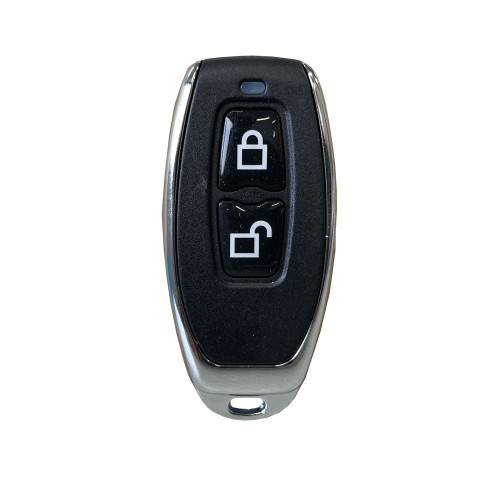
  Remote (Optional Gateway)
  Mechanical Key
  Fingerprint
Not Available
The McGrath ULTRA-SECUA is a digital smart lock built for one job: hinged aluminium security screen doors. It replaces the existing screen door mortice lock - the Whitco, Austral, Doric or Lockwood body already on the door - with a keyless unit that opens by PIN code, RFID tag or card, or Bluetooth through the McGrath Locks App, with a mechanical key as the fallback. It is one of a very small number of smart locks purpose-built for the narrow frames, multi-point locking bars and mesh-exposed interior handle that make a screen door different from a front door. This is the standard single-lock version - it secures the screen door on its own and does not pair with a main door lock. For one action that opens both doors together, see the ULTRA-SECUA Dual Unlock.
Out of the box the lock is controlled over Bluetooth when your phone is in range, or by the codes and tags you set up - no internet connection is needed for day-to-day use. Add an optional McGrath G5 gateway (sold separately) and the same app unlocks the screen door from anywhere, issues and revokes codes remotely and shows who came and went. What a gateway actually does - and whether you need one at all - is covered in our guides. The app itself is McGrath's Australian-supported build of the TTLock platform, the same system behind the rest of the McGrath range.
The lock ships complete: screen door mortice, strike plate, key cylinder, two keys, two RFID tags and the two 3V lithium batteries are all in the box. The external housing carries an IP66 rating and the black finish is tested to 300 hours of salt spray, which matters on the Gold Coast - read what coastal air does to electronic locks. Before ordering, do two things: check your screen door is 19 to 30mm thick, and measure the clearance between the screen and the main door - it is the mistake even experienced installers make.
Usually ships same day if ordered before 11am AEST (excludes weekends and Queensland public holidays).

Fitting the ULTRA-SECUA is more involved than a standard door smart lock. The installer has to pick the right spindle for your door thickness (a 51mm spindle for 19-25mm doors, 57mm for 25-30mm), align the triangular hub marker correctly or the lock will not throw, and on a triple-lock screen may need to reverse the top and bottom lock components. Get any of those wrong and the door will not lock - the wrong spindle position is the most common DIY smart lock fault we see. Terry's recommends professional installation for this product. For our supply and install service see Site Survey and Installation Services, or book a free site survey if you are not sure your door suits.

The ULTRA-SECUA suits single-point and multi-point hinged security screen doors. On some existing triple-lock kits the top and bottom locks - including the plastic adaptor - need to be reversed so the kit locks from the inside by lifting the ULTRA-SECUA interior handle upwards. Skip that step and the multi-point bars will not operate. The bigger question is what links your kit: rigid rods work, flexible cables do not - see the cables vs rods rule and how to identify your kit type. Brand-specific notes cover Austral, Whitco Tasman MKII and Lockwood kits. If your existing kit is an Austral Elegance, the Austral Elegance rod adaptor is the part that makes it fit. If the kit is beyond saving, removing the triple kit and running single-point is a practical alternative.

The ULTRA-SECUA can be programmed two ways: through the McGrath Locks App, or by keying codes straight into the keypad using the printed instructions. If you program the lock from the keypad first, you cannot add a Bluetooth device afterwards - the phone pairing path is closed off and the lock stays keypad-and-key only until it is factory reset. McGrath states this plainly on the user guide and we see it at the counter. Register the lock in the app before you do anything else: how the TTLock platform works, the 24-hour passcode activation rule every new owner trips over, and the TTLock app manual for the full menu walk-through. If the lock has already been keypad-programmed, the reset sequence is in the Pass 3 troubleshooting notes on this page.

This listing is the standard ULTRA-SECUA - it secures the screen door on its own. The ULTRA-SECUA Dual Unlock adds a Bluetooth pairing feature so that unlocking the screen door also unlocks a compatible McGrath main door smart lock in the same action - see how the pairing works. Same hardware, same mortice, same install. For a plain-English explanation of what Dual Unlock actually does, who it suits and how the McGrath approach differs from Yale DualDoor, read the guide. Every screen door option we stock is in the hinged security screen category.


Aluminium front doors behind a security screen usually have a narrow stile. Our slim-profile smart locks are built for those frames - check the stile width first, then browse the range.
View all slim-style smart locks for narrow frame doors
Access Methods
Four ways in, plus a key. For a side-by-side comparison of how each credential type behaves - and fails - see Chapter 03 - Smart Lock Access Methods. The six TTLock passcode types (permanent, timed, one-time, cyclic, custom and erase) are explained in Chapter 14, and the activation window that applies to each is tabulated in TTLock Tips. Browse every lock we stock by credential: PIN code, fob and card, Bluetooth, Wi-Fi and backup key.
 Palm Recognition
 Face Recognition
 Key Features
- Purpose-designed for hinged aluminium security screen doors, single-point and triple-locking - the security screen door detail in Chapter 04 explains why most smart locks cannot do this job.
- Screen door mortice lock, strike plate, key cylinder and two keys are all in the box - one purchase replaces the whole lock, not just the handle.
- Interior handle is designed so it cannot be operated through a damaged fly screen - the vulnerability that makes a standard screen door lock easy to defeat.
- Independent screen door access - locks and unlocks on its own with no pairing to another lock. If you want it to open the main door too, see the Dual Unlock version.
- PIN keypad, RFID tag or card, Bluetooth eKey and mechanical key override - 250 codes, 1,000 RFID credentials and unlimited eKeys.
- Anti-peep PIN entry: type random digits before or after your real code and the lock still opens, so anyone watching cannot learn it.
- Wrong-code lockout: five failed attempts locks the keypad for 35 seconds. During the lockout the door can still be opened from the McGrath Locks App.
- Passage mode holds the screen door unlocked while you are gardening or carrying groceries in - enter a valid code then press 1 2 3 # within five seconds; unlock with a code or card to cancel it. Passage mode set from the app must be cancelled from the app.
- Bluetooth local control as standard; add an optional G5, G4 or G3 gateway for remote unlock and management from anywhere.
- Full access log in the McGrath Locks App - who opened the screen door and when. Useful for rental dispute resolution.
- Reset Button Disable - the physical reset button on the exterior unit can be locked out in the app so nobody can wipe the lock from the outside.
- Field-changeable handing - loosen one screw and rotate the interior handle 90 degrees for a left or right hand door. No handed version to order.
- Two spindle lengths in the box (51mm and 57mm) cover screen doors from 19mm to 30mm thick.
- IP66 rated external housing - dust tight and resistant to high-pressure water jets. The interior unit houses the batteries and is not weather rated.
- Black finish tested to 300 hours neutral salt spray - see what corrosion grades mean and the Queensland salt air note.
- Durability tested to 300,000 lock cycles.
- Powered by two 3V lithium batteries (included) with a 36 to 48 month typical life. Exact replacement cells are stocked.
- Australian Registered Design No. 202014467. Supported and warranted in Australia by McGrath Locks through LSC, a century-old security distributor.
 What's in the Box
- Exterior lock assembly (keypad, RFID reader, handle, key cylinder cover)
- Interior lock assembly (handle, slide button, battery compartment)
- Screen door mortice lock (single and multi-point compatible)
- Strike plate
- Key cylinder with 2 x mechanical override keys
- 2 x RFID access tags (Mifare)
- 2 x 3V lithium batteries
- 2 x spindles - 51mm (19-25mm doors) and 57mm (25-30mm doors)
- Fixing screws, screw hole rubber plugs and reset hole rubber plug
- Drill positioning template
- Mini security screwdriver (triangular recessed battery cover screw)
- User and installation guide
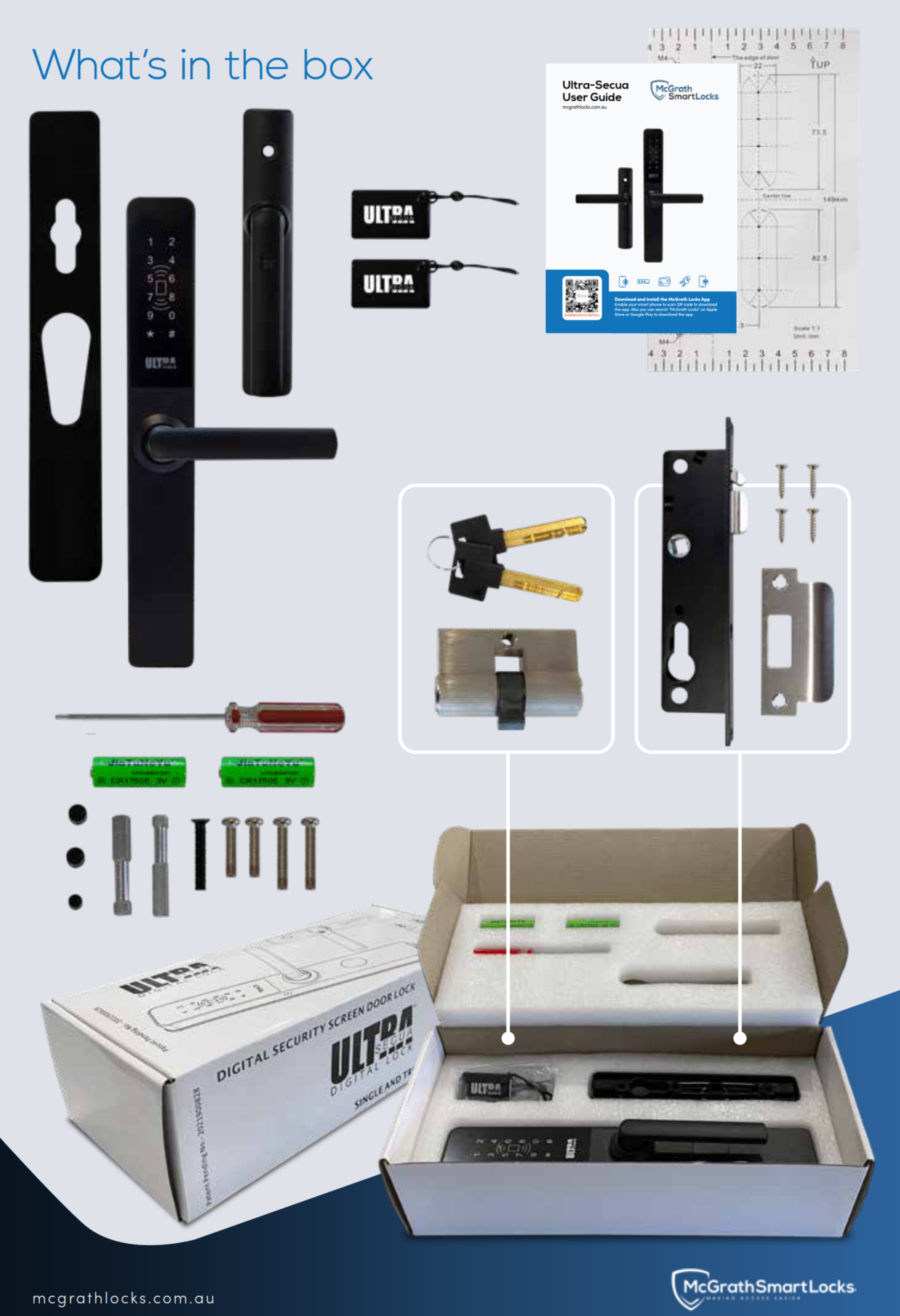
Note: the G5 gateway and the Austral Elegance triple-lock adaptor are not included and are sold separately.
 Suitable Uses
- Hinged aluminium security screen doors - single-point and rod-based triple-locking designs, 19 to 30mm thick. Check the door type compatibility matrix if you are unsure what you have.
- Retrofit over an existing Whitco, Austral, Doric or Lockwood screen door mortice - identify what is on the door now with Chapter 02 - existing hardware, and avoid the clearance mistake before you order.
- Homes where the screen door is the door people actually use - keyless entry for the family with the main door left on its existing lock, or paired with a narrow-stile smart lock on the aluminium front door behind it.
- Rental and short-stay properties where guests, cleaners and trades need time-limited screen door codes and the owner wants an access log - see the two approaches to short-stay access and how TTLock automation works for Airbnb.
- Coastal and exposed homes - IP66 external housing and 300-hour salt spray rated black finish. Read the Gold Coast coastal note before fitting any electronic lock near the beach.
- Home offices and light-commercial front screens where remote access is wanted - add a gateway and browse all app-enabled and Wi-Fi capable smart locks.
- Buyers who want the screen and front door to open in one action should choose the ULTRA-SECUA Dual Unlock instead - this standard model does not pair.

Sliding screen doors - the ULTRA-SECUA is a hinged-door lock; for sliders see the sliding door category. Cable-linked triple-lock kits - rods only. External pedestrian gates - the interior unit is not weather sealed; for a gate use the McGrath Ascot or browse the external gate category. Fire doors - no fire rating; see the fire door category.
 Available Finish Options
 Matt Black
(This Product)
STK MLULSBKWM
The ULTRA-SECUA Standard is supplied in Matt Black only. Finish selection does not affect functionality, compliance, or performance. The Dual Unlock model is also Matt Black. If you need a silver screen door lock, the Yale Unity Security Screen Door Lock is stocked in Silver.
 ULTRA-SECUA Range - Standard vs Dual Unlock
This product (bold row) is the Standard model. Both models share the same lock body, mortice, spindles, batteries, IP66 housing and install procedure - the Dual Unlock adds the pairing feature and nothing else. The products that offer dual unlock in Australia, and how the McGrath and Yale approaches differ, are compared in the guide. The other purpose-built screen door smart lock we stock is the Yale Unity Security Screen Door Lock (Yale Home app, key-free, Silver or Matt Black); for a glass or tempered screen the McGrath Kedron fingerprint deadbolt is the alternative.
 Accessories and Spares
Every part and add-on we stock for the ULTRA-SECUA, in one place. Consumables and servicing items first, then credentials, then the remote-access gateways. All are McGrath Locks genuine parts, supported through LSC's Australian supply chain.
Which gateway? G3, G4 and G5 compared, or choosing the right gateway in Chapter 14. More McGrath parts are in the gateways and bridges, RFID credentials and other smart lock accessories categories.
Installation and Compatibility
- Designed for hinged aluminium security screen doors. Not for sliding screens - see the sliding door category instead.
- Retrofits most Australian screen door mortice formats - Whitco, Austral, Doric and Lockwood. Work out what is on the door now with Chapter 02 - existing hardware; the mortice vs cylindrical door prep explainer is the same chapter.
- Door thickness 19 to 30mm. Two spindles are supplied: 8 x 8 x 51mm for 19-25mm doors, 8 x 8 x 57mm for 25-30mm doors. Measure first - how to measure door thickness.
- Three-step fit: install the mortice in the existing cutout and fit the strike plate to the frame; install the cylinder and fix it with the supplied screw; fit the exterior and interior assemblies, tighten the two fixing screws and press in the rubber plugs.
- The triangular marker on the lock hub must be correctly aligned or the lock will not throw - it is the first thing to check if the door will not lock, and one of the three most common DIY mistakes.
- Triple-locking screens: rod-linked kits only, and the top and bottom locks (with the plastic adaptor) may need reversing. Full guidance in Understanding Triple Lock Kits and brand-specific notes. McGrath's own installation videos are linked from the same guide.
- Check the clearance between the security screen and the main door before ordering - the exterior unit projects further than the lever it replaces. The measurement that matters and Chapter 02 - screen door clearance.
- Door alignment matters as much as the lock. A screen that drags or springs will strain the motor and flatten batteries - the most underestimated factor. Not sure whether to DIY? When DIY is appropriate and when it is not.
 Handle Direction Adjustment
The ULTRA-SECUA suits both left-hand and right-hand opening screen doors and is changed over with a screwdriver - there is no handed version to order. Not sure which hand your door is? How to determine your door's handing, and why the US and Australian conventions confuse people.

To change the handle direction:
- With a screwdriver, loosen the inside screw on the interior assembly.
- Rotate the interior handle 90 degrees to the left or right as required. The "A" mark on the spindle base must stay in the same direction as the handle.
- Retighten the screw securely.
Confirm handing during installation. Ordering the wrong hand is not a risk on this lock, but it is on some others in our range.
 ULTRA-SECUA - Technical Specifications
 Dimensions

 Battery, Power and Backup Access
- Runs on 2 x 3V lithium batteries, supplied in the box. This is the one McGrath lock that does not take AA or AAA cells - order the McGrath 3V lithium replacement rather than reaching for a supermarket pack.
- Typical life 36 to 48 months depending on how often the screen door is used. What really drives battery life - alignment and drag matter more than the number of unlocks.
- Low battery warning at 4.8V: the lock beeps each time you wake the keypad and the McGrath Locks App flags it. Replace both cells together and never mix old and new - monitoring and choosing batteries.
- If remote unlock stops working before the keypad does, that is usually the batteries, not your Wi-Fi - reading a low-battery fault correctly.
- Mechanical key override gets you in if the batteries are flat. The keyhole is under the rubber cover at the base of the exterior unit - what to do when the battery dies, and keep the override key outside the house.
- Codes, cards and app users are held in the lock and survive a battery change. Only a deliberate factory reset clears them.
- The battery cover is held by a triangular recessed screw; the mini security screwdriver is in the box, and the full-size McGrath Torx screwdriver is the replacement tool. The interior unit that houses the batteries is not weather sealed - keep it dry.
- No mains power involved, so a blackout changes nothing at the door - what actually happens in a power outage. More on power in Chapter 13 - Power and Battery FAQs.
Wi-Fi Remote Access (Optional)
There is no Wi-Fi radio in the ULTRA-SECUA. On its own it is a Bluetooth lock - your phone talks to it when you are within about ten metres, and every code and tag works with no internet at all. Smart vs connected is the distinction that matters here.
Pair it with a McGrath gateway and the same app works from anywhere: unlock the screen door for a tradie while you are at work, issue or revoke a code for a guest, and see the access log live. The G5 is dual-band and the one we fit in most homes because it avoids the band-steering problem behind most "my lock dropped off Wi-Fi" calls; the G4 adds a 4G SIM fallback for holiday homes; the G3 is wired Ethernet for offices. One gateway covers every McGrath lock within Bluetooth range - where to place it.
Not sure you need one? Do you actually need a gateway? and Bluetooth only vs gateway in Chapter 14. If the internet drops, local access is unaffected.

 App Platform and Data Hosting
 How TTLock compares with Tuya, Yale Home, Igloohome and Carbine Connect is laid out in Chapter 15 - choosing a platform; the platform's published security history is in Chapter 14 - security considerations.
A screen door lock should still be working, and still supported, in ten years. McGrath locks are distributed by LSC, a century-old Australian security wholesaler, and installed and warranted locally by Terry's. Read why longevity matters more than features, why a globally proven, locally branded app is the safer bet, and what a realistic lifespan looks like for an electronic lock on the Gold Coast.
 Frequently Asked Questions
Five questions buyers ask before ordering. The FAQ tab above carries the full owner's guide - setup, triple locks, codes, gateways and troubleshooting.
Almost certainly, if the door is hinged aluminium, 19 to 30mm thick, and currently has a Whitco, Austral, Doric or Lockwood mortice lock. The two things that stop a fit are a cable-linked triple lock (rods are fine) and too little clearance between the screen and the main door. Check door compatibility and measure the clearance, or book a free site survey.
Yes, if the kit uses rigid rods. Cable-linked kits are not compatible. On rod kits the top and bottom locks and the plastic adaptor usually need reversing so the kit locks by lifting the interior handle. This is the part that trips DIY installers - cables vs rods and why we recommend a locksmith here. Austral Elegance kits also need the rod adaptor.

Same lock, same install. This Standard model secures the screen door on its own. The Dual Unlock adds a Bluetooth pairing feature so that opening the screen door also opens a compatible McGrath main door lock in one action. If you have, or plan to fit, a McGrath lock on the front door and want one code for both, buy the Dual Unlock. What Dual Unlock actually does and what it does not do.
No. Codes, tags and the app over Bluetooth all work with no internet. A gateway is only needed if you want to unlock or manage the lock when you are away from home - what changes when a gateway is added. If you do add one, the G5 is the one to buy for a normal home - gateway choice explained.
You can, but do not. If the lock is first programmed from the keypad using the printed codes, Bluetooth pairing is closed off and the lock stays keypad-and-key only until it is factory reset. Register it in the McGrath Locks App first, then use the keypad as an everyday credential. See the setup warning above, the TTLock app manual, and the 24-hour passcode rule that catches most new owners.
 Additional Information
This is one of the more involved smart lock fits we do: spindle selection by door thickness, hub alignment, and on triple locks the component reversal. Get one wrong and the door will not lock - the symptom is nearly always a handle that turns but a bolt that does not move, which is DIY mistake number one. Terry's recommends professional installation - our supply and install service, and why Gold Coast customers trust Terry's.

The exterior unit projects 50mm from the door face. If the gap between your closed screen and the main door is tighter than that, the lock will foul or the main door will not close. Measure the projection of the lever on the door now and compare - the measurement that matters. The same check applies before pairing a Dual Unlock.

The exterior housing is IP66 rated: dust tight and resistant to high-pressure water jets, which suits a screen door that takes weather. The interior unit, which houses the battery compartment, is not weather rated and must stay dry. That is why this lock is not suitable for an open pedestrian gate; use the McGrath Ascot there. Plain-English IP ratings are in Chapter 11.

The black finish is tested to 300 hours neutral salt spray, which is a genuine coastal-grade result for a screen door lock. It is still an electronic device metres from the surf: rinse the exterior with fresh water occasionally, keep the battery compartment dry, and read why coastal Queensland is not gentle on locks and how corrosion grades are measured.
The ULTRA-SECUA is McGrath's only screen door lock. For the aluminium front door behind it, the slimline A231 and A210 share the same app and gateway. For a glass or tempered screen, the Kedron deadbolt is the alternative. The whole range is profiled in Chapter 10, and how it compares with the other platforms for a residential home is in the platform guide.

12-month warranty against defects in materials and workmanship (24-month on ALBION, ASCOT, ASHGROVE, BARDON, GRANGE, HAMILTON, KEDRON, MANLY, SANDGATE, STAFFORD, ULTRA SECUA and WINDSOR models). McGrath Locks will repair, replace, or refund at their discretion. Proof of purchase required for all claims. Returns & Warranty | McGrath Locks Warranty
 Download PDF Resources
Six-page McGrath brochure: access types, security features, the current technical specifications table, what's in the box and dimension views. The authoritative spec source for this model.
Two-page guide. Page one: keypad programming codes, passage mode, anti-peep, lockout, low battery, reset and demo mode, and the app-first setup warning. Page two: exploded diagram, handing change, spindle selection, three-step install and the triple-lock reversal note.
Single-page component diagram naming every part of the exterior and interior assemblies - useful when talking to Terry's about a service part.
McGrath's original seven-page technical sheet with description, system specification table, programming and installation instructions. Some capacity figures in this earlier edition have since been revised - the brochure above carries the current specifications.
The 56-page platform manual behind the McGrath Locks App: registration, adding a lock, eKeys, the six passcode types, card management, Bluetooth unlocking and gateway setup. Skip the fingerprint section - this lock has no reader. Also available as a web page.
McGrath ULTRA-SECUA - FAQ, Setup and Owner's Guide
Everything we get asked about the ULTRA-SECUA, grouped by topic. General smart lock questions are in Chapter 13 - Smart Lock FAQ, and the full Smart Lock Buyer's Guide starts at Chapter 01.
Fit, Door Compatibility and Triple Locks

19 to 30mm. Two spindles come in the box - 51mm for 19-25mm doors, 57mm for 25-30mm doors - and the installer picks the right one. Measure with a ruler across the door edge, not the frame: Chapter 02 - door thickness.
Look inside the door edge at the top and bottom locks. Rigid metal rods running to the centre lock mean the kit works with the ULTRA-SECUA. Flexible cables or a steel wire in a sheath mean it does not, and the practical fix is to remove the triple kit and run single-point. How to identify your kit type has photos; the single-point alternative explains the trade-off.
McGrath's guide has brand notes for Austral, Whitco Tasman MKII and Lockwood kits. Austral Elegance is the one that needs an extra part, the rod adaptor.
Enough for a 50mm projection from the screen door face. Close the screen, measure from its outer face to the nearest point on the main door or its furniture. Under 55mm and most push-pull front door handles will not clear; Chapter 02 - screen door clearance gives the thresholds and which screen door locks are purpose-built to keep projection down.
No. It is a hinged-door lock. The sliding door category lists what we stock for sliders, including the hook-bolt McGrath A231 for sliders. The door type compatibility matrix covers every Australian door type.
No. Loosen the interior screw, turn the handle 90 degrees, retighten. Field-reversible vs fixed explains why this matters on some products and not on this one.
Yes - by-laws on external door appearance, and whether the screen is on a fire-isolated path (it usually is not, but check). The four strata checks in Chapter 04, and the one-penetration principle for Queensland apartments if your main door is fire rated.
Standard vs Dual Unlock
No - the pairing feature is in the Dual Unlock's firmware, not an add-on. If there is any chance you will want the screen and front door on one code, buy the Dual Unlock now; the price difference is small against a second lock later. Who Dual Unlock is for.
McGrath pairs the two locks directly over Bluetooth at the door; Yale runs DualDoor through the Connect Plus Hub 2 gateway. Different approach, different hardware, both work. McGrath vs Yale - which suits you, and the Yale Unity DualDoor callout for the other side of the comparison.
Setup, App and Codes
Exactly what the user guide warns about: keypad-first programming closes the Bluetooth pairing path. The only way back is a factory reset - press and hold the reset button on the interior unit until the lock says "please input initialization passcode", then enter 0 0 0 #. Every code, card and user is wiped. Now register the lock in the app before touching the keypad. Re-adding a lock covers the app side.
Permanent, timed (a start and end date), one-time (six-hour validity), recurring or cyclic (a cleaner every Tuesday), custom, and an erase code that wipes all others. The six passcode types, and the weekly cleaner example.
A permanent code made remotely must be used at the keypad within 24 hours or it lapses - the single most common TTLock support call. The 24-hour activation rule and how to stop codes expiring.
Almost never. Either someone used an erase code, or the lock's clock has drifted on a Bluetooth-only install. Recovering after an erase code, clock drift symptoms and calibrating the clock without a gateway.
Type any random digits before or after your real code and press #. The lock finds the correct sequence inside the string and opens. Someone watching from the footpath sees twelve digits and learns nothing. It works at the keypad without any setup. PIN access in Chapter 03.

At the keypad, enter a valid code and press # then, within five seconds, press 1 2 3 #. The door stays unlocked until you present a code or card again. If you set passage mode in the app, you must clear it in the app. Handy for gardening, moving in, or a party.

Up to 1,000 credentials. Any 13.56 MHz Mifare Classic S50 or S70 card, fob or sticker enrols - McGrath's own card, fob, wristband and sticker are all guaranteed fits. Bank cards and most transit cards are a different standard and will not. Lose one? Delete just that tag in the app, not the lot. IC cards and other credentials.

Yes - in the app, or at the keypad with *30#, your admin code#, then 0# (1# turns them back on). Useful if the screen door is beside a bedroom.
Erase code first, delete the lock from your app, delete any gateway, collect the tags, then let the new owner register it fresh - the five-step handover checklist. The app also supports transferring a lock to another account.
Remote Access and Gateways
For a normal home, the G5 - dual-band, so it does not fight your router's band steering. Unreliable NBN or a holiday house: the G4 with a 4G SIM. Office with a network switch: the G3 on PoE. Full comparison: choosing the right gateway.
Nine times in ten it is band steering - the router shunting the gateway onto 5GHz where a 2.4GHz-only gateway cannot follow. Either split your Wi-Fi into named 2.4 and 5GHz networks, or fit a G5. Band steering explained, the hardware fix, and Chapter 13 Q11.
Within about eight to ten metres of the lock with as few walls as possible - a screen door lock is often the hardest to reach because it sits on the outer skin of the house. A hallway power point near the front door is the usual answer. Gateway placement.
Yes, with a gateway. Hostaway, Guesty and similar property management systems can push time-limited codes to TTLock locks automatically. PMS integration in Chapter 14, how TTLock automation really works, and the Wi-Fi drops during a stay scenario you must plan for.
Power, Weather and Lifespan
The exterior housing is 24mm deep - there is no room for AA cells, and lithium holds voltage better in heat. Buy the exact McGrath cell; a lower-capacity generic will shorten the interval and may not sit in the holder correctly.
Lift the rubber cover at the base of the exterior unit and use the mechanical key. Then replace both cells. If the key is inside the house, that is the problem key storage outside the house exists to prevent. What to do when the battery dies.
Yes - IP66 is dust tight and resists high-pressure water jets, and a screen door is exactly the exposed position it is rated for. The interior unit is not rated, but it faces into the house. IP52 through IP67 explained.
300 hours salt spray is a strong result for a screen door lock and better than most. Rinse the exterior with fresh water now and then, keep the interior dry, and expect the finish to outlast a cheaper lock by years. Coastal environments - Gold Coast specific.
Rated to 300,000 cycles - at twenty openings a day that is over forty years of mechanism life, so the electronics and the finish set the real limit. Sun, salt and a badly aligned door are what shorten it. Realistic lifespan expectations and what actually fails.
Security and Data
Five wrong attempts locks the keypad for 35 seconds, and you can still open it from the app during the lockout. Combined with 4 to 9 digit codes and anti-peep, brute forcing is not realistic. The app also logs every attempt.
TTLock has published vulnerabilities on record, all requiring Bluetooth proximity to exploit, and has patched them - the full disclosure in Chapter 14. The cloud layer is TTLock's own; your day-to-day unlocking over Bluetooth never touches it. Where each platform hosts data, and what that means for you, is in the platform hosting table and Chapter 15 - security and data sovereignty.
That is the weakness the ULTRA-SECUA was designed around. The interior handle geometry stops it being worked through a cut or damaged screen, unlike the plain lever it replaces. Chapter 01 explains the authentication stack a smart lock adds on top of the mechanical layer.
Troubleshooting
Three checks in order: is the lock in demo mode (no admin registered yet - registering one clears it); is it in passage mode; is the triangular marker on the hub aligned per the installation guide. On a triple lock, were the top and bottom components reversed? The symptom-to-fix table in Chapter 12.
Check the cells are seated the right way round; if the lock worked yesterday, replace both cells. Confirm the ribbon cable between the interior and exterior units is not pinched in the door - the third cause of poor battery life after cell quality and door drag. Door misalignment is the hidden one.
From the factory, before an administrator is registered, the lock opens to code 1 2 3 4 5 6 # and to any card. Registering your admin in the app ends demo mode. If you ever need it back for bench testing, entering 2 4 6 7 9 # re-enables it - but never leave a fitted lock in demo mode.
No. McGrath locks do not have the hardware for it and switching it on only produces false alerts - why McGrath does not support it and how to turn it off in three steps if a previous owner enabled it. The wrong-code lockout above is the alarm that actually works.
Related Products, Guides and Chapters
ULTRA-SECUA family and parts: ULTRA-SECUA Dual Unlock - 3V Lithium Battery - Austral Elegance Rod Adaptor - Torx Screwdriver
Credentials and remote access: RFID Card - RFID Fob - RFID Wristband - RFID Sticker - G5 Gateway - G4 Gateway - G3 Gateway - 240V Wall Adaptor
Other screen door and McGrath options: Yale Unity Screen Door Lock - Silver - Yale Unity Screen Door Lock - Matt Black - McGrath Kedron - McGrath A231 - McGrath A210 - McGrath Ascot gate lock - all McGrath Locks
Categories: Security Screen (Hinged) - Narrow Frame - PIN Code - Fob / Card / RFID - Bluetooth - Has Backup Key - Gateways - RFID Credentials
Buyer's Guide chapters: 01 What Is a Smart Lock - 02 Measuring Your Door - 03 Access Methods - 04 Door Types - 07 Airbnb and Short-Stay - 08 Gateways - 10 Brand Profiles - 11 Standards and IP - 12 Installation - 13 FAQ - 14 TTLock Platform - 15 App Platforms
Blog guides: UltraSecua and Triple Lock Kits - Check Screen Door Clearance - Dual Unlock Explained - TTLock Tips and Tricks - TTLock vs Tuya - Which Platform Is Right for You - Gateways Compared - Mechanical Key Override - Realities of Electronic Locks - Site Survey and Installation - Terry's, LSC and McGrath
What's in the Box - McGrath ULTRA-SECUA
- Exterior lock assembly - keypad, RFID reader, handle, emergency key cylinder under a rubber cover
- Interior lock assembly - handle, slide button, reset button, battery compartment
- Screen door mortice lock (single and multi-point compatible)
- Strike plate
- Key cylinder with 2 x mechanical override keys
- 2 x RFID access tags (Mifare)
- 2 x 3V lithium batteries
- 2 x spindles - 51mm for 19-25mm doors, 57mm for 25-30mm doors
- Fixing screws, screw hole rubber plugs and reset hole rubber plug
- Drill positioning template
- Mini security screwdriver for the triangular battery cover screw
- User and installation guide
McGrath ULTRA-SECUA - Real Installations
McGrath ULTRA-SECUA - Dimensions
McGrath ULTRA-SECUA - Product Brochure
Six-page McGrath brochure. Download the PDF version from the PDF Files tab.


PDF Files - McGrath ULTRA-SECUA
Six pages: access types, security features, current technical specifications, box contents and dimension views.
Keypad programming, passage mode, lockout and low battery on page one; exploded diagram, handing change, spindle selection, install steps and the triple-lock note on page two.
Component diagram naming every part of the exterior and interior assemblies.
McGrath's original seven-page technical sheet. Some capacity figures have since been revised - refer to the brochure for current specifications.
56-page platform manual behind the McGrath Locks App - registration, adding a lock, eKeys, passcode types, card management and gateway setup.
McGrath Locks Warranty
Warranty Summary
How to Make a Claim
- Contact Terry's Tradies Pty Ltd and its associated websites, trading names, and subsidiaries (the place of purchase) within the applicable warranty period.
- Supply your proof of original purchase - a receipt or tax invoice is required.
- Provide a clear description of the fault and your contact details.
- You may be asked to return the product for assessment before a remedy is determined.
- McGrath Locks will, at their discretion, repair the product, replace it with the same or an equivalent model, or provide a refund of the purchase price.
 Exclusions
This warranty does not cover:
- Normal wear and tear
- Products that have been disassembled
- Damage caused by improper handling, incorrect installation, misuse, abuse, neglect, modification, or accident
- Installation by unlicensed persons (including non-licensed locksmiths or technicians)
- Products not used in accordance with the supplied instructions
- Cosmetic damage that does not affect functionality
- Labour or installation costs related to the removal or reinstallation of products
- Exposure to conditions outside normal environmental use
- Work completed before warranty approval
- Damage caused by battery leakage, battery failure, or force majeure
Our goods come with guarantees that cannot be excluded under the Australian Consumer Law. You are entitled to a replacement or refund for a major failure and compensation for any other reasonably foreseeable loss or damage. You are also entitled to have the goods repaired or replaced if they fail to be of acceptable quality and the failure does not amount to a major failure. This warranty is provided in addition to your rights and remedies under the Australian Consumer Law.

Confused? Overwhelmed? We get it.
Choosing the right smart lock can be genuinely tricky - door types, backsets, app platforms, compatibility with your existing hardware... there is a lot to consider. We have decades of experience fitting locks of all types, including smart locks, and we are happy to help.
Our expert recommendation service is free. Upload a few photos of your door and describe what you need, and one of our qualified locksmiths will give you a personalised recommendation.
Get Your Free Recommendation →How it works - three easy steps:
1. Upload photos
A few clear shots of your door, lock and frame - inside and out.
2. We assess
Our locksmith reviews your setup and requirements - door type, weather exposure, how you want to use it.
3. You get a recommendation
A personalised recommendation tailored to your door, budget and needs. No pressure, no upsell.
Also useful while you are deciding: