


Lockton ELEV36 E-Series Smart Door Lock (Hinged Door)
 At A Glance
At A Glance




 Fingerprint
 PIN Code
 RFID Fob/Card
 Bluetooth App
 WiFi (Gateway)
 Key Override
The Lockton ELEV36 is a smart euro mortice lock designed for hinged doors with a 28-50mm door thickness and backsets from 25mm to 70mm. It replaces an existing euro mortice lock in a single installation and adds six access methods - fingerprint, PIN code, RFID fob or card, Bluetooth via app, WiFi via optional gateway, and a 6-pin C4 key override - without requiring a secondary latch or separate lockset.
The external handle is rated IP66, making it suitable for exposed or semi-exposed door positions. The lock is built on the TTLock platform - the same app ecosystem used by McGrath, Austyle, and other brands - meaning residents and managers familiar with TTLock can add an ELEV36 to an existing setup without learning a new system.
The lever clutches on authentication, so lifting the handle without an access credential does not retract the latch - a critical security feature on smart lever locks. An optional G2-GATE WiFi bridge or G3-GATE Ethernet gateway unlocks full remote management from anywhere with an internet connection. Browse our full range of Bluetooth smart locks and fingerprint smart locks, and also see the matching ELEV36-S sliding door version.

 Key Features
- Six access methods: Fingerprint, PIN code (4-8 digits), RFID fob or card, Bluetooth via TTLock app, WiFi via optional gateway, and 6-pin C4 key override. Shop our full app-enabled smart lock range.
- IP66 external handle: Dust-tight and jet-water resistant - suitable for a wide range of installation environments including exposed entry positions.
- Clutching lever handle: The handle is mechanically decoupled from the latch until a valid credential is presented - no retraction without authentication.
- Double-point locking: The latch automatically engages on door close; the deadbolt throws by raising the lever for additional security.
- Retrofits existing euro mortice locks: Compatible with standard hinged-door euro mortice installations - 85mm pitch, 8mm spindle, backsets 25-70mm.
- 300-user capacity: Fingerprint, PIN codes, and RFID cards/fobs can each hold up to 300 registered credentials.
- 6-pin C4 rekeyable half-euro cylinder: Key override that can be re-cut or converted to a restricted profile by a locksmith. Part of our smart locks with key backup range.
- Gateway-ready: Compatible with the G2-GATE WiFi bridge and G3-GATE Ethernet gateway for full remote access management. Browse our full range of WiFi smart locks.
- Sliding door variant available: The ELEV36-S uses the same panel with a sliding door hook-bolt mortice body.
- RFID fingerprint smart lock: Join our fingerprint smart lock range - the ELEV36 is one of our most-installed biometric locks for hinged doors. Also see our RFID/fob/card smart lock range.
Access Methods
 Face Recognition
 What's in the Box
- 1 x Front handle (with touchscreen keypad, fingerprint sensor, RFID sensing area)
- 1 x Front rubber gasket
- 1 x 6-pin C4 rekeyable half-euro cylinder
- 2 x C4 keys
- 1 x Cylinder retaining screw
- 1 x Battery cover
- 1 x Rear handle
- 1 x Rear rubber gasket
- 2 x RFID key fobs (13.56 MHz, ISO/IEC 14443-A)
- 4 x Screw-spindle packs (door thickness: Pack 1: 32-38mm, Pack 2: 39-45mm, Pack 3: 46-52mm, Pack 4: >53mm)
- 4 x AAA Alkaline batteries (do not substitute Lithium)
- 1 x Instruction manual
- 2 x Sliding door installation templates
- 2 x Hinged door installation templates
 Suitable Uses

 Available Finish Options
 Matt Black
STK ELEV36-H Silver
STK ELEV36-H
Finish selection does not affect functionality, compliance, or performance. Specify your preferred finish (Black or Silver) and backset when ordering - see the Item Code Family table below.
 ELEV36 Item Code Family - Hinged Door
Select your backset based on the distance from the door edge to the centre of the spindle hole. The ELEV36-S (sliding door) is listed separately with 4 backset options. For help measuring see Measuring Your Lock Backset.
 Full Specifications
 Dimensions
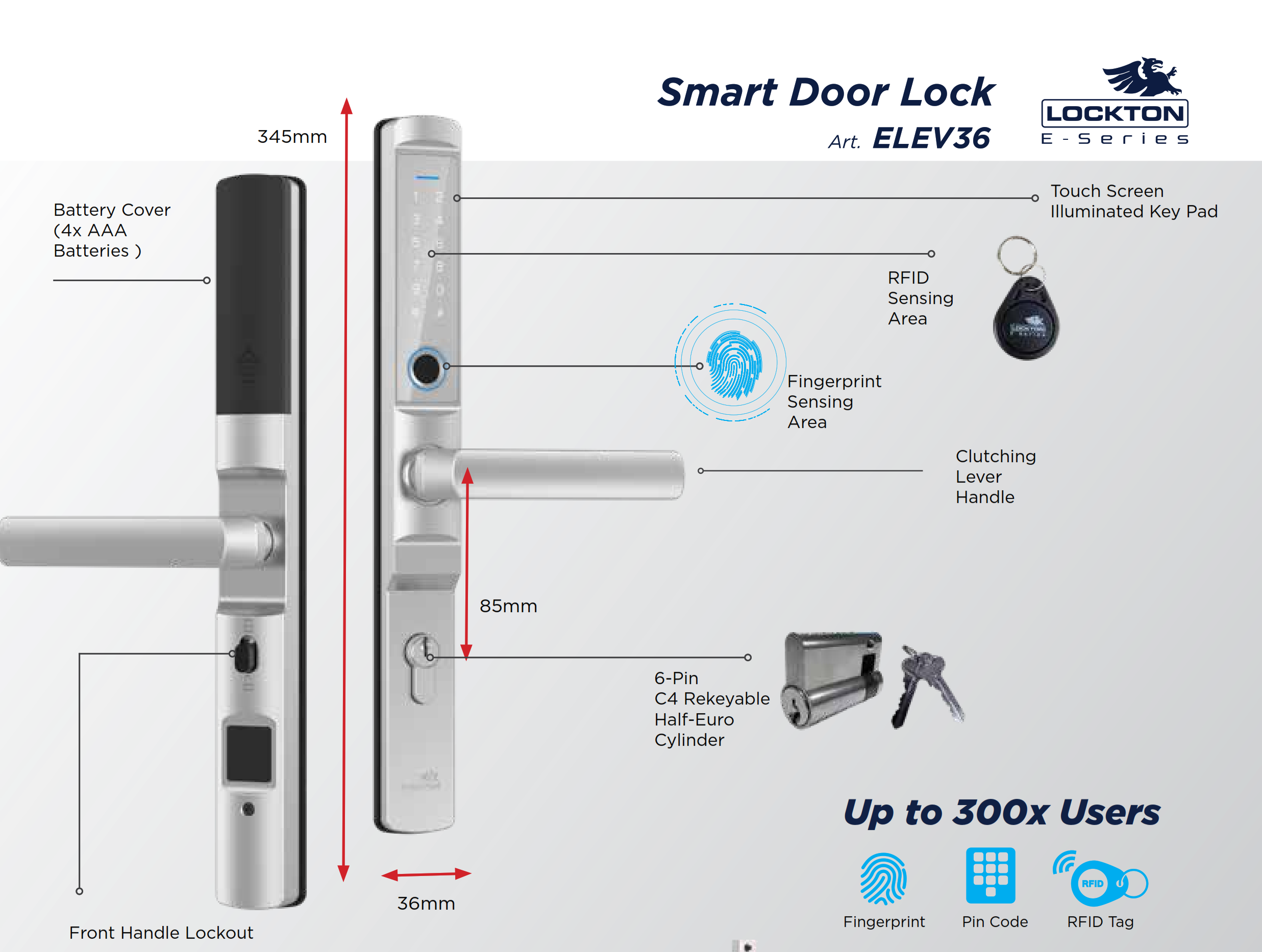

 Battery & Power

 TTLock App
The ELEV36 operates on the TTLock platform, available for iOS and Android . Through the app you can enrol fingerprints, PIN codes, and RFID credentials; issue eKeys; review unlock history; and manage Passage Mode. If you already use TTLock for another lock, the ELEV36 can be added to the same account. For the full platform guide see Ch 14 - TTLock Platform Guide, and for a cross-brand comparison see Ch 15 - Smart Lock App Platforms.
 Frequently Asked Questions
Measure from the edge of the door to the centre of the existing spindle hole. This distance in millimetres is your backset. If replacing an existing euro mortice, the backset is usually stamped on the lock body faceplate. See Measuring Your Lock Backset and Chapter 02 - Measuring Your Door.
Yes. Bluetooth-only operation is fully functional - lock, unlock, and manage credentials from your phone within Bluetooth range. A gateway is only required for remote internet management. For the Airbnb use case a gateway is strongly recommended. See Bluetooth vs Gateway explained and Do You Really Need WiFi for Airbnb?

No. Any 13.56 MHz ISO/IEC 14443-A MIFARE card or fob works. The RFID-FOB-BLK is available separately for additional users. See our RFID fobs and cards range.
The TTLock app sends a low-battery notification well before power is exhausted. When fully depleted, the key override cylinder remains functional - unlock with a physical key, then replace batteries from inside. No data is lost. Do not use Lithium batteries. See TTLock battery management tips.

The external handle carries an IP66 rating - dust-tight and protected against powerful water jets - suitable for covered entry areas and sheltered external positions. Not rated for direct sustained immersion. For exposed coastal environments confirm installation position with a locksmith before purchasing.
Additional Information

 Warranty
Lockton products carry tiered manufacturer warranties - up to 10 years on mechanical locks, 3 years on smart locks and PVD/chrome finishes, and 1 year on electronic door closers, mechanical digital locks, and key accessories. Batteries carry no warranty. Proof of purchase required for all claims. Returns & Warranty | Lockton Warranty Statement
 Download PDF Resources
Six-page brochure covering the ELEV36 E-Series access methods, IP66 rating, key override, door kit options, dimensions, locking operation, 300-user capacity, and all Black/Silver item codes for hinged and sliding backsets.
Drilling and installation template for both hinged and sliding door configurations, covering spindle hole, mortice pocket, and backset positioning for all ELEV36 variants.
Full owner's manual and operating instructions covering fingerprint enrolment, PIN code setup, RFID programming, TTLock app pairing, battery replacement, and factory reset procedure.
Lockton ELEV36 (Hinged Door) - FAQ, Setup and Owner's Guide
More questions? See Ch 13 - Smart Lock FAQ and the TTLock Platform Guide (Ch 14) for in-depth answers. Terry's team is available for phone or on-site support across the Gold Coast.
Choosing the Right ELEV36 Configuration
Measure from the edge of the door to the centre of the existing spindle hole. If there is an existing euro mortice lock in place, the backset is usually stamped on the faceplate of the lock body itself. The ELEV36-H is available in 10 backsets: 25, 28, 30, 35, 40, 45, 50, 60, 65, and 70mm. For a full guide see Measuring Your Lock Backset and Chapter 02 - Measuring Your Door.

The ELEV36-H covers 28-50mm. If your door is thicker, it is outside the published range for this model. The screw-spindle packs inside the box are graded for up to 53mm+ (Pack 4), but Lockton's published specification caps the door thickness at 50mm. For doors beyond 50mm, contact Terry's before ordering to discuss options.

The ELEV36-H uses a standard latch-and-deadbolt euro mortice body designed for hinged doors. The ELEV36-S uses a hook-bolt mortice body designed for sliding doors, which engage differently as the door closes. The external panel and TTLock electronics are identical - only the mortice body differs. Make sure you select the correct variant for your door type before ordering.

Any standard hinged-door euro mortice lock with an 85mm handle pitch and an 8mm spindle. This covers the vast majority of euro mortice locks fitted to timber, aluminium, and glass-panel doors in Australia. If your existing lock has a different pitch, or if the spindle hole is not centred at 85mm between the two handle fixing screws, confirm compatibility before ordering.
Access, Credentials and App
The ELEV36 uses an optical fingerprint sensor. Recognition accuracy is good in dry, clean conditions; wet, dirty, or heavily calloused fingers may register slower or fail on a first attempt. Enrol two fingers per user (e.g. index and middle) for reliability. The sensor supports up to 300 fingerprints. For users who work outdoors or have dry skin, PIN code or RFID backup is always available at the same panel.
Up to 300 PIN codes across all code types. The TTLock app lets you create: Permanent codes (owner-level, no expiry), Timed codes (active during a date/time window - ideal for Airbnb guests), One-Time codes (single use, auto-delete after first entry), Custom codes (set recurring schedule), and Cyclic codes (repeat on a weekly pattern). Full detail at Ch 14 - Passcode Types and TTLock Tips - activation windows.
Yes. Any 13.56 MHz ISO/IEC 14443-A MIFARE-compatible card or fob can be enrolled up to the 300-credential limit. The Lockton RFID-FOB-BLK key fob is sold separately and is the confirmed-compatible branded accessory. Third-party 13.56 MHz ISO 14443-A fobs (e.g. standard MIFARE Classic 1K cards) also work. RFID credentials are programmed and revoked entirely at the lock via the TTLock app - there is no credential on the fob itself.
Yes. eKeys allow you to send time-limited or permanent access via the TTLock app to anyone with a smartphone - they download the app and accept the invite. You can also issue PIN codes or enrol RFID fobs for people who prefer not to use an app. For eKey sharing see Ch 14 - eKeys.
Gateway, Remote Access and WiFi
The G2-GATE is the standard WiFi bridge for the ELEV36 - it connects to your 2.4GHz WiFi and bridges Bluetooth to the cloud. The G3 uses a wired Ethernet connection instead of WiFi, which can be more reliable in dense RF environments. The G4 uses a mobile SIM card (no WiFi or Ethernet needed) - useful for remote properties. The G5 is a dual-band (2.4/5GHz) WiFi gateway. For a side-by-side comparison see G2 vs G3 vs G4 vs G5 Gateways Compared.
No. The G2-GATE and G3-GATE both require a 2.4GHz network. If your router uses band steering (combining 2.4GHz and 5GHz under one SSID), the gateway may have difficulty connecting. Create a dedicated 2.4GHz SSID on your router and connect the gateway to that. See TTLock Tips - band steering explained for troubleshooting steps.
Airbnb and Short-Stay Use
The standard workflow: create a Timed PIN code in the TTLock app that activates at check-in and expires at check-out. Send the code to the guest by text or email. No gateway is required to create codes, but a gateway is needed to create and send them remotely (after leaving the property). For integration with property management systems (Hospitable, Uplisting, RemoteLock, etc.) see Using TTLock for Airbnb in Australia and Ch 07 - Airbnb and Short-Stay Rentals.
Power and Battery
All credentials - fingerprints, PIN codes, RFID fobs, and eKeys - are stored in the lock's non-volatile memory and are not affected by a battery change. There is no need to re-enrol anything after replacing batteries. The TTLock app sends a low-battery notification (typically around 20% charge remaining) giving you plenty of warning before the lock stops operating.
No - Lockton specifies Alkaline batteries only (AAA). Lithium cells operate at a higher voltage and can cause calibration errors or erratic behaviour on TTLock-platform locks. Rechargeable NiMH batteries operate at a lower voltage and will trigger the low-battery warning prematurely. Use Duracell or Energiser AAA Alkaline for best results. See TTLock Tips - choosing batteries.
Installation, Troubleshooting and Suitability
Check that the correct hinged-door template was used (not the sliding door template included in the box). Confirm that the strike plate is correctly aligned with the latch bolt on the door frame. Verify that the selected screw-spindle pack matches your door thickness. For further DIY troubleshooting see Smart Lock Not Locking? 3 Common DIY Mistakes. For on-site support, Terry's team can diagnose and rectify in person - see our Advice and Installation page.
Low-battery alerts and access-event notifications are genuine and expected. If you receive repeated vibration or alert notifications that don't match any access event, this is a known behaviour on some TTLock-platform hardware caused by the app's legacy alert feature responding to minor vibration. This is not a fault with the lock's security. For context on this behaviour and how to manage it, see Tamper Alert on Smart Locks - what it is and How to Turn Off Tamper Alert on a TTLock Smart Lock. You can also check Ch 13 FAQ - Tamper Alert for further context.
The external handle is IP66 rated, which covers dust ingress and powerful jet water - adequate for sheltered or semi-exposed entry positions. However, Lockton rates this as a residential-grade smart lock, not an outdoor gate lock. For a fully exposed pool gate or gate post in direct rain and UV, a lock rated specifically for gate use (such as a Borg gate lock from our mechanical digital lock range) may be more appropriate. Discuss your installation environment with Terry's if you are unsure.
Related Products, Guides and Chapters
ELEV36-S (Sliding Door) - same panel, hook-bolt mortice for sliding doors | Lockton ELEV64 - the E-Series lever lock with fingerprint integrated into the lever | G2-GATE WiFi Bridge - remote access gateway for the ELEV36 | RFID-FOB-BLK - additional RFID key fobs | ELEV36-SLHD-BLK Turn Knobs (Black) - optional knob grip accessory | Extended Strike Plate (29mm Retrofit) - deep-jamb latch guidance | Extended Strike Plate (Large - Break-In Repair) | E-Series Rebate Kit - for rebated hinged doors | All WiFi Gateways and Bridges
Buyer's Guide chapters: Ch 02 - Measuring Your Door | Ch 04 - Door Types | Ch 07 - Airbnb | Ch 13 - Smart Lock FAQ | Ch 14 - TTLock Platform | Ch 15 - App Platforms
Related blogs: TTLock for Airbnb | G2/G3/G4/G5 Gateways Compared | Measuring Your Backset | TTLock Tips and Tricks | TTLock vs Tuya | Which App Platform Is Right for You? | Smart Lock Not Locking? 3 DIY Mistakes | Do You Really Need WiFi for Airbnb?
What's in the Box - Lockton ELEV36 (Hinged Door)

- 1 x Front handle assembly (a) - touchscreen keypad, fingerprint sensor, RFID sensing area
- 1 x Front rubber gasket (b)
- 1 x Half-euro cylinder / 6-pin C4 rekeyable (c)
- 2 x C4 keys (d)
- 1 x Cylinder retaining screw (e)
- 1 x Battery cover (f)
- 1 x Rear handle (g)
- 1 x Rear rubber gasket (h)
- 2 x RFID key fobs (i) - 13.56 MHz, ISO/IEC 14443-A
- 4 x Screw-spindle packs (j) - graded by door thickness: Pack 1: 32-38mm, Pack 2: 39-45mm, Pack 3: 46-52mm, Pack 4: >53mm
- 4 x AAA Alkaline batteries (k) - do not substitute Lithium
- 1 x Instruction manual (l)
- 2 x Sliding door installation templates (m)
- 2 x Hinged door installation templates (n)
Mortice lock body pack includes: 1 x mortice lock body, 5 x wood screws (4.2 x 20mm), 3 x metal self-tapping screws (4.2 x 20mm), 1 x cylinder screw, 1 x strike plate, 1 x strike plate plastic box, 1 x fixing tabs set.
Lockton ELEV36 (Hinged Door) - Real Installations
127 real installations by Terry's Locksmiths and customers across the Gold Coast QLD, Sydney NSW, Melbourne VIC, and Adelaide SA - across timber, aluminium, and glass-panel doors in Black and Silver finishes.


Lockton ELEV36 - Dimensions
Lockton ELEV36 E-Series Smart Door Lock - Product Brochure


PDF Files - Lockton ELEV36 (Hinged Door)
Six-page brochure covering the ELEV36 E-Series access methods, IP66 rating, key override, door kit options, dimensions, locking operation, 300-user capacity, and all Black/Silver item codes for hinged and sliding backsets.
Drilling and installation template for both hinged and sliding door configurations, covering spindle hole, mortice pocket, and backset positioning for all ELEV36 variants.
Full owner's manual and operating instructions covering fingerprint enrolment, PIN code setup, RFID programming, TTLock app pairing, battery replacement, and factory reset procedure.
Lockton Warranty
Lockton Security products are designed and manufactured to high standards of quality, durability, and performance. All Lockton branded products come with guarantees in accordance with the Australian Consumer Law, and additional warranties are offered as detailed below.
Warranty Summary
Warranty periods run from the date of purchase. Proof of purchase is required for all claims.
How to Make a Claim
Lockton products are sold exclusively through trade channels. End-users who have received a Lockton product via an installer or trade supplier should contact their installer in the first instance - the trade supplier will liaise with Lockton Security to process the claim on your behalf.
To lodge a warranty claim through Terry's Tradies Pty Ltd and its associated websites, trading names, and subsidiaries (including Gold Coast Smart Locks), please follow these steps:
- Contact us with details of the defect and, where possible, installation images.
- Supply your proof of purchase (invoice number or receipt).
- Provide contact details for claim updates.
- A Goods Return Number (GRN) will be obtained from Lockton Security on your behalf.
- Package the product securely, include the GRN, and return it as directed. Products returned without a GRN may not be accepted.
Once a correctly submitted claim is assessed by Lockton Security and approved, they will at their own cost and discretion either: repair and return the product; provide a replacement or similar product; supply refurbished goods of equivalent type and quality (covered under the remaining warranty period); or refund the purchase price. If the claim is not approved, Lockton Security will advise in writing and the product will be returned at the customer's expense, or recycled upon request.
 Exclusions
The Lockton warranty does not cover:
- Damage caused by improper use or incorrect product selection
- Improper installation
- Fair wear and tear
- Environmental conditions outside product specifications (e.g. coastal air, high humidity, or exposure to corrosive substances)
- Products that have been modified, repaired, or altered
- Use of non-genuine replacement parts or accessories
- Batteries (no warranty applies)
Our goods come with guarantees that cannot be excluded under the Australian Consumer Law. You are entitled to a replacement or refund for a major failure and compensation for any other reasonably foreseeable loss or damage. You are also entitled to have the goods repaired or replaced if the goods fail to be of acceptable quality and the failure does not amount to a major failure. The Lockton manufacturer warranty is offered in addition to, and does not limit, these statutory rights.
3 Reviews Hide Reviews Show Reviews
-
Lockton lock
The hardware installation was pretty tough and took a fair bit of faffing around to get it in. The software was simple and easy to connect to my phone and set up finger prints and passcodes. The finger print reader works about 25% of the time.
-
Great lock
Easy to install and setup
-
The Smart lock
Very happy with this purchase. I bought this lock after a great deal of searching as I needed a lock with a slimline profile and I needed to retro fit it to an aluminium hinge door to replace an older lock. The end result is better than I excepted, for example being able to unlock the door by fob code or fingerprint etc. I would recommend the Lockton Smartlock. Also I should commend Terry's team. They are with you all the through the purchasing process, checking that it was delivered. Excellent service.

Confused? Overwhelmed? We get it.
Choosing the right smart lock can be genuinely tricky - door types, backsets, app platforms, compatibility with your existing hardware... there is a lot to consider. We have decades of experience fitting locks of all types, including smart locks, and we are happy to help.
Our expert recommendation service is free. Upload a few photos of your door and describe what you need, and one of our qualified locksmiths will give you a personalised recommendation.
Get Your Free Recommendation →How it works - three easy steps:
1. Upload photos
A few clear shots of your door, lock and frame - inside and out.
2. We assess
Our locksmith reviews your setup and requirements - door type, weather exposure, how you want to use it.
3. You get a recommendation
A personalised recommendation tailored to your door, budget and needs. No pressure, no upsell.
Also useful while you are deciding:


