


Keyin Rim Lock Smartlock
At A Glance
 At A Glance




 PIN Code
  Keyin Card Key
  Keyin Plus App
  Fingerprint
(Add-On Module)
 Remote
(Bridge Required)
 Mechanical Key
Not Available
The Keyin Rim Lock Smartlock (Keyin S) is a rim-format smart lock designed as a direct replacement for a traditional deadlatch or rim lock on a timber entry door. Unlike a mortice lock, a rim lock mounts on the surface of the door face - making it a practical retrofit option for doors where a full mortice prep is not available or not practical. The Keyin S supports PIN keypad, RFID card or fob, Bluetooth app, and temporary PIN access out of the box. Fingerprint access is available as an optional add-on via the Keyin + Finger module.
The body is zinc die-cast with a satin nickel finish, and the exterior panel features an illuminated capacitive touch keypad. Auto locking secures the door immediately on closing. The Keyin Plus app (Android 8.0+ and iOS 13.0+) handles access management, temporary PIN issuance, geofencing, and - with an optional WiFi bridge - remote access and live status updates.
The Keyin S accommodates backsets from 60 to 120 mm, which gives it broader door compatibility than many mortice-format smart locks. For guidance on measuring your door backset before ordering, see Chapter 02 - Measuring Your Door (backset section) and how to measure a lock backset.

This product is a special order. Call for lead times before you plan an installation date. If you need a lock on the door sooner, our stocked smart lock range is the place to start, or ask our team for a recommendation.

The Keyin S is not fitted with a mechanical key cylinder. There is no keyhole and no physical key to fall back on: If the batteries go flat, the documented route back in is the 9V emergency power contact on the keypad panel - a 9V battery is not supplied with the lock, so keep one where you can reach it. Read how locks without a key override work and what happens when the battery dies. If a backup key is a requirement for your door, browse smart locks that do have a backup key, or look at the Keyin L Mortice Smartlock, which lists emergency override keys among its access methods.
 Key Features
- Rim lock format - surface-mount on the door face; no mortice pocket required; direct replacement for Lockwood deadlatch and rim lock series. See what a deadlatch is and the Lockwood 002 it commonly replaces.
- Zinc die-cast body, satin nickel finish - durable construction with a professional appearance
- PIN keypad - illuminated capacitive touch keypad with anti-peep PIN and scramble code; PINs are 4 to 10 digits. Browse all PIN code smart locks and read Chapter 03 on PIN entry.
- RFID card and fob access - up to 99 RFID cards or fobs; Keyin-supplied cards and stickers only. Compare credential types in Chapter 03 - RFID, or browse card and fob smart locks.
- Bluetooth app control - lock/unlock, geofencing auto-unlock (Smart Pass), and access management via Keyin Plus app within Bluetooth range
- Immediate locking by a diagonal dead latch - the latch is driven by the door's own movement rather than a motor, so the door is secured the moment it closes with no motor delay (patent 10-2021-0033009). How a latch differs from a deadbolt is covered in Chapter 01.
- Fingerprint access - optional add-on - fingerprint reader available via Keyin + Finger module (sold separately); not built into the Keyin S panel. Locks with the reader built in are in the fingerprint category.
- Immediate and auto locking - door is secured automatically on closing; auto-lock timing is set to immediate, 5 seconds or 10 seconds, and lockout mode activates on repeated wrong PIN entries
- Anti-peep PIN and scramble code - enter extra digits before or after your real PIN to prevent shoulder surfing
- Anti-theft alarm and EMP resistance - alerts on forced entry; resistant to electromagnetic pulse attack
- Internal and external forced lockdown - dedicated lockdown control on the interior module; fire alert sensor built in. See Security and Alerts for how each mode behaves, and what an internal lockdown disables.
- Emergency 9V power input - external jumpstart when batteries are flat (9V battery not supplied)
- Low battery warning - audible alert and app notification before power failure
- Broad backset range - 60-120 mm accommodates most standard and non-standard door preparations. Measure yours with our backset guide.
- Remote access via WiFi bridge - optional bridge accessory enables remote lock/unlock and live status (confirm availability with Terry's). Bridges and gateways generally are explained in Chapter 08 - what a gateway does, and the category is modules and WiFi gateways.
- Manager and Master Mode - user hierarchy management via Keyin Plus app, with up to 99 user PINs and 99 user card keys
PIN
RFID
Bluetooth
Fingerprint*
WiFi (bridge)
* Fingerprint access requires the Keyin + Finger add-on module - not built in to the Keyin S. The Keyin S has no mechanical key override.
Access Methods
 Face Recognition
The Keyin S does not have a built-in fingerprint reader. Fingerprint access is enabled by fitting the separate Keyin + Finger module - ask Terry's about availability and compatibility before purchasing. This is an important distinction from other smart locks where fingerprint is included as standard. See Chapter 03 - Access Methods (fingerprint section) for how fingerprint readers work on smart locks generally, or browse locks with the reader already built in.
 What's in the Box
- Front body (exterior keypad panel) x1
- Main body (interior unit) x1
- Main bracket x1
- Battery cover x1
- Strike x1
- Strike extenders x2
- Keyin card keys x4
- AA alkaline batteries x4
- Guide screws x3, main body screws x4, main bracket and strike screws x9
- Easy manual and installation manual
Not included: the 9V battery used for emergency power, the Keyin + Finger fingerprint module and the WiFi bridge. Extra card keys must be Keyin-supplied - other-brand RFID cards and fobs cannot be registered to this lock.
The strike extenders are listed as one 1.5 mm and one 3.5 mm packer in the product manual and as two 1.5 mm packers in the installation guide - check what is in your carton before cutting the strike in.
 Suitable Uses
 Available Finish Options
 Satin Nickel
(This Product)
STK Keyin S
Finish selection does not affect functionality, compliance, or performance. Satin nickel is the zinc die-cast, nickel-plated and clear-coated build; the gloss-coated cast aluminium finishes in Keyin's wider catalogue are not ranged here.

 Keyin Plus App
The Keyin S is managed through the Keyin Plus app, available on iOS 13.0 or later and Android 8.0 or later. Keyin Plus is its own platform - it is not TTLock, not Igloohome and not Yale Home, so if you are comparing ecosystems start with Chapter 15 - choosing a platform and what TTLock is, since most of our other brands sit on it.
Within Bluetooth range, the app provides lock/unlock, geofencing Smart Pass auto-unlock, temporary PIN issuance, access history, and Manager/Master user hierarchy management. With a compatible WiFi bridge, remote access and live status updates are available - confirm bridge availability with Terry's. The legacy listing also referenced Alexa, SmartThings, and Apple Home compatibility (with smart plug-in required) - confirm current smart home integration status with Terry's before relying on these for your installation.
Keyin's own catalogue states that smart home integration - SmartThings, Google Home, Amazon Alexa and Tuya - requires the WiFi Bridge, which is sold separately, and that timed digital keys with finance-grade encryption apply to Bluetooth models. The PlusLINK ecosystem that the WiFi Bridge belongs to is the same ecosystem that carries the Keyin + Finger add-on. What a bridge or gateway actually buys you is set out in Chapter 08, including what still works when the internet is down and where to put it. If a bridge ever drops off the network, band steering is the usual culprit.
For a comparison of smart lock app platforms, see Chapter 15 - Smart Lock App Platforms and Which Smart Lock Platform Is Right for You. Browse every app-enabled smart lock or the locks with WiFi built in if you would rather not add a bridge.
 Battery and Power
The Keyin S is powered by 4 x AA alkaline batteries (LR6, 1.5V) at a rated 6V DC. Expected battery life is approximately 12 months at 10 uses per day. Use quality alkaline batteries - avoid rechargeable NiMH cells, which can cause erratic behaviour due to lower voltage. Replace all four together: mixing new and old cells, or inserting one the wrong way round, can cause leakage. What really drives battery life in Australian conditions is covered in The Realities of Electronic Door Locks and Chapter 13 - power and battery.
If batteries are completely flat, press a fresh 9V battery against the external power contacts on the keypad panel to provide enough temporary power to enter a PIN or present a card key and retract the bolt. The 9V battery is not supplied with the lock. The lock issues a low-battery warning melody before failure - pay attention to audible alerts and app notifications. Because there is no mechanical key override on this model, the 9V contact is your only way back in once the batteries are dead, so act on the first warning.
 Security and Alerts
The Keyin S carries five documented security behaviours beyond the credentials themselves. They are worth understanding before handover, because two of them will lock the door against everyone outside if they are left engaged.

Set and cleared with the open/close button on the interior unit, or cleared by turning the manual knob. While it is engaged, every outside credential is disabled - PIN, card key and app alike. This is the same class of feature as a privacy snib or a secure-lock mode on other brands, and it carries the same practical risk: nobody outside can get in, including you. Read what an internal lockdown disables, the short-stay risk and best practice before you hand a code to a guest.

External lockdown is set by holding a valid PIN entry or a card key against the panel for three seconds, and cleared by an authorised entry at the front body. With the door locked, the lock sounds a high-tone alarm if it is forced or damaged from outside. Any alarm can be silenced from inside with the open/close or S button, or by opening the lock with a PIN or card key. This is genuine lock hardware rather than an app-side setting.

On detecting high temperature the Keyin S alarms and unlocks automatically to aid escape. This is a safety behaviour, not a fire rating: the lock has no fire certification and must not be fitted to a fire door. If your door is a fire door, see how to identify one, the fire-door smart lock category, and what AS 1905.1 actually requires.
You can pad your real PIN with extra digits before it, after it, or both, so an onlooker cannot read the code off your hand. Five consecutive unauthorised attempts shut the front body down for three minutes; the shutdown clears by waiting it out, by turning the manual knob, or by pressing the open/close or S button from inside. Note that the fake-password feature does not operate while the lock is in Manager Mode.
Manager Mode separates a manager credential from individual user credentials, so each person can be added and removed on their own user number rather than sharing one code. Switching modes deletes every previously registered credential, so set the mode you want before you enrol anyone. Other settings, including auto-lock behaviour and volume, survive the change. Registering a new card key in normal mode also clears the previously registered cards, so re-present the whole set together.
Full Specifications
Dimensions, capacities, power and timing figures above are taken from the Keyin S product manual specification page and the dimension sheet. The 60-120 mm backset range is carried from the original listing and is not stated in the manufacturer documents we hold - confirm with Terry's if your door sits near either end of it.
 Dimensions
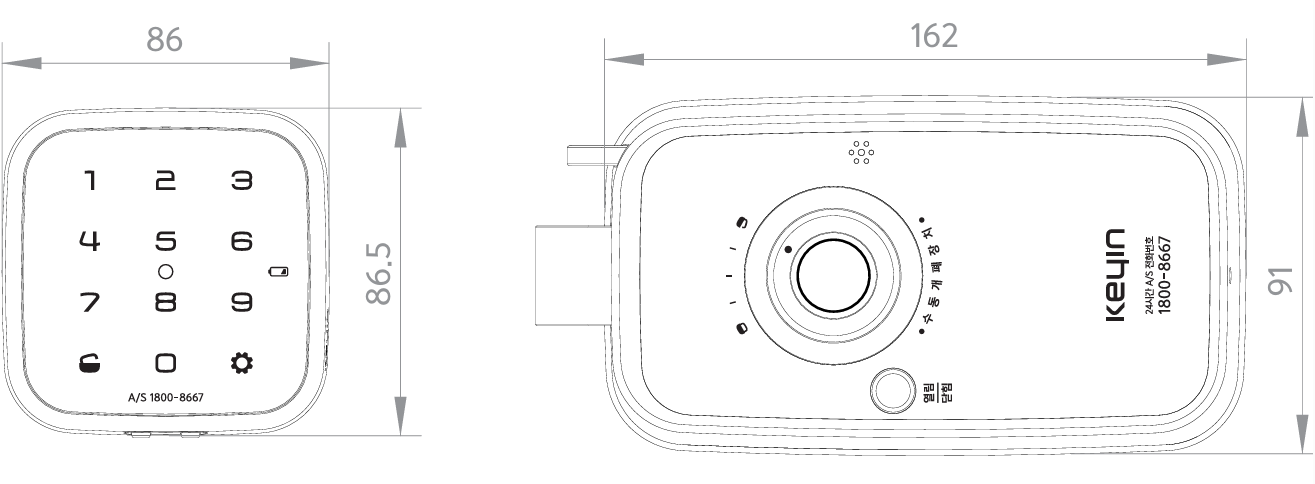
Engineering drawing showing panel and body dimensions. Use the Dimensions tab for a full-screen view. Confirm your door's backset before ordering.
 Installation
The Keyin S mounts to the face of the door, so the only hole cut through the leaf is a single 32 mm opening for the front body cable. The bracket, main body and strike all fix with the supplied screws. The printed guide carries a fold-out drilling template with left-hand and right-hand variants, plus a QR code to the installation video.
The gap between the strike and the main body must finish at 5 mm, within 1 mm either way. Outside that range auto locking may not work properly, and a lock that will not throw reliably is almost always an alignment problem rather than a fault. Two supplied strike extenders let you pack the strike out to suit. See why misalignment is the number one cause and the three common DIY mistakes.

The printed instructions are written around an outward-opening door and cover both left- and right-hand variants. An inward-opening installation is sent to the QR-code video instead, so an inswing installer gets no printed procedure - worth knowing before you start. Work out your door's handing first with our handing guide, and check what is on the door now before removing it.

- Pass the front body cable through the 32 mm hole and the lower hole in the main bracket - running it through the upper hole risks damaging the wire.
- Drive the first main-body screw partially, check the latch-to-body distance, then tighten all four.
- Fit the batteries and test the open/close button with the door closed before you call the job done.
- Deciding whether to do it yourself is covered in Chapter 12 - when to DIY. Terry's installs across the Gold Coast - see advice and installation or book a site survey.
 Frequently Asked Questions
No. The Keyin S does not include a fingerprint reader as standard. Fingerprint access is available only if the Keyin + Finger module is purchased and fitted separately. If fingerprint is essential to your use case, confirm add-on availability with Terry's before purchasing the Keyin S, or consider a smart lock with a built-in fingerprint reader. See Chapter 03 - Access Methods (fingerprint) for how biometric readers work and what to consider when choosing one.
The Keyin S accommodates backsets from 60 to 120 mm - a wider range than most mortice smart locks, which typically fix at 60 mm or 70 mm. This makes it a useful option for doors with unusual or older preparations. Measure your door's backset (the distance from the edge of the door to the centre of the bolt hole) before ordering. See Chapter 02 - Measuring Your Door (backset), the Measuring Your Lock Backset blog and what happens if you order the wrong backset for measurement guidance.
No. The Keyin Plus app works fully within Bluetooth range without any bridge - including locking/unlocking, temporary PIN issuance, geofencing Smart Pass, and access history. A WiFi bridge is required only for remote access (when you are away from the property), live status updates at a distance, and the SmartThings, Google Home, Alexa and Tuya integrations. Confirm bridge availability with Terry's before ordering. For more on when a gateway adds genuine value, see Chapter 08 - Gateway Comparison and do you actually need a gateway.
The Keyin S is designed as a replacement for the Lockwood deadlatch and rim lock series. However, before ordering, confirm that your door's backset and rim preparation match the Keyin S's requirements - while the 60-120 mm backset range is broad, the lock's physical footprint (main body 162 x 91 mm) and strike plate must also align with your door. If you are unsure about compatibility, contact Terry's with photos of the existing lock before purchasing. For installation guidance, see Chapter 12 - Installation and Troubleshooting, 3 Common DIY Installation Mistakes and the installation notes above.
Press a fresh 9V battery against the external power contacts on the keypad panel. This provides enough temporary power to enter your PIN and retract the bolt. Once inside, replace the four AA batteries in the interior battery compartment. The 9V battery is not supplied, and this lock has no mechanical key to fall back on, so keep one somewhere you can reach without getting inside. The lock warns you with audible alerts and app notifications when batteries are low - act on these before the power fails completely.
Additional Information
A rim lock mounts on the door face and is simpler to retrofit onto a door that already has a surface-mount preparation. A mortice lock is set into the door edge and typically provides greater strength and a flush appearance. If your door already has a mortice prep and you need a fire-rated option, consider the Keyin-L Fire Rated Mortice Smartlock. For a detailed breakdown of lock formats and door types, see Chapter 04 - Door Type Compatibility, Chapter 01 - What Is a Smart Lock (mortice deadbolt) and the mechanical layer underneath every smart lock.

Keyin is a relatively new brand in the Australian smart lock market. The Keyin S's core PIN, RFID, and Bluetooth functions operate standalone without cloud connectivity. Remote access, smart home integrations, and the Keyin + Finger fingerprint add-on should all be confirmed available with Terry's before purchase. For context on how different smart lock platforms compare in Australia, see Which Smart Lock Platform Is Right for You and Chapter 15 - Smart Lock App Platforms.

The Keyin range is made in Korea and brought into Australia by GNJ Smart Homes. Two consequences are worth knowing. First, the moulded-in lettering on the lock bodies is Korean: the main body carries Korean labels for the manual open/close control and the open and closed positions, and the front body carries a Korean 24-hour service number, which is not an Australian support line. Warranty and support go through Terry's. Second, the documentation supplied with the lock dates from 2021 to 2023, so if a detail in the manual does not match the unit in your hands, call us rather than assuming the paperwork is right.
The Keyin S's PIN and temporary-PIN features make it a practical option for rental properties where access codes need to be changed between tenants. Remote key grant (via app, no gateway required) lets the owner issue a time-limited PIN without a physical visit, and Manager Mode keeps each tenant or cleaner on their own user number rather than sharing one code. For a broader discussion of how smart locks work in rental and Airbnb contexts, see Chapter 07 - Airbnb and Short-Stay Rentals and what an audit trail gives you. Note that full Airbnb automation (PMS integration, algoPIN) is not a feature of the Keyin platform - if that is what you need, read how algoPIN works first.

The Keyin S is noted as water and shock resistant in the legacy listing, but no specific IP rating is confirmed. Keyin's own manual is explicit that the lock is not recommended in open environments exposed to rain, direct sun, high humidity or salt air near beaches, and that severe condensation causes problems. It is suited to sheltered interior or undercover exterior applications on timber doors - not for exposed coastal locations or applications where salt air, driving rain, or direct sun exposure is expected. For an honest guide to smart lock lifespan in Australian conditions, see How Long Do Digital Door Locks Last?, The Realities of Electronic Door Locks and Queensland considerations in Chapter 11.
 Warranty
Warranty terms for the Keyin S are managed by Terry's Gold Coast Smart Locks. Contact Terry's directly for warranty support, claims, and any product faults. All products are also covered by Australian Consumer Law guarantees, which apply independently of the manufacturer's warranty period.
 Download PDF Resources
The 16-section owner's manual for this lock - registering and deleting PINs and card keys, opening from outside and inside, auto/manual locking and timing, lockdown and alerts, Manager Mode, battery and 9V emergency power, and the full specification page.
Two-page fitting guide - the 11-item parts check, door type and handing, the seven-step install sequence, the post-install checklist, and a fold-out drilling template with left-hand and right-hand variants on page two.
Single-sheet dimensioned drawing of the front body and main body elevations, giving the 86 x 86.5 mm and 162 x 91 mm face dimensions. Face sizes only - the depths are in the product manual, and the sheet carries no scale statement, so it is not a 1:1 template.
Eight-page range catalogue from the Australian distributor. Page 2 is the KeyinS page, and the Keyin At a Glance matrix compares every model, material, access set and smart-home capability in the range. Large file - allow time on a slow connection.
Keyin S Rim Lock Smartlock - FAQ, Setup and Owner's Guide
Everything below is here to help you buy, install, set up and live with the Keyin S. For general smart-lock questions see our Smart Lock FAQ (Chapter 13), and for choosing, measuring and fitting start at the Smart Lock Buyer's Guide or the Quick Start Guide.
Access, Codes and Card Keys
Between four and ten digits. You set it by pressing the S registration button inside the battery cover, entering the new code, then pressing S again. Registering a new PIN replaces the previous one in normal mode. The lock ships with a factory default code, so change it at handover before the lock goes into service - a default code left in place is the single most common way a keypad lock gets opened by someone who should not be opening it. Compare credential types in Chapter 03 - PIN.
It lets you hide your real PIN inside a longer string of digits. Type random numbers before your code, after it, or both, and the lock still opens - so someone watching over your shoulder cannot read the code off the keypad. There is no setting to turn on; it simply works. One limitation worth knowing: the fake password does not operate while the lock is in Manager Mode.
No. Only Keyin-supplied cards and stickers can be registered. The manual states that cards not supplied by Keyin, including other-brand NFC cards, cannot be registered at all, and that this is deliberate for security reasons. That also rules out using a phone's NFC as a tap credential. Four Keyin card keys come in the box; order spares through Terry's rather than from the general RFID cards and fobs range, which will not enrol on this lock. How the technology works is in Chapter 03 - RFID.
In normal mode, registering a card key clears every previously registered card. The fix is to present the whole set together in one registration pass rather than adding cards one at a time on separate days. If you need to add and remove people individually, switch the lock to Manager Mode, where each user card sits on its own user number and can be deleted without disturbing the others.
Up to 99 card keys in normal use, and in Manager Mode up to 99 user PINs plus up to 99 user card keys, each on its own user number. Manager Mode is the setting to use for a share house, a rental, or anywhere people come and go, because you can delete one person without resetting everyone. Be aware that switching between normal and Manager Mode deletes all previously registered credentials - decide the mode before you enrol anybody.
Yes, by fitting the separate Keyin + Finger module, which is part of Keyin's PlusLINK add-on range and is sold separately. It pairs to the lock over Bluetooth and mounts where it suits you rather than on the lock body, which is useful if the reader needs to sit lower for a wheelchair user or higher out of a child's reach. Check availability with Terry's first - see which Keyin locks it fits. If you would rather have the reader built into the lock, browse the fingerprint smart lock category.
Locking, Auto-Lock and Modes

The door is secure the instant it shuts, with no motor delay. Most smart locks sense the door closing and then drive a motor to throw a deadbolt, which leaves a short gap where the door is shut but not yet locked. The Keyin S instead uses a diagonally shaped dead latch that is pushed home by the door's own movement, so there is no motorised step and no gap. Keyin holds a patent on the mechanism (10-2021-0033009). How a latch differs from a deadbolt is covered in Chapter 01.
Yes to both. Auto locking is the factory default, and the timing can be set to immediate, five seconds or ten seconds. You can also switch the lock to manual locking, in which case you lock it from inside with the open/close button or from outside by holding a finger on the number pad for a second. Auto lock with a delay is the usual choice where people carry shopping in and out; manual suits a door that is propped open during the day.

Yes. Volume runs across seven steps from mute to high and is set from the keypad, so a lock on a hallway door does not have to announce every entry. Mute silences the key tones; the security alarms are a separate function and still sound.
Press the open/close button on the main body, or turn the manual knob to the open direction. The manual knob is also how you clear an internal lockdown and how you recover from the three-minute lockout after repeated wrong PIN entries, so it is worth showing every occupant where it is.
Security, Lockdown and Alerts
Internal lockdown is set from inside and disables every outside credential - PIN, card and app - until it is cleared. External lockdown is set from outside with a valid PIN or card held for three seconds, and sounds a high-tone alarm if someone tries to leave by opening the lock from inside. Internal lockdown is the one that catches people out: while it is on, nobody outside can get in, including you. Read the real-world perils of an internal snib and best practice before a guest stays.
After five consecutive unauthorised attempts the front body shuts down for three minutes. It clears by waiting the three minutes out, by opening the door with the manual knob from inside, or by pressing the open/close or S button from inside. This is the lock's hacking-prevention behaviour and it cannot be disabled - which is the point.
It is a real alarm in the lock. With the door locked, forcing or damaging the lock from outside triggers a high-tone alarm at the door. Any alarm can be silenced from inside by holding the open/close or S button for five seconds, or by opening the lock normally with a PIN or card key.
No. The fire alert is a safety behaviour: on sensing high temperature the lock alarms and unlocks itself so people can get out. That is not the same thing as fire certification. The Keyin S has no fire rating and must not be fitted to a fire door. If your door is a fire door - and in Queensland apartments many entry doors are - see how to identify one, the locks that are actually compliant and the fire door category. The Keyin L is the fire-rated option inside the Keyin range.
App, Remote Access and Smart Home
No. Keyin Plus is its own platform, built by the manufacturer for the Keyin range. It is not TTLock, which is the platform behind McGrath, Lockton, Austyle and several other brands we stock, and it is not Yale Home, Carbine Connect or Igloohome either. That matters if you already run one app across several doors, because a Keyin lock will not join it. What TTLock is and how to choose a platform are both worth reading before you commit a whole house to one ecosystem.

It unlocks the door as you arrive. The app watches your location and, once you have been away and come back within Bluetooth range of the lock, releases it so you can walk straight in. It works over Bluetooth and needs no bridge. Like every geofence, it depends on your phone's location permission staying on, so if it stops firing, check the app's permissions first.
Only with the WiFi bridge fitted. Keyin's catalogue states that smart home integration - SmartThings, Google Home, Amazon Alexa and Tuya - requires the WiFi Bridge, sold separately. Without it the lock is a Bluetooth device and nothing upstream can see it. Confirm bridge availability with Terry's before you plan an integration, and read what a gateway does and what still works when the internet is down.

Yes - the app carries an access history, and with a bridge fitted you can see events at a distance rather than only when you are in Bluetooth range. That is enough for a rental or a share house where you want a record of comings and goings. It is not a property-management integration: the Keyin platform does not do PMS booking sync or algorithmic guest codes, so if you are running a short-stay property at volume, read the two approaches to short-stay access first.
iOS 13.0 or later and Android 8.0 or later.
Registration is done at the lock with the S button and then followed through in the app. If you never install the app at all, the lock still works on PIN and card key alone - the app adds management, not basic access.Power and Batteries
Four AA alkaline cells (LR6, 1.5V), giving about a year at ten operations a day. Use alkalines, not rechargeables: the lower cell voltage of NiMH can make the lock behave erratically. Replace all four at once and check the orientation - mixing old and new cells, or reversing one, can cause leakage. Real-world battery life in Australian conditions is covered in The Realities of Electronic Door Locks.
You hold a 9V battery against the emergency power contact on the front body, which powers the lock long enough to enter your PIN or present a card and open the door. The 9V battery is not included with the lock, so buy one and keep it somewhere you can reach without being inside - a car glovebox, a neighbour, a key safe. The lock plays a low-battery melody well before it dies, so in practice this should never come up; the point is to have the plan in place before it does. See what happens when the battery dies and where to keep an emergency backup.
Turn the cover screw anticlockwise to release it, and clockwise to lock it again once the cover is seated firmly. The S registration button lives inside the battery cover, so this is also how you reach the button to enrol a PIN or a card key.
Fit, Door Preparation and Installation
One 32 mm hole through the leaf for the front body cable. Everything else - the main bracket, the main body and the strike - fixes to the surface with the supplied screws. That is the whole argument for a rim lock over a mortice: no pocket to rout, no edge prep, and far less that can go wrong on an older or thinner door. The lock covers a footprint of 86 x 86.5 mm outside and 162 x 91 mm inside, so check those against the flat area you have to work with.
Check the gap between the strike and the main body first. It has to finish at 5 mm, within 1 mm either way, and the manufacturer states plainly that auto locking may not work properly outside that range. Two strike extenders are supplied so you can pack the strike out to land in the window. Misalignment is the number one reason any smart lock fails to throw - see Chapter 12 on misalignment and the three common DIY mistakes. If the latch itself is sticking, the manual notes this can be down to the door's condition and calls for reinstalling the lock correctly.
It can be fitted to one, but the printed instructions do not cover it. The supplied guide is written around outward-opening doors and covers both left- and right-hand variants; for an inward-opening install, Keyin sends you to a video via a QR code instead. If your door opens inwards and you want printed steps in your hand, plan for that - or have it installed. Work out your handing first with the four handing combinations.
A rim lock is one of the more approachable retrofits, and if you are comfortable marking and drilling a 32 mm hole square through a door and getting a 5 mm strike gap, the supplied template makes it a manageable afternoon. If the door is old, out of square, or the existing lock has left a scar you need to cover, get it done properly. Chapter 12 has the honest DIY test, and Terry's covers the Gold Coast - see advice and installation, book a site survey, or ask for a recommendation.
Suitability and Limits
No. Keyin's own manual advises against open environments with rain, direct sun, high humidity or salt air near beaches, and warns that severe condensation causes problems. No IP rating is published for this lock. Treat it as a sheltered or undercover product - a front door under an eave or a porch is fine; a west-facing door in full afternoon sun, an unroofed gate, or a beachfront entry is not. In coastal Queensland this matters more than most buyers expect - see how coastal air shortens lock life.

Often, but check before you order. The main body measures 162 x 91 mm and the front body 86 x 86.5 mm, so hold those figures against the scar on your door. A rim lock has a good chance of covering an old deadlatch footprint because it sits on the face rather than in the edge, but nothing is guaranteed. Send Terry's a photo of the existing lock and the door face if you are unsure. Identifying what you have now is covered in Chapter 02 - existing hardware.

Take the Keyin S if your door has a rim or deadlatch prep, you want the simplest retrofit, and you do not need a key override or a fire rating. Take the Keyin L Fire Rated Mortice Smartlock if the door is a fire door, if you want a full mortice body with a motionless pull handle, or if emergency override keys matter to you - the L lists them among its access methods and the S has none. The L suits doors 40 to 100 mm thick and is a new-install or refurbishment product rather than a straight swap. Both run on the same Keyin Plus app, so a house can carry one of each without a second app.
Related Products, Guides and Chapters
The Keyin range: Keyin S Rim Lock Smartlock (this product) · Keyin L Fire Rated Mortice Smartlock · Keyin + Finger Bluetooth Fingerprint Reader · every Keyin product we stock
Browse by what matters to you: PIN code · Card, fob and RFID · Bluetooth · Fingerprint · Has a backup key · WiFi · App enabled · Regular front doors · Internal doors · Fire doors · Bridges and gateways · All smart locks
Buyer's Guide chapters: Ch 01 What Is a Smart Lock · Ch 02 Measuring Your Door · Ch 03 Access Methods · Ch 04 Door Types · Ch 05 Fire Door Smart Locks · Ch 07 Airbnb and Short-Stay · Ch 08 Gateways · Ch 11 Standards and IP Ratings · Ch 12 Installation and Troubleshooting · Ch 13 Smart Lock FAQ · Ch 15 App Platforms
Helpful blog reading: Mechanical Key Override on Smart Locks · Measuring Your Lock Backset · 3 Common DIY Installation Mistakes · The Perils of the Internal Snib · Which Smart Lock Platform Is Right for You · The Realities of Electronic Door Locks · How Long Do Digital Door Locks Last? · Understanding Door Handing · Secondary Locks and the One-Penetration Principle · Digital Door Locks - Before You Buy · Site Survey and Installation
What's in the Box - Keyin S Rim Lock Smartlock
- Front body x1 - the exterior panel carrying the illuminated touch keypad, the card key touch spot, the low battery indicator, the open buttons and the 9V emergency power contact
- Main body x1 - the interior unit carrying the latch bolt, door closing sensor, battery cover, manual knob, speaker, open/close button and the S registration button
- Main bracket x1
- Battery cover x1
- Strike x1
- Strike extenders x2 - packers used to bring the strike-to-body gap into the 5 mm range
- Keyin card keys x4
- AA alkaline batteries x4
- Guide screws x3, main body screws x4, main bracket and strike screws x9
- Easy manual and installation manual (the installation manual includes the fold-out drilling template)
Keyin S - Dimensions
Keyin S - Product Brochure


PDF Files - Keyin S Rim Lock Smartlock
The 16-section owner's manual for this lock - registering and deleting PINs and card keys, opening from outside and inside, auto/manual locking and timing, lockdown and alerts, Manager Mode, battery and 9V emergency power, and the full specification page.
Two-page fitting guide - the 11-item parts check, door type and handing, the seven-step install sequence, the post-install checklist, and a fold-out drilling template with left-hand and right-hand variants on page two.
Single-sheet dimensioned drawing of the front body and main body elevations, giving the 86 x 86.5 mm and 162 x 91 mm face dimensions. Face sizes only - the depths are in the product manual, and the sheet carries no scale statement, so it is not a 1:1 template.
Eight-page range catalogue from the Australian distributor. Page 2 is the KeyinS page, and the Keyin At a Glance matrix compares every model, material, access set and smart-home capability in the range. Large file - allow time on a slow connection.

Confused? Overwhelmed? We get it.
Choosing the right smart lock can be genuinely tricky - door types, backsets, app platforms, compatibility with your existing hardware... there is a lot to consider. We have decades of experience fitting locks of all types, including smart locks, and we are happy to help.
Our expert recommendation service is free. Upload a few photos of your door and describe what you need, and one of our qualified locksmiths will give you a personalised recommendation.
Get Your Free Recommendation →How it works - three easy steps:
1. Upload photos
A few clear shots of your door, lock and frame - inside and out.
2. We assess
Our locksmith reviews your setup and requirements - door type, weather exposure, how you want to use it.
3. You get a recommendation
A personalised recommendation tailored to your door, budget and needs. No pressure, no upsell.
Also useful while you are deciding:


