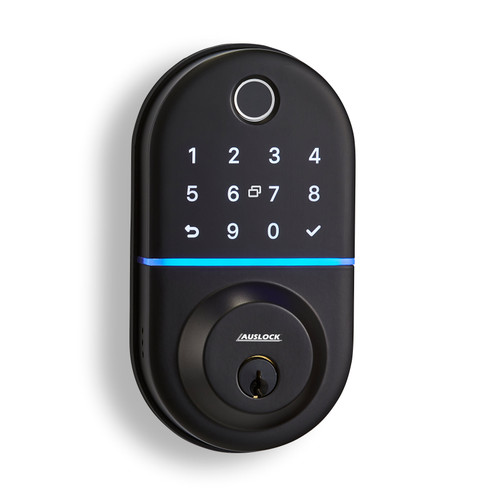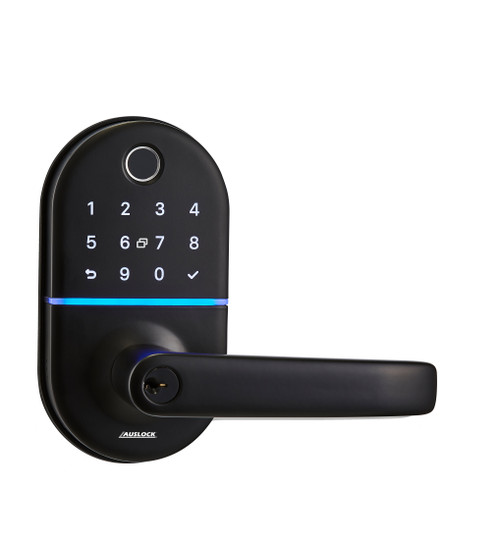


Auslock Handy Series H13 Smart Lever Handle Lock — Black
The Auslock H13 is a motorised smart lever handle lock designed for timber and aluminium entry doors. It integrates the keypad, fingerprint reader (optional), and lever handle into a single exterior assembly — replacing a standard lever set without additional drilling on most residential door preparations. The tubular latch is adjustable between 60 mm and 70 mm backset, and the lever handle direction is independently adjustable on both panels to suit left- or right-hand door swing.
The H13 provides five access methods — Bluetooth app, PIN code, RFID card, fingerprint (optional), and mechanical key override — with remote access available via the optional Auslock G2 or G3 Gateway. A 16-digit scramble code function prevents PIN identification from shoulder-surfing or keypad wear patterns, and a Type-C emergency power port allows a power bank to operate the lock if batteries are fully depleted.


In-stock orders typically dispatch within 1–2 business days from our Gold Coast warehouse.
 Key Features
- Five access methods — Bluetooth app, PIN code, RFID card, fingerprint (optional), and mechanical key override
- Lever-integrated keypad and fingerprint sensor — all access electronics in the exterior lever assembly; clean single-unit look
- Lever set retrofit — fits standard lever set door preparations; no extra drilling on most residential doors
- Adjustable tubular latch — 60 mm or 70 mm backset selectable before installation; set once before fitting the latch
- Field-reversible lever — independently adjustable on both panels; suits left- and right-hand door swing
- Scramble code (vague code) — your real PIN can be embedded anywhere within a 16-digit entry string; prevents shoulder-surfing and wear-pattern attacks
- Suits timber and aluminium doors — 35–65 mm door thickness
- High credential capacity — up to 200 fingerprints (optional), 150 PIN codes, 200 RFID cards
- Auto-lock and passage mode — configurable via the Auslock App; manual lock in passage mode by holding * on keypad
- USB-C emergency power port — connect a power bank if batteries are depleted
- 4 × AA alkaline batteries — not included; alkaline only; low-battery alert below 4.8 V
- Google Assistant and Amazon Alexa voice control (gateway required)
- Black finish only

 Available Finish Options
 Black
Black
(This Product)
STK AUSH13B-BLK
This product is available in Black only.
 Access Methods
| Method | How It Works | Gateway Required? |
|---|---|---|
 Fingerprint |
Touch sensor — up to 200; permanent, timed, recurring. Optional feature — confirm inclusion. See fingerprint guidance. | No |
PIN Code |
4–9 digits + # — up to 150; 16-digit scramble code supported. See PIN guidance. | No |
 RFID Card / Tag |
Tap card or fob — up to 200; 3 RFID tags included; permanent or timed. | No |
 Bluetooth App |
Auslock App (iOS and Android) — local unlock within ~5 m; share e-keys, view history. | No |
 Remote App (Wi-Fi) |
Lock/unlock from anywhere; remote credential management. | Yes — G2 or G3 (sold separately) |
 Backup Key |
Mechanical override — insert and rotate 90° counter-clockwise; 2 keys included. | No |
 Face Recognition |
Not supported on this model. | N/A |
 What's in the Box
- Exterior assembly (keypad, fingerprint reader, and lever) ×1
- Interior assembly (lever and battery compartment) ×1
- Adjustable tubular latch (60 mm / 70 mm backset) ×1
- Strike plate ×1; strike box ×1
- Waterproof rubber plates ×2
- RFID key tags ×3; mechanical keys ×2
- 60 mm square shaft ×1; 75 mm square shaft ×1
- Positioning columns ×2
- L-shape Allen wrench (3 mm) ×1; reset pin ×1
- Punch diagram / installation template ×1
- Fixing hardware: Screw A ×4, Screw B ×4, Screw C ×3, Screw D ×3, Screw stub A ×3 (×2 sets)
- User manual

 Suitable Uses

 Auslock Lever/Latch Smart Lock Range
| Model | SKU | Fingerprint | Backset | Door range | Key feature |
|---|---|---|---|---|---|
| Auslock H11A | STK AUSH11A | No | 60 or 70 mm | 30–70 mm | No fingerprint; zinc alloy; widest door range |
| Auslock H11B | STK AUSH11B | Yes — always included | 60 or 70 mm | 30–70 mm | Adds fingerprint; otherwise identical to H11A |
| Auslock H13 (This Product) | STK AUSH13B-BLK | Optional — confirm | 60 or 70 mm | 35–65 mm | Lever-integrated keypad; aluminium door compatible; scramble code |
| Auslock N25 | STK AUSN25 | Yes | Adjustable | 35–65 mm | Lever-integrated keypad; round rose; architectural profile |
 Full Specifications
| Specification | Detail |
|---|---|
| Model | Auslock H13-TB Smart Lever Handle Lock |
| SKU | STK AUSH13B-BLK |
| Lock type | Motorised smart lever handle lock with tubular latch |
| Fingerprint | Optional — confirm inclusion before ordering. If included: up to 200; see fingerprint access guidance. |
| Material | Aluminium alloy |
| Finish | Black |
| Front panel | 72 mm W × 140 mm H × 19 mm D |
| Back panel width | 124 mm |
| Backset | Adjustable — 60 mm or 70 mm. Set before installation. |
| Door thickness | 35–65 mm. See door thickness guide. |
| Door types | Timber and aluminium doors |
| Handle direction | Field-adjustable on both panels independently |
| Lock weight | 2 kg |
| Fingerprint capacity | Up to 200 (optional feature) |
| PIN capacity | Up to 150; 16-digit scramble code supported |
| RFID card capacity | Up to 200 |
| Wrong PIN lockout | 5 consecutive wrong entries; keypad locked 5 minutes; other access methods unaffected |
| Connectivity | Bluetooth (local); Wi-Fi via Auslock G2 or G3 Gateway (sold separately, 2.4 GHz) |
| App platform | Auslock App (iOS and Android) — not TTLock, not Tuya |
| Voice control | Amazon Alexa, Google Assistant (requires gateway) |
| Auto-lock | Yes — configurable via app |
| Passage mode | Yes — hold * to manually re-lock while in passage mode |
| Power | 4 × AA alkaline batteries (not included); low-battery alert below 4.8 V; alkaline only |
| Emergency power | USB-C port on exterior panel — temporary power from 5 V power bank (not charging) |
| Operating temperature | -10 °C to 55 °C |
| Operating humidity | 0–95% |
| Fire rating | None |
| Reset procedure | Hold Reset button (back panel) 5 s, then enter 000# on keypad |
| Warranty | 12 months |
 Dimensions
Confirm your door's backset and lever set door preparation before ordering. The installation template in the box marks the exact hole positions for your door.

 Battery, Power & Backup
The H13 runs on 4 × AA alkaline batteries — not included. Alkaline only — lithium and rechargeable batteries are not compatible. The low-battery alert fires below 4.8 V. Replace all four batteries together when notified; do not mix old and new cells.
If batteries fully deplete, connect a 5 V power bank to the exterior USB-C port for temporary power — this activates the touchscreen for PIN entry. Note this powers the lock temporarily but does not charge the batteries. Keep a power bank accessible outside the property.
The mechanical backup key is a final failsafe independent of battery state. Insert and rotate 90° counter-clockwise to unlock. Keep one key at a secure off-site location.
Remote App Access & Gateway
The H13 connects to the Auslock App via Bluetooth for local control within approximately 5 m. For remote access from anywhere — locking, unlocking, viewing history, managing credentials, and enabling voice control — an Auslock Gateway is required within ~12 m of the lock.

 Auslock App
The H13 uses the Auslock App, available on iOS and Android. This is Auslock's own proprietary platform — not TTLock, not Tuya. The app supports multiple admin levels, e-key sharing, named access codes, scheduled and recurring codes, activity logs, and remote access when a gateway is connected.

 Frequently Asked Questions
Measure your door backset before installation — it is the distance from the door edge to the centre of the spindle hole. The tubular latch adjusts between 60 mm and 70 mm — push the latch tongue to select the correct length. Set the backset before fitting the latch into the door. Using the wrong backset size is one of the most common install errors — confirm the measurement first.
The H13 supports a 16-digit entry string. Your real 4–9 digit PIN can be embedded anywhere within that string — the lock recognises it regardless of the surrounding digits. This prevents observers from identifying your code by watching your finger movements or by reading wear patterns on the keypad buttons.
Permanent passcodes must be tested within 24 hours of creation, otherwise they auto-expire as a security measure. Create the code, test it from the keypad immediately, and it will remain active indefinitely.

First confirm the backset is set correctly (60 mm or 70 mm to match your door prep). Then check strike plate alignment — even 1–2 mm of door sag can prevent the latch from engaging. Test with the door open: if it operates smoothly open but fails when closed, adjust the strike plate. See Chapter 12 — misalignment.
Confirm batteries are installed with correct polarity and have sufficient charge. Check the wire connection between the exterior and interior panels. If both are correct, check for pinched wiring inside the door prep. See 3 common DIY installation mistakes.
 Additional Information
Confirm whether the fingerprint module is included in your specific unit. If included, enrol via the Auslock App while beside the lock. Each fingerprint requires 4 scan presentations — enrol at 2–3 different angles for reliable recognition. Add a second finger as backup. For fingerprint troubleshooting see Chapter 03 — fingerprint access. If fingerprint is always required, the H11B always includes the sensor.
The H13 uses the Auslock App — a distinct platform from TTLock or Tuya. If you need PMS integration or inter-brand compatibility, this is not the right product. Chapter 15 — Choosing an App Platform explains the distinction.
The H13 is designed to fit standard lever set door preparations without extra drilling — DIY-accessible on most timber and aluminium entry doors. Confirm your door prep format and backset before ordering. Read the three most common smart lock install mistakes before starting.
 Warranty
12 months from date of sale covering defects in materials and electronic components under normal residential use. Does not cover misuse, improper installation, or vandalism. Terry's Locksmiths manages all Auslock warranty claims — contact us first and we'll handle it from there. This warranty operates alongside your rights under Australian Consumer Law.
 PDF Downloads
What's in the Box — Auslock H13 Smart Lever Handle Lock
- Exterior assembly (keypad, fingerprint reader, and lever) ×1
- Interior assembly (lever and battery compartment) ×1
- Adjustable tubular latch (60 mm / 70 mm backset) ×1
- Strike plate ×1; strike box ×1
- Waterproof rubber plates ×2
- RFID key tags ×3; mechanical keys ×2
- 60 mm square shaft ×1; 75 mm square shaft ×1
- Positioning columns ×2
- L-shape Allen wrench (3 mm) ×1; reset pin ×1
- Punch diagram / installation template ×1
- Fixing hardware (assorted screws ×2 sets)
- User manual
Auslock H13 — Dimensions
Auslock H13 Smart Lever Handle Lock — User Manual


Auslock Warranty
All Auslock products purchased through Terry's Tradies Pty Ltd and its associated websites, trading names, and subsidiaries are backed by a 12-month limited manufacturer's warranty. If something isn't right, contact us first - we manage all warranty assessments on your behalf and will work with you to get it resolved.
Warranty Summary
How to Make a Claim
- Contact Terry's Tradies Pty Ltd at your original place of purchase with a description of the fault.
- Have your proof of purchase ready (receipt or order confirmation).
- Provide clear photos and/or video of the defect - this is required before any assessment can begin.
- We may ask you to complete troubleshooting steps or a technical support form before the item is returned. Do not send the product back without our written approval.
- If the claim is approved, we will arrange the next steps with you directly - including return freight where applicable.
What the Warranty Doesn't Cover
The following are not covered under the Auslock manufacturer's warranty:
- Incorrect or improper installation
- Door or frame misalignment
- Incorrect mortise, latch, or backset selection
- Installation on doors outside the product's specifications
- Environmental exposure beyond the product's stated IP rating
- Water ingress not consistent with the product's IP rating
- Power surge, fire, flood, lightning, or other natural disaster
- Cosmetic damage or normal wear and tear
- Battery misuse or leakage
- Forced entry, vandalism, or tampering
- Unauthorised modification
- Use of non-Auslock components
- Commercial or high-traffic use (unless approved in writing)
Rechargeable battery products (Models A01, A02, A03, A519, A619): Battery-related damage is excluded where a non-certified charger, fast charger, incorrect voltage (outside 5.2V / 2A), third-party battery, or unsuitable charging environment has been used.
Change-of-Mind Returns
Change-of-mind returns are accepted at our discretion and subject to the manufacturer's return conditions. If you've changed your mind, contact us within 14 days of receiving your order and we'll let you know if a return is possible and what applies.
To be eligible, products must be:
- Unused and uninstalled
- Not powered on, activated, paired, programmed, or configured in any way
- In original, fully sealed condition with all packaging, accessories, and components
Where a return is approved, a 20% restocking fee applies and return shipping is at your cost. Products that have been installed, powered on, or had any credentials registered are not eligible for return.
Our goods come with guarantees that cannot be excluded under the Australian Consumer Law (ACL). You are entitled to a replacement or refund for a major failure and compensation for any other reasonably foreseeable loss or damage. You are also entitled to have goods repaired or replaced if they fail to be of acceptable quality and the failure does not amount to a major failure. Nothing in this policy limits or excludes your rights under the ACL.

Confused? Overwhelmed? We get it.
Choosing the right smart lock can be genuinely tricky - door types, backsets, app platforms, compatibility with your existing hardware... there is a lot to consider. We have decades of experience fitting locks of all types, including smart locks, and we are happy to help.
Our expert recommendation service is free. Upload a few photos of your door and describe what you need, and one of our qualified locksmiths will give you a personalised recommendation.
Get Your Free Recommendation →How it works - three easy steps:
1. Upload photos
A few clear shots of your door, lock and frame - inside and out.
2. We assess
Our locksmith reviews your setup and requirements - door type, weather exposure, how you want to use it.
3. You get a recommendation
A personalised recommendation tailored to your door, budget and needs. No pressure, no upsell.
Also useful while you are deciding: