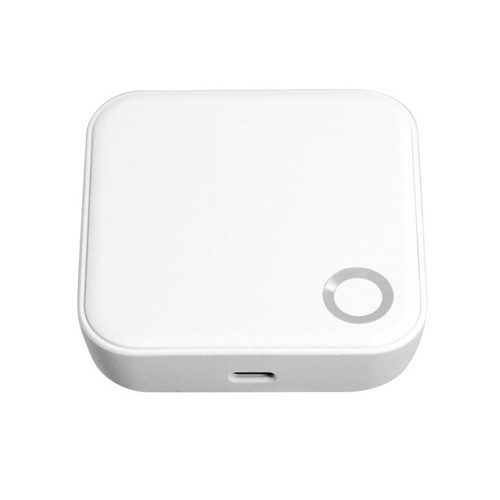
Häfele Zigbee Gateway with Wi-Fi/USB Cable
The Häfele Zigbee Gateway with Wi-Fi/USB Cable (Cat. No. 985.03.024) is the bridge between compatible Häfele smart locks - the Genesis DL8800 and DL4000 - and the Häfele Smart Living App. It connects to your home or office Wi-Fi network (2.4GHz only) on one side and communicates with the lock over Zigbee on the other, linking the lock to the internet and turning on the app's remote features.
Without a gateway, the Häfele Genesis DL8800 Smart Lock and Häfele DL4000 Digital Deadbolt operate fully as standalone units using their onboard access methods. The gateway is only needed for remote app features such as remote unlock, timed codes and access history - if remote access isn't part of your plan, you don't need to buy it. The gateway itself is a compact, circular white device powered by USB (cable supplied).

Only when you want the Häfele Smart Living App's remote access features. Compatible Häfele smart locks operate fully without a gateway using their onboard credentials, so buy this gateway when remote app features - such as remote unlock, timed codes, access history or remote authorisation management - are part of your installation plan. For a plain-English explanation, see what a gateway does in Chapter 08, how a gateway compares with built-in Wi-Fi and the difference between smart and connected locks. Still deciding? Our Quick Start Guide walks you through whether you need remote access.
 Key Features
- Bridges compatible Häfele smart locks to the Häfele Smart Living App over your 2.4GHz Wi-Fi network for Wi-Fi remote access.
- Turns on the app's remote features: remote unlock from anywhere, timed and single-use PIN codes, access history, remote authorisation management and remote volume control (details under Remote App Access).
- Zigbee radio communicates directly with the lock while built-in Wi-Fi connects to your network - the job a smart lock gateway does.
- Compact circular form factor; powered by USB (USB cable included).
- Compatible with the Häfele Genesis DL8800 Smart Lock and the Häfele DL4000 Digital Deadbolt.
- Cat. No. 985.03.024 is the current version, superseding Cat. No. 985.03.006.

 Remote App Access - How the Gateway Works
The gateway sits between your Häfele lock and your router. It talks to the lock over Zigbee and joins your 2.4GHz Wi-Fi network with its built-in Wi-Fi, which puts the lock online and within reach of the Häfele Smart Living App. Remote access is an extra layer on top of the lock's own credentials - Chapter 01 shows how a smart lock's access layers fit together.
The Häfele Smart Living App is available on the App Store and Google Play.
With the gateway paired to your lock, the app gives you:
- Remote unlock from anywhere via the app.
- Timed and single-use PIN codes created remotely - how PIN codes and time-limited codes work.
- Access history - review who has entered and when, and keep an audit trail.
- Remote access authorisation management - add, edit or remove credentials without being on site.
- Volume control of the connected lock, available remotely.
For each lock's onboard credentials and its own remote access set-up, see the DL8800 access methods and DL8800 remote app access section, and the DL4000 access methods and DL4000 Smart Living App section.
 What's in the Box
- 1 x Zigbee gateway
- 1 x USB cable
- 1 x User manual
Works with the Häfele Genesis DL8800 Smart Lock and the Häfele DL4000 Digital Deadbolt. No USB power adaptor is listed among the supplied items, so have a USB power source ready where the gateway will sit.
 Suitable Uses
- Residential installs where remote unlock capability is required - letting in a tradesperson, guest or family member when you are not home.
- Airbnb and short-stay rental properties where timed PIN codes need to be created and revoked remotely - see what adding Wi-Fi and a gateway actually changes.
- Any installation where access history review and an audit trail are needed via the app - why audit trails matter for dispute resolution.
- Installations where onsite credential programming isn't practical and codes need to be managed remotely (PIN and time-limited codes explained).
- Adding Smart Living App connectivity to an existing Häfele DL8800 or DL4000 install that was originally set up without a gateway.
 Available Finish Options
 White
White
(This Product)
STK 985.03.024
Finish selection does not affect functionality, compliance, or performance.
 Compatible Häfele Smart Locks
Note: the gateway enables Smart Living App remote features on the products listed above. Confirm compatibility with Häfele Australia before pairing with any product not listed here.
 Full Specifications
 Frequently Asked Questions
No. Both the DL8800 and DL4000 operate fully as standalone locks without a gateway, using their onboard access methods - touchscreen PIN, RFID card/tag, fingerprint and mechanical key override on the DL8800, and touchscreen PIN code and mechanical key override on the DL4000. The gateway is only required if you want to use the Häfele Smart Living App for remote features such as remote unlock, timed codes or access history. Smart versus connected locks explains the difference.
The gateway communicates with the lock via Zigbee, which has a useful indoor range. It doesn't need to sit right beside the lock, but it should be within Zigbee range of the lock and within Wi-Fi range of your router. Exact range varies with wall construction and interference, so position the gateway centrally where both signals are reliable.
A 2.4GHz Wi-Fi network only - it doesn't support 5GHz. If your router uses band steering (automatically merging 2.4GHz and 5GHz into one network name), the gateway may experience connectivity issues; in that case, configure your router to broadcast the 2.4GHz band separately. See why smart locks drop off Wi-Fi - the band-steering problem, how to improve stability and our smart lock FAQ on Wi-Fi dropouts.
Yes. The gateway can be added to an existing DL8800 or DL4000 installation at any time. Pair it with the lock through the Häfele Smart Living App following the in-app pairing instructions - no hardware modification to the lock is required.

985.03.024 is the current version of the Häfele Zigbee Gateway and supersedes 985.03.006. Häfele lists both numbers under the same description, Gateway Zigbee w/USB cable, and doesn't call out a functional difference between them. If you have ordered or specified 985.03.006 in the past, 985.03.024 is the current replacement.
 Additional Information
- Wi-Fi network requirements: the gateway connects to 2.4GHz Wi-Fi only. Most home routers broadcast both 2.4GHz and 5GHz, and where a router uses band steering to merge them into a single network name, the gateway may struggle to hold a stable connection. If you see repeated disconnections, separate the 2.4GHz band in your router settings and connect the gateway to that network explicitly. Our Wi-Fi blog covers the band-steering problem and what usually causes Wi-Fi dropouts.
- Gateway placement: position the gateway where it has a reliable Zigbee signal to the lock and a reliable Wi-Fi signal to your router. For most Australian residential installations, a power point in the same room as, or adjacent to, the entry door is sufficient. Avoid placing the gateway inside metal enclosures or behind large metal appliances, as these can weaken both Zigbee and Wi-Fi signals. If signal drops persist, work through how to improve Wi-Fi stability.
- Older paperwork and brochures: the Genesis DL8800 brochure still prints the superseded gateway number 985.03.006 - the FAQ above explains the number change. Confirm compatibility with Häfele Australia if you have any concerns about pairing the updated unit with an older lock installation.
- Smart Living App scope: the Häfele Smart Living App can manage other Häfele smart home products beyond door locks - including doorbells, roller door controls, lighting, air conditioning, cameras and blinds - where those products are also compatible with the Zigbee Gateway. Confirm which Smart Living App integrations are relevant to your installation with Häfele Australia. If you're still weighing up app ecosystems, Chapter 15 matches smart lock app platforms to buyer scenarios.
 Warranty
7-year warranty on mechanical and finish defects, 2-year warranty on electrical components - covers defective materials, components, and faulty workmanship. Proof of purchase required for all claims. Returns & Warranty | Häfele Warranty Information
 Download PDF Resources
Häfele catalogue page, updated 09.25: the Zigbee Gateway listing (985.03.024 replacing 985.03.006, and what is supplied), then features, dimensions, door preparation and box contents for the DL4000 Digital Deadbolt, one of the two locks this gateway works with.
Brochure for the Genesis DL8800, the other lock this gateway works with: access modes, Smart Living App features such as remote unlock and the history log, standards and ordering codes. It prints the gateway's earlier Cat. No., 985.03.006.
Häfele's warranty for its Electronic Digital Lock (EDL) range - cover periods, the conditions that void cover, exclusions and service contacts.
Häfele Zigbee Gateway - FAQ, Setup and Owner's Guide
Answers to the questions buyers and owners ask about the Häfele Zigbee Gateway - what it adds, staying connected, compatibility and the Smart Living App. For general smart lock questions see our Smart Lock FAQ on Wi-Fi and connectivity, and for the full picture the Smart Lock Buyer's Guide.
What the Gateway Adds
Manage the lock when you're away from it. Paired with a compatible Häfele lock, the gateway lets the Häfele Smart Living App unlock the door remotely, create timed and single-use PIN codes, show access history, manage access authorisations and adjust the lock's volume from anywhere. At the door, the DL8800 and DL4000 work the same either way. Smart versus connected locks and Wi-Fi remote access explain the distinction.

If you need to create and revoke timed PIN codes, or check who has come and gone, without visiting the property, that is exactly what it adds. If you're happy to program codes at the lock, the DL8800 and DL4000 work without it. Before deciding, read what adding Wi-Fi and a gateway actually changes and why audit trails matter for dispute resolution.
Staying Connected
Check your router first. The gateway joins 2.4GHz Wi-Fi only, so if your router merges 2.4GHz and 5GHz under one network name, broadcast the 2.4GHz band separately and connect the gateway to it. Then check placement: the gateway needs a reliable Zigbee signal to the lock and a reliable Wi-Fi signal to the router, away from metal enclosures and large metal appliances. Our guides to band steering and improving stability go further, and Chapter 13 answers the Wi-Fi dropout question.
The lock keeps working at the door. The gateway is the lock's link to the internet, so remote app features such as remote unlock and remote code management need it powered and online, but the DL8800 and DL4000 operate fully on their onboard access methods without it. Chapter 08 covers what happens when the internet goes down.
Compatibility
The Häfele Genesis DL8800 Smart Lock and the Häfele DL4000 Digital Deadbolt - it adds Smart Living App remote features to either. If you have a Häfele product that isn't one of these two, confirm compatibility with Häfele Australia before pairing. Each lock's own page explains its remote access set-up: the DL8800 remote app access section and the DL4000 Smart Living App section.
The Smart Living App

The Häfele Smart Living App, available on the App Store and Google Play.
Pair the gateway with your lock through the app, following the in-app pairing instructions. If you're comparing ecosystems before choosing a lock, Chapter 15 matches app platforms to buyer scenarios.
Yes - beyond door locks, the Häfele Smart Living App can manage Häfele doorbells, roller door controls, lighting, air conditioning, cameras and blinds, where those products are also compatible with the Zigbee Gateway. Check which integrations suit your installation with Häfele Australia before you plan around them.
Power and What's in the Box
It runs on USB power through the supplied USB cable, so it needs a USB power source where it sits. The box holds the gateway, a USB cable and a user manual. For most homes a power point in the same room as, or next to, the entry door is sufficient, as long as the gateway keeps a reliable signal to both the lock and your router.
Related Products, Guides and Chapters
Häfele smart locks this gateway works with: Häfele Genesis DL8800 Smart Lock - Coogee Lever - Black · DL8800 remote app access · Häfele DL4000 Digital Deadbolt - Touchscreen with Key Override · DL4000 Smart Living App · Häfele brand page
Shop by category: Modules and Wi-Fi Gateways/Bridges · Smart Lock Accessories
Buyer's Guide chapters: Ch 01 Smart vs Connected · Ch 03 Wi-Fi Remote Access · Ch 07 Audit Trails · Ch 08 What a Gateway Does · Ch 08 When the Internet Goes Down · Ch 13 Wi-Fi Dropouts FAQ · Ch 15 Choosing a Platform · Quick Start - Do You Need Remote Access?
Helpful blog reading: Why Smart Locks Drop Off Wi-Fi · Improving Wi-Fi Stability · Airbnb Smart Locks: Do You Really Need Wi-Fi?
What's in the Box - Häfele Zigbee Gateway with Wi-Fi/USB Cable
- 1 x Zigbee gateway
- 1 x USB cable
- 1 x User manual
PDF Files - Häfele Zigbee Gateway with Wi-Fi/USB Cable
Häfele catalogue page, updated 09.25: the Zigbee Gateway listing (985.03.024 replacing 985.03.006, and what is supplied), then features, dimensions, door preparation and box contents for the DL4000 Digital Deadbolt, one of the two locks this gateway works with.
Brochure for the Genesis DL8800, the other lock this gateway works with: access modes, Smart Living App features such as remote unlock and the history log, standards and ordering codes. It prints the gateway's earlier Cat. No., 985.03.006.
Häfele's warranty for its Electronic Digital Lock (EDL) range - cover periods, the conditions that void cover, exclusions and service contacts.
Häfele Warranty
Warranty Summary
 How to Make a Claim
- Keep your proof of purchase (receipt or invoice) - this is required for all Häfele warranty claims.
- Contact Terry's Tradies Pty Ltd and its associated websites, trading names, and subsidiaries (including Gold Coast Smart Locks) in the first instance to assess the fault and initiate the claim process.
- If directed to engage Häfele directly, contact them on 1300 185 044 or email customercare@hafele.com.au.
- Häfele will determine whether the product will be repaired, replaced, or refunded at their discretion.
- Reasonable claim expenses are covered by Häfele. Retain any receipts for costs incurred and contact Häfele directly to arrange reimbursement.
 Exclusions
This warranty will be voided if:
- The lock is not installed in accordance with Häfele's installation instructions, where that non-compliance gives rise to the fault.
- The lock is installed in an outdoor setting without cover, in direct contact with rain or harsh weather conditions.
- The lock is misused, abused, or operated contrary to the instructions contained in the owner's handbook.
- The lock is used for any purpose other than its intended use.
This warranty does not cover:
- Damage to surface coatings caused by cleaning or maintenance products not recommended in the owner's handbook.
- Defects caused by normal wear and tear, accident, negligence, alteration, or misuse.
- A product that has been dismantled, repaired, or serviced by anyone other than an authorised Häfele service agent.
- Consumable items such as batteries.
Important Notes
Our goods come with guarantees that cannot be excluded under the Australian Consumer Law. You are entitled to a replacement or refund for a major failure, and to compensation for any other reasonably foreseeable loss or damage. You are also entitled to have goods repaired or replaced if they fail to be of acceptable quality and the failure does not amount to a major failure. The benefits of this warranty are in addition to any other rights or remedies you may have under law.
- Repairs carried out under this warranty do not extend or reset the warranty period. The warranty period for any replacement parts fitted ends at the same time as the warranty for the entire product.
- Service call charges apply where a technician attends and the fault is found to be excluded by this warranty, or where the product is found to be in full operating condition - these costs are borne by the owner.
- Häfele offers ongoing service and maintenance agreements through their Service+ Assist program. Contact Häfele on 1300 185 044 or email customercare@hafele.com.au for details.

Confused? Overwhelmed? We get it.
Choosing the right smart lock can be genuinely tricky - door types, backsets, app platforms, compatibility with your existing hardware... there is a lot to consider. We have decades of experience fitting locks of all types, including smart locks, and we are happy to help.
Our expert recommendation service is free. Upload a few photos of your door and describe what you need, and one of our qualified locksmiths will give you a personalised recommendation.
Get Your Free Recommendation →How it works - three easy steps:
1. Upload photos
A few clear shots of your door, lock and frame - inside and out.
2. We assess
Our locksmith reviews your setup and requirements - door type, weather exposure, how you want to use it.
3. You get a recommendation
A personalised recommendation tailored to your door, budget and needs. No pressure, no upsell.
Also useful while you are deciding: