

ASSA ABLOY SMARTair Standalone Programming Card - iCLASS Shadow
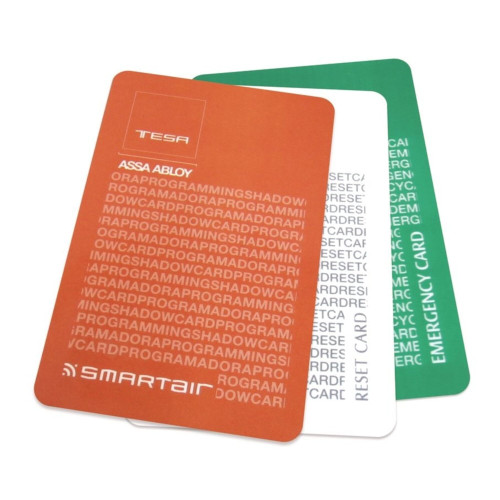
The ASSA ABLOY SMARTair Standalone Programming Card - iCLASS Shadow (SNACLICSTASDWIC) is the Shadow card in SMARTair's Standalone programming set - a system administration credential for configuring and managing SMARTair devices running in Standalone mode. Installers and administrators use it to initialise devices, add or remove users' credentials and configure device parameters directly at the lock, cylinder or reader, without connecting to SMARTair management software.
ASSA ABLOY's point about the Shadow card is simple: with the Shadow card functionality there's no need to delete all cards if one goes missing (SMARTair System Information Guide). It's an HID iCLASS credential, used together with the iCLASS (Red) programming card and other programming credentials to securely manage access permissions, and it suits the SMARTair Standalone devices we list, all of which read HID iCLASS (Compatible SMARTair Devices).
Standalone is SMARTair's simplest management level: door devices, a programming card and users' credentials, with changes made in person at each door (Product Overview). When a site needs audit trails, time schedules or central control, the same door devices move up to Update-on-Card with a firmware change and no new hardware (Product Overview, page 3) - see Related SMARTair Products.

Usually ships in 3 business days.
 Key Features
- Programming credential for SMARTair Standalone systems.
- Supports HID iCLASS RFID credential technology.
- Used during installation and system configuration.
- Allows administrators to manage user credentials directly at the device.
- Shadow card functionality: no need to delete all cards if one goes missing (Information Guide).
- Works alongside the iCLASS (Red) programming card as SMARTair's Standalone programming set.
- Essential component of Standalone SMARTair deployments.
 What's Included
- SMARTair Standalone Shadow programming card.
- Configuration documentation.
 Suitable Uses
Sites that need simple, secure access control for their people and rarely monitor door activity (Information Guide) - SMARTair's Standalone level, where changes are made in person at each door and there's no audit trail to collect (Product Overview). ASSA ABLOY matches Standalone to a low event frequency and only an occasional need for door history (Information Guide, page 4). Browse card, fob and RFID smart locks.

Sites that need an audit trail, time schedules, automatic cancellation of lost cards, alerts or remote opening. Audit trails, schedules and automatic cancellation come with Update-on-Card, Wireless Online and Openow; real-time alerts with Wireless Online and Openow; remote opening with Wireless Online only (Product Overview, page 3; page 4). Those levels are managed in TS1000 with the SMARTair portable programmer, plus the SMARTair USB encoder on card sites.
 SMARTair System Tools and Licences
SMARTair splits set-up and management across a small family of tools and licences. Each one does a different job, on different management levels:
 How the Shadow Programming Card is Used
In Standalone SMARTair installations, programming cards give administrators control of each device directly, without a computer or network connection. ASSA ABLOY shows the routine at the door in three steps: open programming mode, program the user, close programming mode (Product Overview).
- Initialise new SMARTair devices.
- Add authorised RFID credentials.
- Delete or cancel lost credentials.
- Modify system configuration directly at the device.
Because programming cards grant administrative access to the device, store them securely and let only authorised installers or system administrators use them.
The iCLASS Shadow card is part of the SMARTair Standalone programming set and is used alongside the iCLASS (Red) programming card, the card ASSA ABLOY names for adding and deleting users (Information Guide). Keep both cards together and stored securely - they are the only way to administer a Standalone device without software.
 SMARTair System Compatibility
The Standalone Shadow programming card can be used with SMARTair devices operating in Standalone mode, including:
- SMARTair escutcheon locks - the i-max Standalone escutcheons
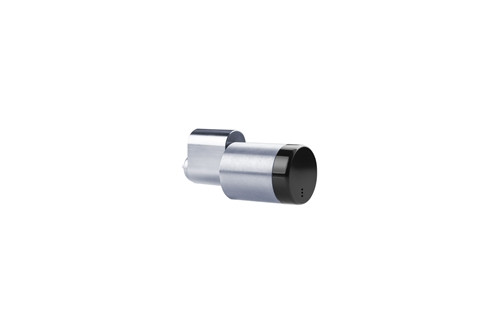
- SMARTair knob cylinders - the black and white Standalone cylinders
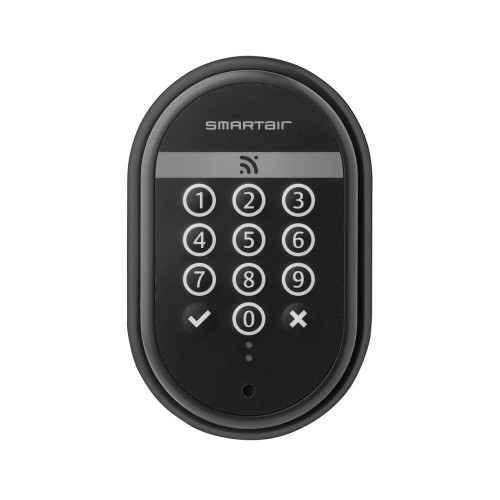
- SMARTair wall readers - the Standalone keypad wall reader
- SMARTair electronic padlocks
Every SMARTair i-gate padlock we list is an Update-on-Card + Openow or Wireless Online + Openow model; ASSA ABLOY shows devices moving between management levels in both directions (Product Overview, page 3). For larger installations requiring centralised management, SMARTair systems typically use TS1000 or Web Manager software with a USB credential encoder instead of Standalone programming cards (Product Overview, page 6).
Compatible SMARTair Devices
These are the SMARTair Standalone devices we list. All of them read HID iCLASS, like this card, and all are set up with the Standalone programming cards.
 Full Specifications
Related SMARTair Products and Guides
- Programming set. Pair this Shadow card with the iCLASS (Red) programming card for full Standalone administration.
- Devices it programs. Standalone SMARTair hardware such as the Standalone keypad wall reader, plus the SMARTair i-max Standalone escutcheons and Standalone knob cylinders (black, white). The full list is under Compatible SMARTair Devices.
- Moving beyond Standalone. For central management, credential encoding and mobile keys, step up to a networked system with the SMARTair USB encoder, the SMARTair portable programmer and an Openow mobile access licence. The door devices move to Update-on-Card with a firmware change and an upgrade key - no new hardware; Openow then adds a Bluetooth module on the i-max and wall readers, and a firmware change on knob cylinders and i-gate padlocks (Product Overview).
- Browse. RFID cards, fobs and tags for smart locks and card, fob and RFID smart locks.
- Learn more. See how Standalone compares with networked access in our access methods chapter and gateway comparison chapter, and our site survey and installation service and smart lock buyers guide.
 Frequently Asked Questions

They're designed to work together. The red card is the one ASSA ABLOY names for adding and deleting users at the door, and the Shadow card functionality means there's no need to delete all cards if one goes missing (Information Guide). Together they make up SMARTair's Standalone programming set, so plan on both for full Standalone administration - order the red card with this one.

No. On a Standalone site everything is done at the door with the programming cards - no software, computer or network is required (Information Guide).
SMARTair devices running in Standalone mode that read HID iCLASS: the i-max Standalone escutcheons, the Standalone knob cylinders and the Standalone keypad wall reader. They're all listed under Compatible SMARTair Devices.
On Standalone, lost or stolen cards are cancelled by hand at each device (Product Overview). With the Shadow card functionality there's no need to delete all cards if one goes missing (Information Guide). Keep the programming cards themselves somewhere secure - they grant administrative access.

Yes. Every SMARTair door device moves from Standalone to Update-on-Card with a firmware change using the portable programmer and an upgrade key - no hardware changes. The site then adds the TS1000 software licence and the card encoder (Product Overview).
 Additional Information
- Dispatch and planning. This card usually ships in 3 business days. Order it with the red card and the door devices so the site can be set up in one visit.
- Keep the cards secure. Programming cards grant administrative access at the door, so store them securely and record who holds which card.
- Know what Standalone doesn't do. Standalone has no audit trail, alerts or remote opening (Product Overview, page 3), no time schedules, and lost cards are cancelled by hand (page 4). If you need any of those, plan for Update-on-Card, Wireless Online or Openow from the start - remote opening is Wireless Online only.
- Match the credential. This card is HID iCLASS, and so are the Standalone devices we list. If you're adding to an existing site, send us a sample card and we'll confirm it before you order.
- Warranty and support. This card is supplied and supported in Australia by Terry's, and we manage any replacement or configuration queries. For help setting up a Standalone site, see advice and installation.
 Warranty
ASSA ABLOY branded products purchased new in Australia from authorised resellers are covered against defects in materials and workmanship for:
- Mechanical components: 10 years
- Electrical and electronic components: 5 years (excluding batteries)
- Cylinders and keys: 3 years
 Download PDF Resources
The May 2023 technical overview of SMARTair - the four management levels and the equipment each needs, with Standalone's programming card and upgrade path (page 3), the feature comparison (page 4) and credentials (page 8).
The May 2022 SMARTair benefits guide - the management levels with decision guidance (page 4), including Standalone with the red programming card and the Shadow card, plus TS1000 and credentials.
Technical data for the SMARTair i-max electronic escutcheon - the i-max escutcheons listed under Compatible SMARTair Devices on this page: the reader technologies, the management levels and the programming cable used to initialise the escutcheon and for emergency openings.
Technical data for the SMARTair RFID wall reader (without keypad) in its Standalone, Update-on-Card and Openow versions - the datasheet the Standalone keypad wall reader listed under Compatible SMARTair Devices on this page carries for the facts common to both: power, the relay board, the yearly calendar and the jack for the portable programmer and emergency kit.
PDF Files - SNACLICSTASDWIC
The May 2023 technical overview of SMARTair - the four management levels and the equipment each needs, with Standalone's programming card and upgrade path (page 3), the feature comparison (page 4) and credentials (page 8).
The May 2022 SMARTair benefits guide - the management levels with decision guidance (page 4), including Standalone with the red programming card and the Shadow card, plus TS1000 and credentials.
Technical data for the SMARTair i-max electronic escutcheon - the i-max escutcheons listed under Compatible SMARTair Devices on this page: the reader technologies, the management levels and the programming cable used to initialise the escutcheon and for emergency openings.
Technical data for the SMARTair RFID wall reader (without keypad) in its Standalone, Update-on-Card and Openow versions - the datasheet the Standalone keypad wall reader listed under Compatible SMARTair Devices on this page carries for the facts common to both: power, the relay board, the yearly calendar and the jack for the portable programmer and emergency kit.
ASSA ABLOY Warranty Overview
ASSA ABLOY branded products sold in Australia are covered by manufacturer warranties issued by ASSA ABLOY Australia Pty Ltd. Warranty coverage varies depending on mechanical components, electronic components, cylinders and finish categories.
This overview summarises the structure of ASSA ABLOY warranty coverage. Full terms, exclusions and claim procedures are set out in the official ASSA ABLOY Warranty document.
 Warranty Periods Summary
 Finish & Material Notes
- Stainless steel does not mean stain-free. Tea staining is not covered where cleaning and maintenance guidelines have not been followed.
- Cosmetic, decorative and appearance damage is not covered.
- Battery failure or battery leakage damage is not covered.
What the Warranty Covers
- Defects in material and workmanship within the applicable period.
- Assessment by ASSA ABLOY to determine repair, replacement with the same or closest equivalent product, or refund of purchase price.
- Remedy determined at ASSA ABLOY’s discretion.
 Common Exclusions
- Normal wear and tear.
- Misuse, abuse or installation outside published technical specifications.
- Improper maintenance or neglect.
- Unauthorised modification or repair.
- Use of non-genuine ASSA ABLOY parts or substitute components.
- Exposure to corrosive environments including coastal air, salt spray, chemicals, contamination or high humidity.
- Removal, refitment, freight or labour charges.
- Second-hand or imported products not sold through authorised Australian channels.
 Warranty Claim Process
- Retain proof of original purchase.
- Return the product to the original authorised retailer where applicable.
- If claiming directly, obtain a case number before returning goods.
- Securely package returned goods and clearly reference the case number.
- Warranty assessment determines repair, replacement or refund.
 Australian Consumer Law
ASSA ABLOY warranties operate in addition to rights available under the Australian Consumer Law. Goods come with guarantees that cannot be excluded. Customers may be entitled to a replacement or refund for a major failure and compensation for reasonably foreseeable loss or damage.
Where a product fails to meet acceptable quality standards and the failure does not amount to a major failure, the customer is entitled to repair or replacement.
Official Warranty Documents

Confused? Overwhelmed? We get it.
Choosing the right smart lock can be genuinely tricky - door types, backsets, app platforms, compatibility with your existing hardware... there is a lot to consider. We have decades of experience fitting locks of all types, including smart locks, and we are happy to help.
Our expert recommendation service is free. Upload a few photos of your door and describe what you need, and one of our qualified locksmiths will give you a personalised recommendation.
Get Your Free Recommendation →How it works - three easy steps:
1. Upload photos
A few clear shots of your door, lock and frame - inside and out.
2. We assess
Our locksmith reviews your setup and requirements - door type, weather exposure, how you want to use it.
3. You get a recommendation
A personalised recommendation tailored to your door, budget and needs. No pressure, no upsell.
Also useful while you are deciding: